
在中的每条消息之后添加“喜欢”和“不喜欢”按钮
如何添加喜欢和不喜欢按钮后,每个消息回发后,通过机器人,以获得用户的反馈。如果用户点击不喜欢按钮,那么我的机器人应该给出一些更接近这个话题的建议。这可以在Azure Bot框架中实现吗?
回答 2
Stack Overflow用户
发布于 2022-03-30 01:11:16
最好的方法是用卡片来回应。有不同类型的卡片有不同的用途。例如,我们可以创建一个按钮卡并为该按钮分配操作,就像机器人对话中的每个消息卡一样和不喜欢。
所有bot响应都存储在.lg文件中。该文件将在bot响应页面中向编写器公开。有三个不同的模板。简单响应、条件响应和结构化响应。根据需求,用这些模板设计了bot。
上述链接可用于结构化响应。
下面的链接是根据实现流程实现不同模板和目的的卡片。
https://learn.microsoft.com/en-us/composer/how-to-send-cards?tabs=v2x
Stack Overflow用户
发布于 2022-03-31 14:11:48
可以在Azure中实现吗?
是的,您可以使用Azure Bot SDK V4.0在Asp.net CoreBotSDKV-4.0上实现这一点,您可以这样做。
如何在机器人每次回发消息后添加“喜欢”和“不喜欢”按钮以获得用户反馈?
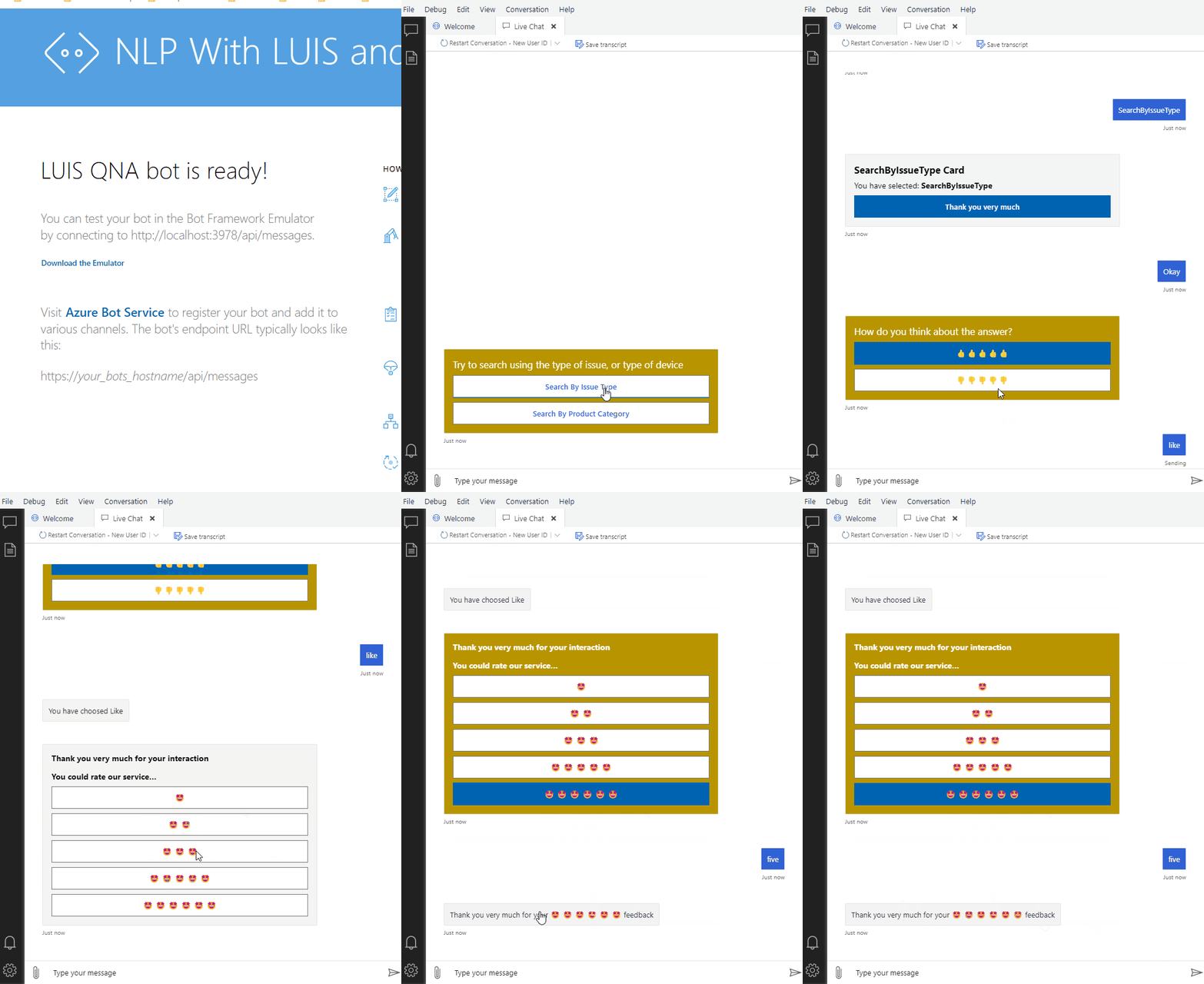
您可以使用“英雄卡”添加这样的按钮,然后可以设置Unicode for like和dislike选项。下面是如何设计特定卡的示例。
喜欢-不喜欢PromptCard:
public IMessageActivity LikeDislikeCard()
        {
            try
            {
                //Break in Segment
                var timeInfoCard = Activity.CreateMessageActivity();
                //Bind to Card
                var heroCard = new HeroCard
                {
                    Title = "How do you think about the answer?",
                    Images = new List<CardImage> { new CardImage("") },
                    Buttons = new List<CardAction> {
                        new CardAction(ActionTypes.ImBack, "", value: "like") ,
                        new CardAction(ActionTypes.ImBack, "", value: "dislike")
                    },
                };

                // Create the attachment.
                var attachment = heroCard.ToAttachment();

                timeInfoCard.Attachments.Add(attachment);
                timeInfoCard.AttachmentLayout = AttachmentLayoutTypes.Carousel;
                return timeInfoCard;
            }
            catch (Exception ex)
            {
                throw new NotImplementedException(ex.Message, ex.InnerException);
            }

        }
在发送响应时,请调用-不喜欢PromptCard:
        var likeDislikeCard = LikeDislikeCard();
        await turnContext.SendActivityAsync(likeDislikeCard);
注意:但是正如你所指出的,你想要接受用户对机器人对话的反馈,所以有更好的方法来实现这一点。在这种情况下,您可以使用以下方式收集用户反馈:
用户反馈卡:
public IMessageActivity UserFeedbackCard()
        {
            try
            {
                //Break in Segment
                var timeInfoCard = Activity.CreateMessageActivity();
                var thanks = "Thank you very much for your interaction";
                var rate = "You could rate our service...";
                //Bind to Card
                var heroCard = new HeroCard
                {
                    // Title = "Thank you very much for your interaction, you could rate me..",
                    Text = string.Format("**{0}** " + Environment.NewLine + "**{1}**", thanks, rate),
                    Images = new List<CardImage> { new CardImage("") },
                    Buttons = new List<CardAction> {
                        new CardAction(ActionTypes.ImBack, "\U0001F929", value: "one") ,
                        new CardAction(ActionTypes.ImBack, "\U0001F929 \U0001F929 ", value: "two"),
                        new CardAction(ActionTypes.ImBack, "\U0001F929 \U0001F929 \U0001F929", value: "three"),
                        new CardAction(ActionTypes.ImBack, "\U0001F929 \U0001F929 \U0001F929 \U0001F929 \U0001F929", value: "four"),
                        new CardAction(ActionTypes.ImBack, "\U0001F929 \U0001F929 \U0001F929 \U0001F929 \U0001F929 \U0001F929", value: "five"),
                    },
                };

                // Create the attachment.
                var attachment = heroCard.ToAttachment();

                timeInfoCard.Attachments.Add(attachment);
                timeInfoCard.AttachmentLayout = AttachmentLayoutTypes.Carousel;
                return timeInfoCard;
            }
            catch (Exception ex)
            {
                throw new NotImplementedException(ex.Message, ex.InnerException);
            }

        }
输出:
https://stackoverflow.com/questions/71662227
复制相似问题
腾讯云开发者

Copyright © 2013 - 2026 Tencent Cloud. All Rights Reserved. 腾讯云 版权所有
深圳市腾讯计算机系统有限公司 ICP备案/许可证号:粤B2-20090059  粤公网安备44030502008569号
腾讯云计算(北京)有限责任公司 京ICP证150476号 | 京ICP备11018762号