
如何更改滚动条的高度?
如何更改滚动条的高度?
提问于 2022-03-28 03:03:27
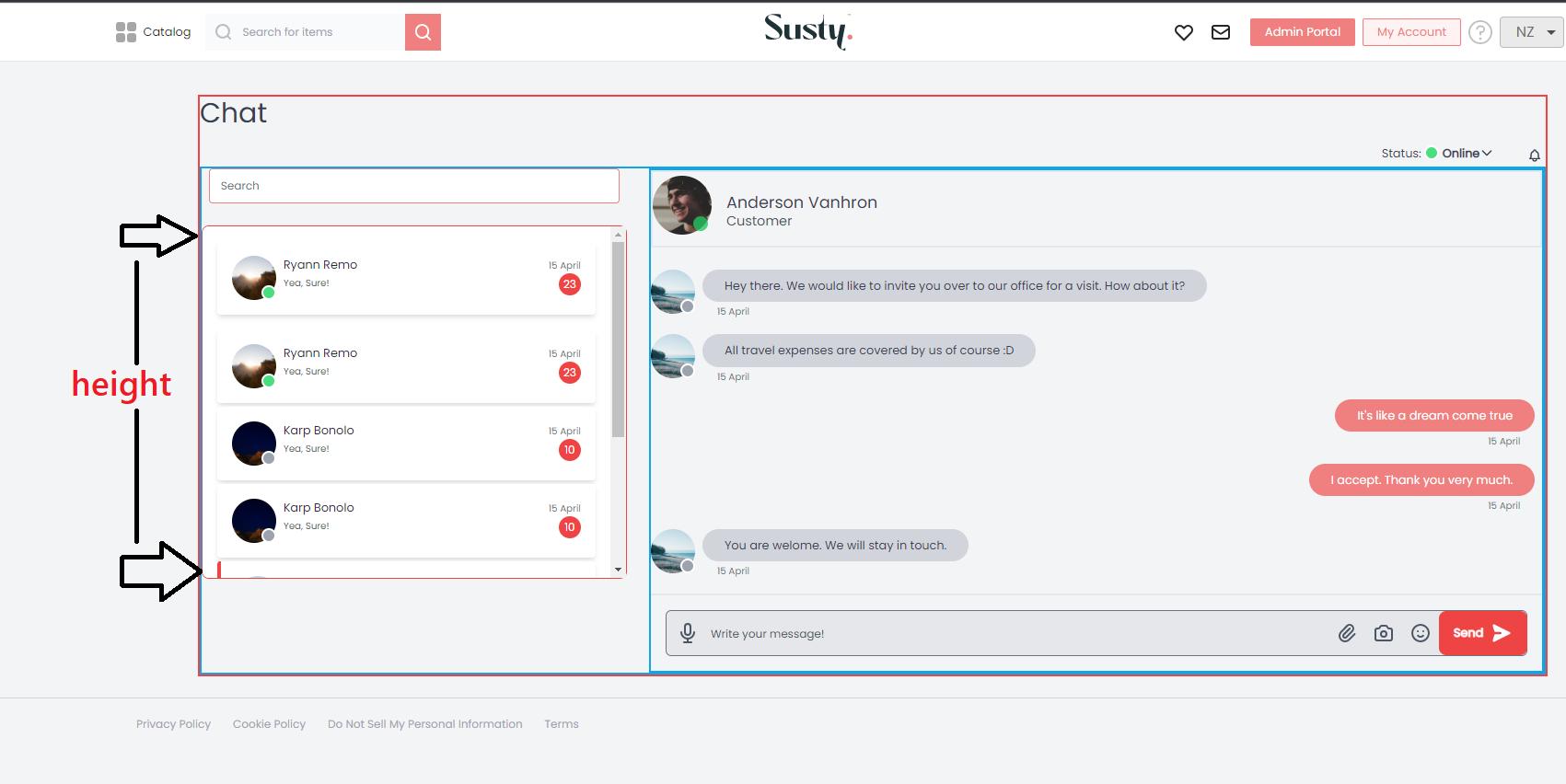
,这是我的顺风滚动条,我想改变它的高度,我怎么能做到呢?下图显示了它的高度。我不能改变sm:h-96 ,你能给我建议一种改变身高的方法吗?
 {/** Chat Scroll View */}
  <div class=" text-gray-500 bg-white rounded-lg border w-full max-w-xl sm:h-96 p-4 overflow-y-scroll scrollbar border-solid border-2 border-red-500">
    <div class="space-y-1">
      <div className="entry cursor-pointer transform hover:scale-105 duration-300 transition-transform bg-white mb-4 rounded p-4 flex shadow-md">
        <div className="flex-2">
          <div className="w-12 h-12 relative">
            <img
              className="w-12 h-12 rounded-full mx-auto"
              src={"https://picsum.photos/300"}
              alt="chat-user"
            />
            <span className="absolute w-4 h-4 bg-green-400 rounded-full right-0 bottom-0 border-2 border-white"></span>
          </div>
        </div>
        <div className="flex-1 px-2">
          <div className="truncate w-32">
            <span className="text-gray-800">Ryann Remo</span>
          </div>
          <div>
            <small className="text-gray-600">Yea, Sure!</small>
          </div>
        </div>
        <div className="flex-2 text-right">
          <div>
            <small className="text-gray-500">15 April</small>
          </div>
          <div>
            <small className="text-xs bg-red-500 text-white rounded-full h-6 w-6 leading-6 text-center inline-block">
              23
            </small>
          </div>
        </div>
      </div>

      <div className="entry cursor-pointer transform hover:scale-105 duration-300 transition-transform bg-white mb-4 rounded p-4 flex shadow-md">
        <div className="flex-2">
          <div className="w-12 h-12 relative">
            <img
              className="w-12 h-12 rounded-full mx-auto"
              src={"https://picsum.photos/300"}
              alt="chat-user"
            />
            <span className="absolute w-4 h-4 bg-green-400 rounded-full right-0 bottom-0 border-2 border-white"></span>
          </div>
        </div>
        <div className="flex-1 px-2">
          <div className="truncate w-32">
            <span className="text-gray-800">Ryann Remo</span>
          </div>
          <div>
            <small className="text-gray-600">Yea, Sure!</small>
          </div>
        </div>
        <div className="flex-2 text-right">
          <div>
            <small className="text-gray-500">15 April</small>
          </div>
          <div>
            <small className="text-xs bg-red-500 text-white rounded-full h-6 w-6 leading-6 text-center inline-block">
              23
            </small>
          </div>
        </div>
      </div>

      <div className="entry cursor-pointer transform hover:scale-105 duration-300 transition-transform bg-white mb-4 rounded p-4 flex shadow-md">
        <div className="flex-2">
          <div className="w-12 h-12 relative">
            <img
              className="w-12 h-12 rounded-full mx-auto"
              src={"https://picsum.photos/500"}
              alt="chat-user"
            />
            <span className="absolute w-4 h-4 bg-gray-400 rounded-full right-0 bottom-0 border-2 border-white"></span>
          </div>
        </div>
        <div className="flex-1 px-2">
          <div className="truncate w-32">
            <span className="text-gray-800">Karp Bonolo</span>
          </div>
          <div>
            <small className="text-gray-600">Yea, Sure!</small>
          </div>
        </div>
        <div className="flex-2 text-right">
          <div>
            <small className="text-gray-500">15 April</small>
          </div>
          <div>
            <small className="text-xs bg-red-500 text-white rounded-full h-6 w-6 leading-6 text-center inline-block">
              10
            </small>
          </div>
        </div>
      </div>

      <div className="entry cursor-pointer transform hover:scale-105 duration-300 transition-transform bg-white mb-4 rounded p-4 flex shadow-md">
        <div className="flex-2">
          <div className="w-12 h-12 relative">
            <img
              className="w-12 h-12 rounded-full mx-auto"
              src={"https://picsum.photos/500"}
              alt="chat-user"
            />
            <span className="absolute w-4 h-4 bg-gray-400 rounded-full right-0 bottom-0 border-2 border-white"></span>
          </div>
        </div>
        <div className="flex-1 px-2">
          <div className="truncate w-32">
            <span className="text-gray-800">Karp Bonolo</span>
          </div>
          <div>
            <small className="text-gray-600">Yea, Sure!</small>
          </div>
        </div>
        <div className="flex-2 text-right">
          <div>
            <small className="text-gray-500">15 April</small>
          </div>
          <div>
            <small className="text-xs bg-red-500 text-white rounded-full h-6 w-6 leading-6 text-center inline-block">
              10
            </small>
          </div>
        </div>
      </div>

      <div className="entry cursor-pointer transform hover:scale-105 duration-300 transition-transform bg-white mb-4 rounded p-4 flex shadow-md border-l-4 border-red-500">
        <div className="flex-2">
          <div className="w-12 h-12 relative">
            <img
              className="w-12 h-12 rounded-full mx-auto"
              src={"https://picsum.photos/200"}
              alt="chat-user"
            />
            <span className="absolute w-4 h-4 bg-gray-400 rounded-full right-0 bottom-0 border-2 border-white"></span>
          </div>
        </div>
        <div className="flex-1 px-2">
          <div className="truncate w-32">
            <span className="text-gray-800">Mercedes Yemelyan</span>
          </div>
          <div>
            <small className="text-gray-600">Yea, Sure!</small>
          </div>
        </div>
        <div className="flex-2 text-right">
          <div>
            <small className="text-gray-500">15 April</small>
          </div>
        </div>
      </div>

      <div className="entry cursor-pointer transform hover:scale-105 duration-300 transition-transform bg-white mb-4 rounded p-4 flex shadow-md">
        <div className="flex-2">
          <div className="w-12 h-12 relative">
            <img
              className="w-12 h-12 rounded-full mx-auto"
              src={"https://picsum.photos/600"}
              alt="chat-user"
            />
            <span className="absolute w-4 h-4 bg-gray-400 rounded-full right-0 bottom-0 border-2 border-white"></span>
          </div>
        </div>
        <div className="flex-1 px-2">
          <div className="truncate w-32">
            <span className="text-gray-800">Cadi Kajetán</span>
          </div>
          <div>
            <small className="text-gray-600">Yea, Sure!</small>
          </div>
        </div>
        <div className="flex-2 text-right">
          <div>
            <small className="text-gray-500">15 April</small>
          </div>
        </div>
      </div>

      <div className="entry cursor-pointer transform hover:scale-105 duration-300 transition-transform bg-white mb-4 rounded p-4 flex shadow-md">
        <div className="flex-2">
          <div className="w-12 h-12 relative">
            <img
              className="w-12 h-12 rounded-full mx-auto"
              src={"https://picsum.photos/650"}
              alt="chat-user"
            />
            <span className="absolute w-4 h-4 bg-gray-400 rounded-full right-0 bottom-0 border-2 border-white"></span>
          </div>
        </div>
        <div className="flex-1 px-2">
          <div className="truncate w-32">
            <span className="text-gray-800">Rina Samuel</span>
          </div>
          <div>
            <small className="text-gray-600">Yea, Sure!</small>
          </div>
        </div>
        <div className="flex-2 text-right">
          <div>
            <small className="text-gray-500">15 April</small>
          </div>
        </div>
      </div>
    </div>
  </div>
{/** Chat Scroll View */}回答 1
Stack Overflow用户
回答已采纳
发布于 2022-03-29 02:48:54
如果您想根据您的偏好更改高度,可以使用arbitrary value,例如h-[120px]、h-[30rem]或h-[180px]。您可以根据需要的高度更改方括号内的值。
您可以在顺风文档中了解有关任意值的更多信息,如:https://tailwindcss.com/docs/adding-custom-styles#using-arbitrary-values
页面原文内容由Stack Overflow提供。腾讯云小微IT领域专用引擎提供翻译支持
原文链接:
https://stackoverflow.com/questions/71642001
复制相关文章
相似问题
腾讯云开发者

Copyright © 2013 - 2026 Tencent Cloud. All Rights Reserved. 腾讯云 版权所有
深圳市腾讯计算机系统有限公司 ICP备案/许可证号:粤B2-20090059  粤公网安备44030502008569号
腾讯云计算(北京)有限责任公司 京ICP证150476号 | 京ICP备11018762号