
在Power BI中用不同列的条件从同一列减去两行
在Power BI中用不同列的条件从同一列减去两行
提问于 2022-03-27 18:22:09
我在Power中创建了一个表,其中我有工作级别,对于每个职务级别,我有两行--一列用于“现有员工”,第二行用于“新雇用”。现有的雇员和新的雇员都有薪酬比率。我想要创建一个新的列,它提供了每个职务级别的新雇用薪酬比率和现有员工薪酬比率之间的差异。如果结果为负值,则显示空白,否则显示结果。
如下所示:
Job Level   Employee Group  Comp Ratio  Difference
3            Existing             108%         -108 ( don't show this)
3            New Hire             0%
4            Existing             107%          3
4            New Hire             110%
5            Existing             104%         -1 (Don't show this)
5            New Hire             103%
谢谢,CSTech
截图如下:
回答 1
Stack Overflow用户
回答已采纳
发布于 2022-03-27 23:30:30
您可以在代码中这样做
输入电源查询编辑器Home => Transform Data
- Enter高级编辑器
Home => Query => Advanced Editor
- In编辑器删除,最后几行以
in ...
- Paste开头的代码在新的代码
- 后的第一行新粘贴的代码中,将
#"Previous Step"更改为代码中实际上一步的名称。
算法
如果每个分组子表'null'为New Hire,则
- 组按作业级别
- 添加一列,然后如果
Comp Ratio列中的第二项大于第一列,则写入空
<代码>H 127,然后减去并写入差异,否则编写一个
//Add this to your code
    #"Grouped Rows" = Table.Group(#"Previous Step", {"Job Level"}, {
        {"Difference", (t)=> Table.AddColumn(t,"Difference", each
            if [Employee Group] = "New Hire" then null
                else if t[Comp Ratio]{1} > t[Comp Ratio]{0}
                   then t[Comp Ratio]{1} - t[Comp Ratio]{0}
            else null,Percentage.Type), type table[Job Level=Int64.Type, Comp Ratio=Percentage.Type, Difference=Percentage.Type]}
            }),
    #"Expanded Difference" = Table.ExpandTableColumn(#"Grouped Rows", "Difference",
         {"Comp Ratio", "Difference"})
in
    #"Expanded Difference"
结果与您的数据
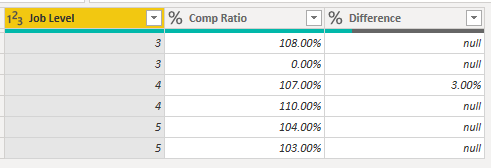
M代码复制上表
let
    Source = Table.FromRows(Json.Document(Binary.Decompress(Binary.FromText("i45WMlbSUXKtyCwuycxLBzINDSz0DAxUlWJ1IFJ+qeUKHplFqUCmAVzCBF2POYoUkh5DQ4QuU3RdJihSyLoMjCFSsQA=", BinaryEncoding.Base64), Compression.Deflate)), let _t = ((type nullable text) meta [Serialized.Text = true]) in type table [#"Job Level" = _t, #"Employee Group" = _t, #"Comp Ratio" = _t]),
    #"Previous Step" = Table.TransformColumnTypes(Source,{
        {"Job Level", Int64.Type},
        {"Employee Group", type text},
        {"Comp Ratio", Percentage.Type}}),

//Add this to your code
    #"Grouped Rows" = Table.Group(#"Previous Step", {"Job Level"}, {
        {"Difference", (t)=> Table.AddColumn(t,"Difference", each
            if [Employee Group] = "New Hire" then null
                else if t[Comp Ratio]{1} > t[Comp Ratio]{0}
                   then t[Comp Ratio]{1} - t[Comp Ratio]{0}
            else null,Percentage.Type), type table[Job Level=Int64.Type, Comp Ratio=Percentage.Type, Difference=Percentage.Type]}
            }),
    #"Expanded Difference" = Table.ExpandTableColumn(#"Grouped Rows", "Difference",
         {"Comp Ratio", "Difference"})
in
#"Expanded Difference"页面原文内容由Stack Overflow提供。腾讯云小微IT领域专用引擎提供翻译支持
原文链接:
https://stackoverflow.com/questions/71639096
复制相关文章
相似问题
腾讯云开发者

Copyright © 2013 - 2026 Tencent Cloud. All Rights Reserved. 腾讯云 版权所有
深圳市腾讯计算机系统有限公司 ICP备案/许可证号:粤B2-20090059  粤公网安备44030502008569号
腾讯云计算(北京)有限责任公司 京ICP证150476号 | 京ICP备11018762号