
如何调用这个Pop-Up,以及如何实现它?
如何调用这个Pop-Up,以及如何实现它?
提问于 2022-03-27 09:33:34
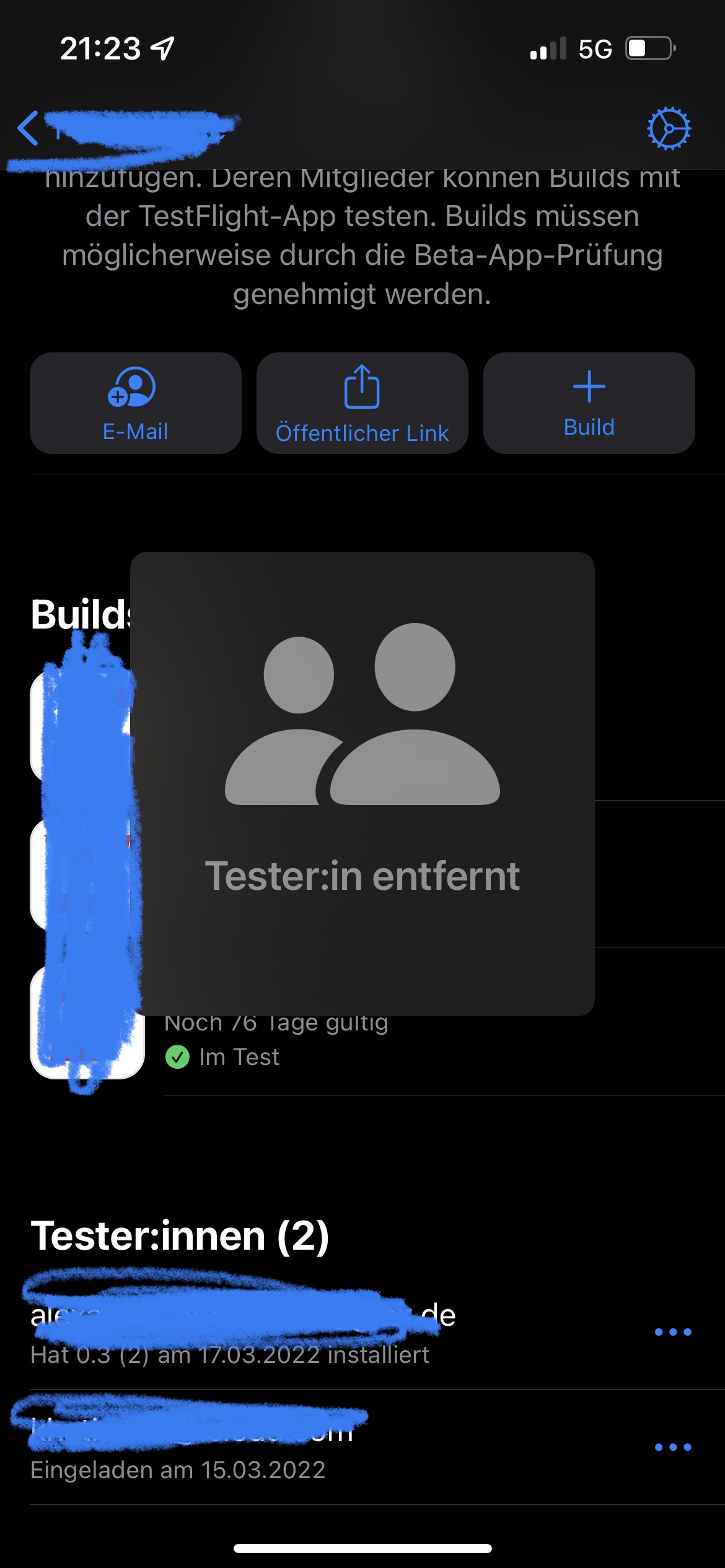
我注意到苹果公司的一些应用程序实现了这种类型的Pop-Up (见链接图像)。我试着在网上找到它,但没有成功。
可能它的名称将足够我实现它到我的故事板-应用程序,但我没有找到一个文件在网上。因此,稍作解释就会有所帮助。
回答 1
Stack Overflow用户
回答已采纳
发布于 2022-03-27 16:59:42
您可以通过编程方式创建containerView,在控制器类、descriptionLabel、ImageView (在我的例子中也是按钮)下声明您的ImageView:
let myButton: UIButton = {
    let b = UIButton()
    b.backgroundColor = .white
    b.setTitle("Tap Me!", for: .normal)
    b.setTitleColor(.black, for: .normal)
    b.titleLabel?.font = .systemFont(ofSize: 17, weight: .semibold)
    b.layer.cornerRadius = 20
    b.clipsToBounds = true
    b.translatesAutoresizingMaskIntoConstraints = false

    return b
}()

let containerView: UIView = {
    let v = UIView()
    v.backgroundColor = .ultraDark // set your pop up backround color
    v.layer.cornerRadius = 18
    v.clipsToBounds = true
    v.alpha = 0
    v.translatesAutoresizingMaskIntoConstraints = false

    return v
}()

let myImageView: UIImageView = {
    let iv = UIImageView()
    iv.image = UIImage(systemName: "person.2.fill")?.withRenderingMode(.alwaysTemplate)
    iv.tintColor = .gray
    iv.contentMode = .scaleAspectFit
    iv.translatesAutoresizingMaskIntoConstraints = false

    return iv
}()

let descriptionLabel: UILabel = {
    let l = UILabel()
    l.translatesAutoresizingMaskIntoConstraints = false
    return l
}()
现在在viewDidLoad中设置目标和约束:
view.backgroundColor = .black
    myButton.addTarget(self, action: #selector(controlTextInTextfields), for: .touchUpInside)

    view.addSubview(myButton)
    myButton.trailingAnchor.constraint(equalTo: view.safeAreaLayoutGuide.trailingAnchor, constant: -30).isActive = true
    myButton.heightAnchor.constraint(equalToConstant: 50).isActive = true
    myButton.leadingAnchor.constraint(equalTo: view.safeAreaLayoutGuide.leadingAnchor, constant: 30).isActive = true
    myButton.bottomAnchor.constraint(equalTo: view.safeAreaLayoutGuide.bottomAnchor, constant: -20).isActive = true

    view.addSubview(containerView)
    containerView.heightAnchor.constraint(equalToConstant: 230).isActive = true
    containerView.widthAnchor.constraint(equalToConstant: 220).isActive = true
    containerView.centerXAnchor.constraint(equalTo: view.centerXAnchor).isActive = true
    containerView.centerYAnchor.constraint(equalTo: view.centerYAnchor).isActive = true

    containerView.addSubview(myImageView)
    myImageView.heightAnchor.constraint(equalTo: containerView.heightAnchor, multiplier: 0.8).isActive = true
    myImageView.widthAnchor.constraint(equalTo: myImageView.heightAnchor, constant: -20).isActive = true
    myImageView.centerXAnchor.constraint(equalTo: containerView.centerXAnchor).isActive = true
    myImageView.centerYAnchor.constraint(equalTo: containerView.centerYAnchor, constant: -20).isActive = true

    containerView.addSubview(descriptionLabel)
    descriptionLabel.leadingAnchor.constraint(equalTo: containerView.leadingAnchor).isActive = true
    descriptionLabel.trailingAnchor.constraint(equalTo: containerView.trailingAnchor).isActive = true
    descriptionLabel.topAnchor.constraint(equalTo: myImageView.bottomAnchor, constant: -20).isActive = true
    descriptionLabel.heightAnchor.constraint(equalToConstant: 20).isActive = true
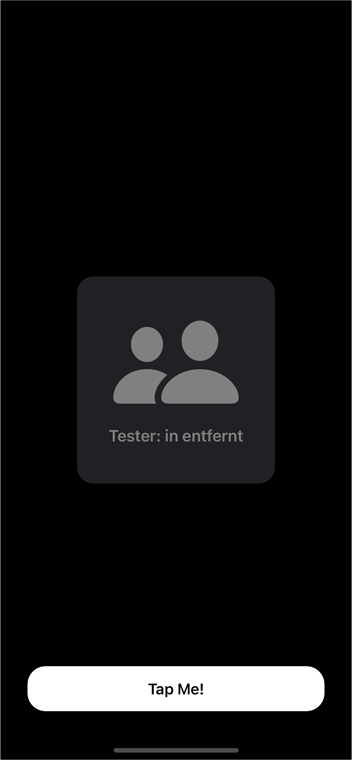
现在编写函数以显示弹出并将其动画化(我添加了动画,因为它更酷):
func savedPopUpView(myView: UIView, label: UILabel, labelText: String) {
    let savedLabel = label
    savedLabel.text = labelText
    savedLabel.font = UIFont.boldSystemFont(ofSize: 18)
    savedLabel.textColor = .gray
    savedLabel.numberOfLines = 0
    savedLabel.textAlignment = .center
    myAnimation(myV: myView)
}

fileprivate func myAnimation(myV: UIView) {

    myV.alpha = 1
    DispatchQueue.main.async {
        myV.layer.transform = CATransform3DMakeScale(0, 0, 0)

        UIView.animate(withDuration: 0.2, delay: 0, usingSpringWithDamping: 1, initialSpringVelocity: 1, options: .curveEaseOut, animations: {
            myV.layer.transform = CATransform3DMakeScale(1, 1, 1)

        }, completion: { (completed) in
            //completed
            UIView.animate(withDuration: 0.2, delay: 2, usingSpringWithDamping: 1, initialSpringVelocity: 1, options: .curveEaseOut, animations: {
                myV.layer.transform = CATransform3DMakeScale(0.1, 0.1, 0.1)
                myV.alpha = 0
            })
        })
    }
}
如何使用,调用目标按钮函数如下:
@objc func controlTextInTextfields() {
    savedPopUpView(myView: containerView, label: descriptionLabel, labelText: "Tester: in entfernt")
}
在这种情况下,弹出消失在2秒后,您可以更改这个参数取决于您最喜欢的.
结果:
页面原文内容由Stack Overflow提供。腾讯云小微IT领域专用引擎提供翻译支持
原文链接:
https://stackoverflow.com/questions/71635172
复制相关文章
相似问题
腾讯云开发者

Copyright © 2013 - 2026 Tencent Cloud. All Rights Reserved. 腾讯云 版权所有
深圳市腾讯计算机系统有限公司 ICP备案/许可证号:粤B2-20090059  粤公网安备44030502008569号
腾讯云计算(北京)有限责任公司 京ICP证150476号 | 京ICP备11018762号