
如何在guizero对象(如按钮)上使用Tkinter的.place()方法
如何在guizero对象(如按钮)上使用Tkinter的.place()方法
提问于 2022-03-26 21:32:17
你好,我正在尝试在guizero按钮对象上使用.place() Tkinter方法。有了Tkinter,代码看起来就像
vidbutton = tk.Button(w, text="Video", command = connectgp)
vidbutton.place(relheight=0.176, relwidth=0.176, relx=0.02, rely=0.02)

shutterbutton = tk.Button(w, text="Shutter", command = connectgp)
shutterbutton.place(relheight=0.176, relwidth=0.176, relx=0.196, rely=0.02)
当执行上述代码时,将显示放置在彼此旁边的两个按钮,并具有正确的间距比,我试图用guizero代替下面的代码来实现这一点。
connectbutton = PushButton(app, text="Connect Gopros", command=connect)
connectbutton.tk.place(relheight=0.176, relwidth=0.176, relx=0.02, rely=0.02)

videobutton = PushButton(app, text="Video", command=video)
videobutton.tk.place(relheight=0.176, relwidth=0.176, relx=0.196, rely=0.02)对于guizero代码,只有最后一个按钮将显示正确的位置,而对于前面的guizero对象,.place()完全被忽略。
非常困惑和建议会有帮助。
回答 1
Stack Overflow用户
发布于 2022-03-26 23:59:50
您需要将Widget按钮放置在Box Widget中作为其父控件,您可以通过下面的guizero布局指南获得更多细节:https://lawsie.github.io/guizero/layout/#boxes,特别是对齐方式和位置。
根据我所做的尝试,如果您进行了以下调整,您的代码可以给出标准tk的相同结果:
from guizero import *

def connect():
    print("Connected!")


def video():
    print("Video!")

app = App(title="guizero")

botton_box = Box(app)
botton_box2 = Box(app)
botton_box.tk.place(relheight=0.176, relwidth=0.176, relx=0.02, rely=0.02)
botton_box2.tk.place(relheight=0.176, relwidth=0.176, relx=0.196, rely=0.02)

connectbutton = PushButton(botton_box,width="fill", height="fill", align="left", text="Connect Gopros", command=connect)
videobutton = PushButton(botton_box2, width="fill", height="fill", align="right",text="Video", command=video)


app.display()
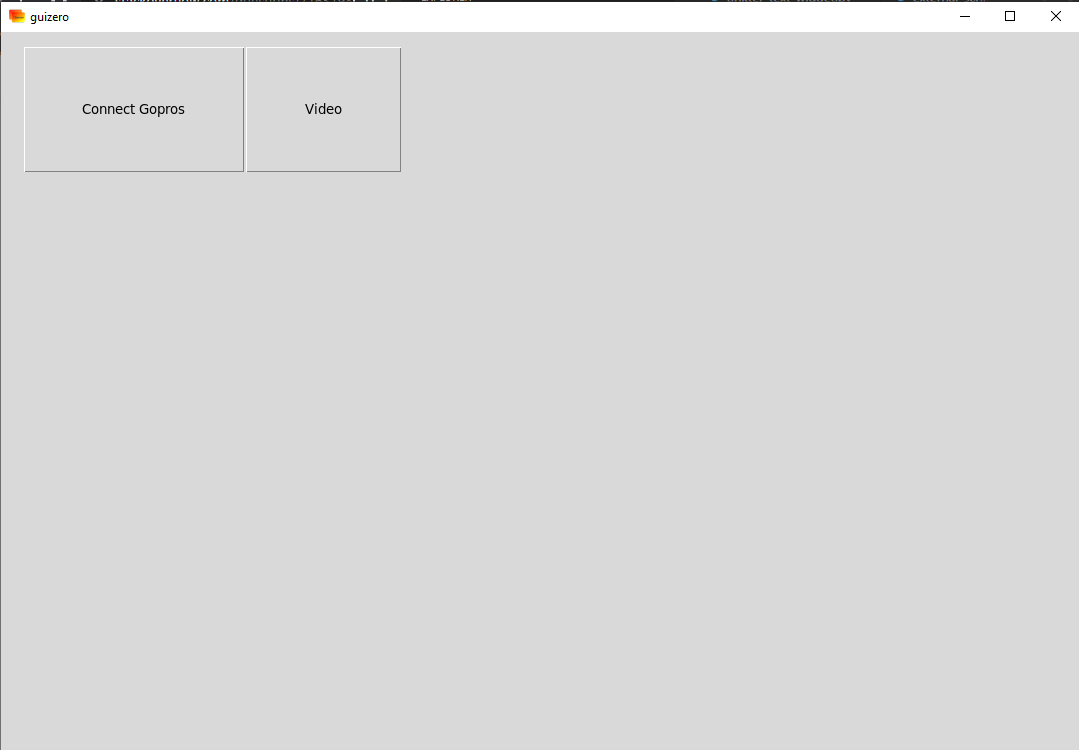
布局将基于您的操作系统如下:
页面原文内容由Stack Overflow提供。腾讯云小微IT领域专用引擎提供翻译支持
原文链接:
https://stackoverflow.com/questions/71631980
复制相关文章
相似问题
腾讯云开发者

Copyright © 2013 - 2026 Tencent Cloud. All Rights Reserved. 腾讯云 版权所有
深圳市腾讯计算机系统有限公司 ICP备案/许可证号:粤B2-20090059  粤公网安备44030502008569号
腾讯云计算(北京)有限责任公司 京ICP证150476号 | 京ICP备11018762号