
无法按照msdn文档(vs代码)访问.net 6核心web
下面是vs代码中的步骤:
dotnet new webapi -o TodoApi
cd TodoApi
dotnet add package Microsoft.EntityFrameworkCore.InMemory
code -r ../TodoApi

dotnet dev-certs https --trust

Then I click yes in the pop-up window.
现在我想做以下几点:
Press Ctrl+F5.
At the Select environment prompt, choose .NET Core.
Select Add Configuration > .NET: Launch a local .NET Core Console App.
In the configuration JSON:
Replace <target-framework> with net6.0.
Replace <project-name.dll> with TodoApi.dll.
Press Ctrl+F5.
In the Could not find the task 'build' dialog, select Configure Task.
Select Create tasks.json file from template.
Select the .NET Core task template.
Press Ctrl+F5.当我按control+F5时,唯一明智的选项是.NET 5+ and .NET Core,所以我选择了它。
此自动生成2个文件:
launch.json:
{
    // Use IntelliSense to learn about possible attributes.
    // Hover to view descriptions of existing attributes.
    // For more information, visit: https://go.microsoft.com/fwlink/?linkid=830387
    "version": "0.2.0",
    "configurations": [
        {
            "name": ".NET Core Launch (web)",
            "type": "coreclr",
            "request": "launch",
            "preLaunchTask": "build",
            "program": "${workspaceFolder}/bin/Debug/net6.0/TodoApi.dll",
            "args": [],
            "cwd": "${workspaceFolder}",
            "stopAtEntry": false,
            "serverReadyAction": {
                "action": "openExternally",
                "pattern": "\\bNow listening on:\\s+(https?://\\S+)"
            },
            "env": {
                "ASPNETCORE_ENVIRONMENT": "Development"
            },
            "sourceFileMap": {
                "/Views": "${workspaceFolder}/Views"
            }
        },
        {
            "name": ".NET Core Attach",
            "type": "coreclr",
            "request": "attach"
        }
    ]
}
tasks.json
{
    "version": "2.0.0",
    "tasks": [
        {
            "label": "build",
            "command": "dotnet",
            "type": "process",
            "args": [
                "build",
                "${workspaceFolder}/TodoApi.csproj",
                "/property:GenerateFullPaths=true",
                "/consoleloggerparameters:NoSummary"
            ],
            "problemMatcher": "$msCompile"
        },
        {
            "label": "publish",
            "command": "dotnet",
            "type": "process",
            "args": [
                "publish",
                "${workspaceFolder}/TodoApi.csproj",
                "/property:GenerateFullPaths=true",
                "/consoleloggerparameters:NoSummary"
            ],
            "problemMatcher": "$msCompile"
        },
        {
            "label": "watch",
            "command": "dotnet",
            "type": "process",
            "args": [
                "watch",
                "run",
                "--project",
                "${workspaceFolder}/TodoApi.csproj"
            ],
            "problemMatcher": "$msCompile"
        }
    ]
}
现在,如果我按下control+F5,那么这个项目就会运行,但是我不知道如何访问它-- http://locahost:5000不工作。
在launch.json文件中--注意配置名称是.NET核心启动(web),而不是.NET:启动本地.NET核心控制台应用程序;因此,我删除了launch.json文件的内容,选择add configuration并选择启动.net核心控制台应用程序,如下所示:
{
    "configurations": [
    {
        "name": ".NET Core Launch (console)",
        "type": "coreclr",
        "request": "launch",
        "preLaunchTask": "build",
        "program": "${workspaceFolder}/bin/Debug/net6.0/Todoapi.dll",
        "args": [],
        "cwd": "${workspaceFolder}",
        "stopAtEntry": false,
        "console": "internalConsole"
    }
    ]
}
然后我删除tasks.json文件并点击control+F5,选择,从模板中选择Createtask.json文件,选择.net核心。这给了我:
{
    // See https://go.microsoft.com/fwlink/?LinkId=733558
    // for the documentation about the tasks.json format
    "version": "2.0.0",
    "tasks": [
        {
            "label": "build",
            "command": "dotnet",
            "type": "shell",
            "args": [
                "build",
                // Ask dotnet build to generate full paths for file names.
                "/property:GenerateFullPaths=true",
                // Do not generate summary otherwise it leads to duplicate errors in Problems panel
                "/consoleloggerparameters:NoSummary"
            ],
            "group": "build",
            "presentation": {
                "reveal": "silent"
            },
            "problemMatcher": "$msCompile"
        }
    ]
}现在我按control+F5,该项目运行,但我如何访问它?http://localhost:5000不工作。
产出如下:
-------------------------------------------------------------------
You may only use the Microsoft .NET Core Debugger (vsdbg) with
Visual Studio Code, Visual Studio or Visual Studio for Mac software
to help you develop and test your applications.
-------------------------------------------------------------------
Using launch settings from 'C:\Users\Archco\Downloads\TodoApi\Properties\launchSettings.json' [Profile 'TodoApi']...回答 1
Stack Overflow用户
发布于 2022-03-26 01:18:36
从链接条款中:
在浏览器中,导航到https://localhost:/swagger,其中显示输出中随机选择的端口号。
我遵循了问题中的步骤,下面是一个示例输出:
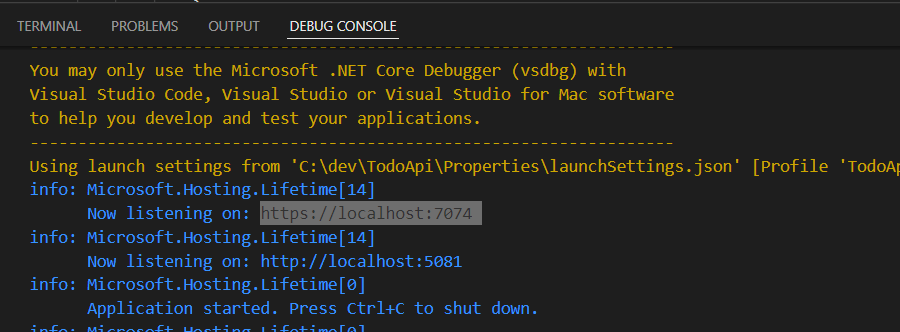
其中包括带有地址的行:
Now listening on: https://localhost:7074请注意,有趣的部分是在https://localhost:7074/swagger,而不仅仅是https://localhost:7074
https://stackoverflow.com/questions/71619664
复制相似问题
腾讯云开发者

Copyright © 2013 - 2026 Tencent Cloud. All Rights Reserved. 腾讯云 版权所有
深圳市腾讯计算机系统有限公司 ICP备案/许可证号:粤B2-20090059  粤公网安备44030502008569号
腾讯云计算(北京)有限责任公司 京ICP证150476号 | 京ICP备11018762号