
如何根据屏幕尺寸与自动布局进行缩放?
假设我有一个UIImageView,它有一个特定的纵横比约束(这处理高度/底部的约束),固定在superview的顶部,引导,在XIB/情节提要中的100英尺宽的屏幕中拖着5pt。这样,如果屏幕大小发生变化,图像视图就可以相应地缩放。
这是5pt+5pt (10 90)的边缘间距在一个100英尺宽的屏幕上,图像占90pt (屏幕的90%)。
不过,我希望保证金间距也能缩小。
我怎样才能做到,在更大的手机上,例如宽度1000 it (以前的10倍),边距现在将相应为50pt+50pt (100 It),图像占用屏幕的剩余900 it,保留90%?(如果我们使水平约束有所不同,这可能会更加复杂。)领先15点,尾随45点。
如果我们“正常地”不缩放边距pt,那么引导/尾随的约束将是5pt (在1000 pt甚至1000 pt宽的电话中总共是10 pt!)这不是我们通常想要的。
如何通过自动布局轻松地实现这一目标?我想到了班级的规模,但这不符合我想要做的事情(以迎合任何大小的设备)。
回答 2
Stack Overflow用户
发布于 2022-03-23 13:19:25
ASFAIK没有方法定义相对于另一个视图的宽度的前导或尾随约束。
要实现您想要的结果,可以在UIImageView上设置以下约束
- 一个常数顶约束
- 用于图像水平中心的centerX约束
- 具有所需高宽比的常数纵横比约束
- 具有与UIImageView的superview相同宽度的宽度约束,乘法器为0.9 (90%)
当您这样做时,图像的水平边距始终是屏幕大小的10%。
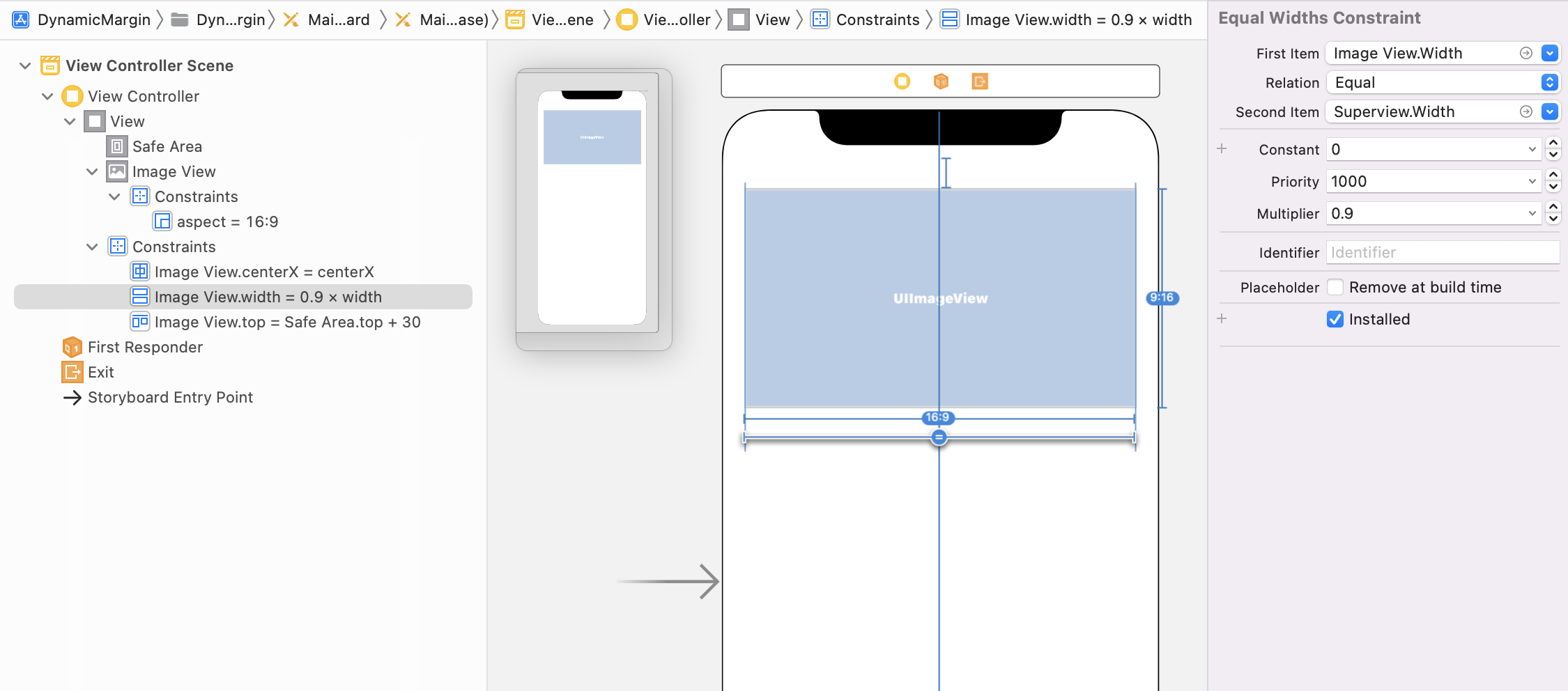
编辑:
当您还需要一个相对的顶部边距时,您可以将UIImageView放入另一个UIView (具有灰色背景的UIView)中,并使用以下约束:
- 一个常量的底部约束(如果不想要底部边距,则为零)
- 用于图像水平中心的centerX约束
- 具有所需高宽比的常数纵横比约束
- 具有与UIImageView的superview相同宽度的宽度约束,乘法器为0.9 (90%)
- 高度约束,与UIImageView的superview具有相同的高度,乘数为0.9 (90%或任何您想要的值)
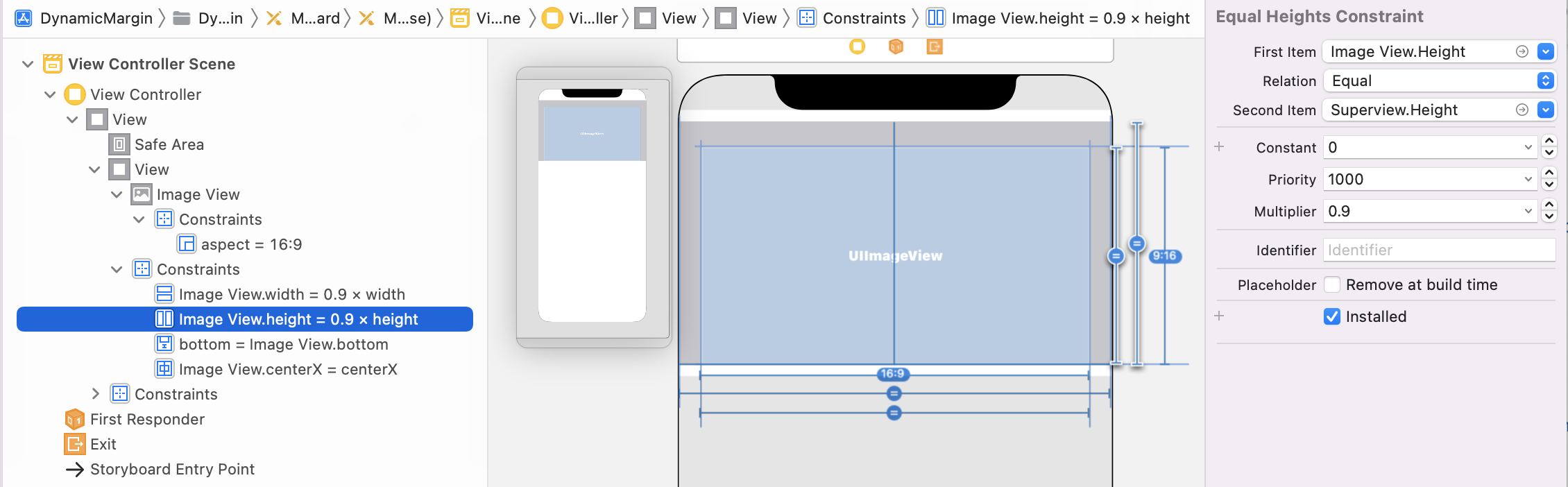
如果您想要一个与水平边距相同的上边距,则必须按以下方式计算它:verticalMultiplier = horizontalMultiplier / (2 * aspectRatio)
Stack Overflow用户
发布于 2022-03-23 13:57:18
无论是将其放置在Storyboard / IB中还是通过代码进行,最简单的方法可能是使用水平堆栈视图,两边都有一个(清晰的)“间隔”视图。
不过,你必须事先决定的是你想要的比例。
也就是说,我们认为前导空间应该是基于5-pts的总宽度的100-pts。或者基于25-pts的150-pts ..。等。
因此,我们的堆栈视图将有3个排列好的子视图:
- "LeftSpacer“
- imageView (比方说,有
640:360比率) - "RightSpacer“
将LeftSpacer的宽度约束为堆栈视图的宽度,并使用(left space)/100乘法器。
将RightSpacer的宽度约束为堆栈视图的宽度,并使用(right space)/100乘法器。
以下是两个例子。
顶部堆栈视图将左、右间隔设置为5/100。底部堆栈视图有Left: 5/100和Right: 45/100。在这两个堆栈视图中,图像视图都被设置为640:360纵横比(因为这是我手头的图像)。
这就是堆栈视图Width: 100的外观。
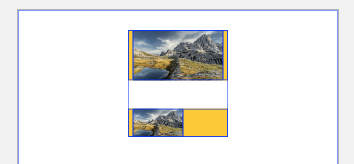
最上面的例子-两个间隔视图都是5像素,图像视图是90像素。
下面的例子-左间隔:5,右:45,图像视图:50。
和堆栈视图Width: 200
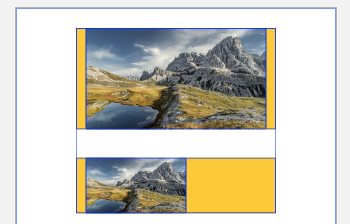
最上面的例子--两个间隔视图都是10像素,图像视图是180像素。
底部示例-左间隔:10像素,右:90像素,图像视图:100像素。
和堆栈视图Width: 300
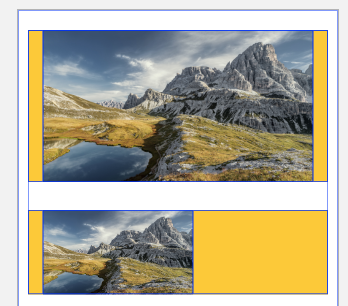
上面的例子-两个间隔视图都是15-pt,图像视图是270-pt。
底部示例-左间隔:15-像素,右:135-像素,图像视图:150
这是文件大纲:
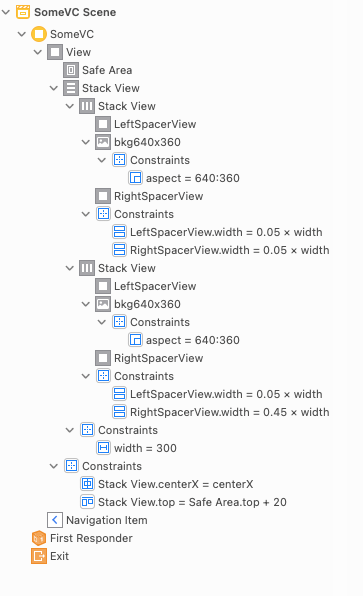
如果您想检查Storyboard源,请查看:
<?xml version="1.0" encoding="UTF-8"?>
<document type="com.apple.InterfaceBuilder3.CocoaTouch.Storyboard.XIB" version="3.0" toolsVersion="19529" targetRuntime="iOS.CocoaTouch" propertyAccessControl="none" useAutolayout="YES" useTraitCollections="YES" useSafeAreas="YES" colorMatched="YES">
    <device id="retina4_0" orientation="portrait" appearance="light"/>
    <dependencies>
        <plugIn identifier="com.apple.InterfaceBuilder.IBCocoaTouchPlugin" version="19519"/>
        <capability name="Safe area layout guides" minToolsVersion="9.0"/>
        <capability name="System colors in document resources" minToolsVersion="11.0"/>
        <capability name="documents saved in the Xcode 8 format" minToolsVersion="8.0"/>
    </dependencies>
    <scenes>
        <!--SomeVC-->
        <scene sceneID="YpP-O8-TWi">
            <objects>
                <viewController id="P90-ov-dhs" customClass="SomeVC" customModule="TabBased" customModuleProvider="target" sceneMemberID="viewController">
                    <view key="view" contentMode="scaleToFill" id="Afn-4E-CtW">
                        <rect key="frame" x="0.0" y="0.0" width="320" height="568"/>
                        <autoresizingMask key="autoresizingMask" widthSizable="YES" heightSizable="YES"/>
                        <subviews>
                            <stackView opaque="NO" contentMode="scaleToFill" axis="vertical" spacing="28" translatesAutoresizingMaskIntoConstraints="NO" id="EZB-9U-TcY">
                                <rect key="frame" x="10" y="20" width="300" height="264.5"/>
                                <subviews>
                                    <stackView opaque="NO" contentMode="scaleToFill" translatesAutoresizingMaskIntoConstraints="NO" id="wTh-HR-1cy">
                                        <rect key="frame" x="0.0" y="0.0" width="300" height="152"/>
                                        <subviews>
                                            <view contentMode="scaleToFill" translatesAutoresizingMaskIntoConstraints="NO" id="WVJ-wZ-t9Z" userLabel="LeftSpacerView">
                                                <rect key="frame" x="0.0" y="0.0" width="15" height="152"/>
                                                <color key="backgroundColor" systemColor="systemYellowColor"/>
                                            </view>
                                            <imageView clipsSubviews="YES" userInteractionEnabled="NO" contentMode="scaleToFill" horizontalHuggingPriority="251" verticalHuggingPriority="251" image="bkg640x360" translatesAutoresizingMaskIntoConstraints="NO" id="39U-sA-bbn">
                                                <rect key="frame" x="15" y="0.0" width="270" height="152"/>
                                                <constraints>
                                                    <constraint firstAttribute="width" secondItem="39U-sA-bbn" secondAttribute="height" multiplier="640:360" id="soT-yc-UP0"/>
                                                </constraints>
                                            </imageView>
                                            <view contentMode="scaleToFill" translatesAutoresizingMaskIntoConstraints="NO" id="Tww-ar-yol" userLabel="RightSpacerView">
                                                <rect key="frame" x="285" y="0.0" width="15" height="152"/>
                                                <color key="backgroundColor" systemColor="systemYellowColor"/>
                                            </view>
                                        </subviews>
                                        <constraints>
                                            <constraint firstItem="Tww-ar-yol" firstAttribute="width" secondItem="wTh-HR-1cy" secondAttribute="width" multiplier="5/100" id="DLh-N4-vfJ"/>
                                            <constraint firstItem="WVJ-wZ-t9Z" firstAttribute="width" secondItem="wTh-HR-1cy" secondAttribute="width" multiplier="5/100" id="qYi-Rk-ZOI"/>
                                        </constraints>
                                    </stackView>
                                    <stackView opaque="NO" contentMode="scaleToFill" translatesAutoresizingMaskIntoConstraints="NO" id="TsK-Kw-YRa">
                                        <rect key="frame" x="0.0" y="180" width="300" height="84.5"/>
                                        <subviews>
                                            <view contentMode="scaleToFill" translatesAutoresizingMaskIntoConstraints="NO" id="iw4-he-3pJ" userLabel="LeftSpacerView">
                                                <rect key="frame" x="0.0" y="0.0" width="15" height="84.5"/>
                                                <color key="backgroundColor" systemColor="systemYellowColor"/>
                                            </view>
                                            <imageView clipsSubviews="YES" userInteractionEnabled="NO" contentMode="scaleToFill" horizontalHuggingPriority="251" verticalHuggingPriority="251" image="bkg640x360" translatesAutoresizingMaskIntoConstraints="NO" id="P4f-Bc-9F2">
                                                <rect key="frame" x="15" y="0.0" width="150" height="84.5"/>
                                                <constraints>
                                                    <constraint firstAttribute="width" secondItem="P4f-Bc-9F2" secondAttribute="height" multiplier="640:360" id="ZqY-ss-ToB"/>
                                                </constraints>
                                            </imageView>
                                            <view contentMode="scaleToFill" translatesAutoresizingMaskIntoConstraints="NO" id="Fs5-7r-dME" userLabel="RightSpacerView">
                                                <rect key="frame" x="165" y="0.0" width="135" height="84.5"/>
                                                <color key="backgroundColor" systemColor="systemYellowColor"/>
                                            </view>
                                        </subviews>
                                        <constraints>
                                            <constraint firstItem="iw4-he-3pJ" firstAttribute="width" secondItem="TsK-Kw-YRa" secondAttribute="width" multiplier="5/100" id="D5C-Yo-YOh"/>
                                            <constraint firstItem="Fs5-7r-dME" firstAttribute="width" secondItem="TsK-Kw-YRa" secondAttribute="width" multiplier="45/100" id="ajJ-GY-bZW"/>
                                        </constraints>
                                    </stackView>
                                </subviews>
                                <constraints>
                                    <constraint firstAttribute="width" constant="300" id="Hel-XG-PhB"/>
                                </constraints>
                            </stackView>
                        </subviews>
                        <viewLayoutGuide key="safeArea" id="Ur7-hW-kek"/>
                        <color key="backgroundColor" systemColor="systemBackgroundColor"/>
                        <constraints>
                            <constraint firstItem="EZB-9U-TcY" firstAttribute="centerX" secondItem="Afn-4E-CtW" secondAttribute="centerX" id="5lZ-RK-pgy"/>
                            <constraint firstItem="EZB-9U-TcY" firstAttribute="top" secondItem="Ur7-hW-kek" secondAttribute="top" constant="20" id="bg6-Jx-gi9"/>
                        </constraints>
                    </view>
                    <navigationItem key="navigationItem" id="ZhN-1l-tl9"/>
                </viewController>
                <placeholder placeholderIdentifier="IBFirstResponder" id="Rgh-e1-NRf" userLabel="First Responder" customClass="UIResponder" sceneMemberID="firstResponder"/>
            </objects>
            <point key="canvasLocation" x="-118.125" y="1365"/>
        </scene>
    </scenes>
    <resources>
        <image name="bkg640x360" width="640" height="360"/>
        <systemColor name="systemBackgroundColor">
            <color white="1" alpha="1" colorSpace="custom" customColorSpace="genericGamma22GrayColorSpace"/>
        </systemColor>
        <systemColor name="systemYellowColor">
            <color red="1" green="0.80000000000000004" blue="0.0" alpha="1" colorSpace="custom" customColorSpace="sRGB"/>
        </systemColor>
    </resources>
</document>
显然,在代码中进行复制是很简单的。
如果出于某种原因,您不想使用堆栈视图,那么您基本上可以在两个“侧间隔视图”上使用前导/尾随和比例宽度约束,或者使用ConstraintLayoutGuide而不是清晰的视图来使其重量更轻。
编辑-为了得到更多的澄清.
首先,我应该明确指出,ConstraintLayoutGuide指的是UILayoutGuide - whoops:
您概述的任务如下:
如果我的视图是100像素宽,我希望子视图在左边和右边有5个文本“填充”。但是,随着视野的扩大,填充物应该按比例扩大。因此,如果视图宽为200像素,则两边的填充应该是10。
还可描述为:
我要5%“填充物”在两边。
自动布局没有办法将主锚设置为superview宽度的百分比。
因此,传统上,我们使用清晰的背景“间隔”视图:
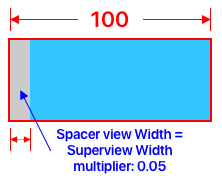
在iOS 9中,苹果推出了UILayoutGuide (文档):
概述 使用布局指南来替换您可能为表示视图间空间或用户界面中的封装而创建的占位符视图。
这些内容不能添加到Storyboard / IB中,但可以在代码中以与标准UIView相同的方式使用。
下面是一个简单的示例,它向“容器”视图添加了一个" cyan“视图和一个UILayoutGuide视图,为”容器“视图提供了15%的”引导空间“:
class LayoutGuideExampleViewController: UIViewController {

    override func viewDidLoad() {
        super.viewDidLoad()

        let safeG = view.safeAreaLayoutGuide

        // create a "container" view
        let cView = UIView()
        cView.translatesAutoresizingMaskIntoConstraints = false
        cView.layer.borderWidth = 1
        cView.layer.borderColor = UIColor.red.cgColor

        view.addSubview(cView)

        // constraints for the container view
        NSLayoutConstraint.activate([
            cView.topAnchor.constraint(equalTo: safeG.topAnchor, constant: 20.0),
            cView.heightAnchor.constraint(equalToConstant: 40.0),
            cView.widthAnchor.constraint(equalToConstant: 100.0),
            cView.centerXAnchor.constraint(equalTo: safeG.centerXAnchor),
        ])

        // create a "cyan" view
        let cyanView = UIView()
        cyanView.translatesAutoresizingMaskIntoConstraints = false
        cyanView.backgroundColor = .cyan

        // add it to the container
        cView.addSubview(cyanView)

        // constrain the cyan view Top / Bottom / Trailing to the container
        NSLayoutConstraint.activate([
            cyanView.topAnchor.constraint(equalTo: cView.topAnchor),
            cyanView.bottomAnchor.constraint(equalTo: cView.bottomAnchor),
            cyanView.trailingAnchor.constraint(equalTo: cView.trailingAnchor),
        ])

        // we want the cyan view's leading-edge to be 15% from the
        //  leading-edge of the container
        // but, we can't do that with a leadingAnchor
        //  so, let's add a UILayoutGuide

        // create the guide
        let leftGuide = UILayoutGuide()

        // add it to the container view
        cView.addLayoutGuide(leftGuide)

        // now, we'll constrain the guide
        NSLayoutConstraint.activate([

            //  Top / Bottom / Leading to the container
            leftGuide.topAnchor.constraint(equalTo: cView.topAnchor),
            leftGuide.bottomAnchor.constraint(equalTo: cView.bottomAnchor),
            leftGuide.leadingAnchor.constraint(equalTo: cView.leadingAnchor),

            //  Width as 15% of the container Width
            leftGuide.widthAnchor.constraint(equalTo: cView.widthAnchor, multiplier: 15.0 / 100.0),

            // and cyan view Leading to the guide's Trailing
            cyanView.leadingAnchor.constraint(equalTo: leftGuide.trailingAnchor),

        ])
    }

}
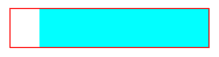
100 pt“容器”视图的结果-15% (15%) (红色大纲):
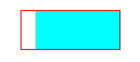
如果将容器宽度更改为200像素,我们将得到30% (15%)的前导空间:
https://stackoverflow.com/questions/71585789
复制相似问题
腾讯云开发者

Copyright © 2013 - 2026 Tencent Cloud. All Rights Reserved. 腾讯云 版权所有
深圳市腾讯计算机系统有限公司 ICP备案/许可证号:粤B2-20090059  粤公网安备44030502008569号
腾讯云计算(北京)有限责任公司 京ICP证150476号 | 京ICP备11018762号