
VBA字典的错误结果
VBA字典的错误结果
提问于 2022-03-22 13:28:53
我是VBA的新手,在VBA中做字典会得到错误的结果。
输入:
- B栏:社团的身份证
- A栏:他们的商店证件
- C栏:数额
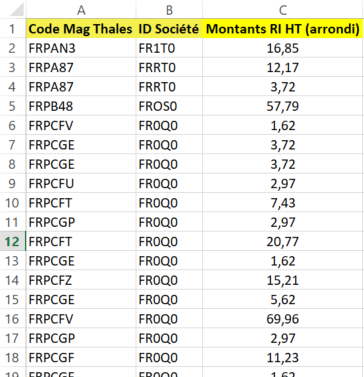
预期输出:
- E栏:社团ID
- F列:存储ID (唯一值)
- G栏:每个商店ID的总额
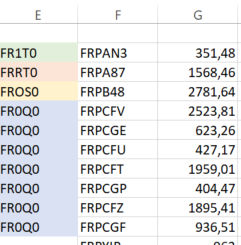
我得到了什么:
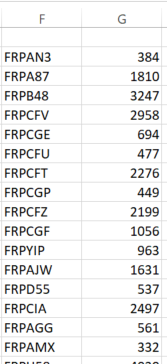
例如:对于商店ID FRPAN3,我应该有351,48。
代码:
Option Explicit
Dim dico As Object, f As Worksheet, i&

Sub ValeursUniques()

Set dico = CreateObject("Scripting.Dictionary")
Set f = Sheets("Feuil1")

For i = 2 To f.Range("B" & Rows.Count).End(xlUp).Row
    dico(f.Range("B" & i).Value) = dico(f.Range("B" & i).Value) + Val(f.Range("C" & i))
Next i

Range("F2").Resize(dico.Count, 1) = Application.Transpose(dico.keys)
Range("G2").Resize(dico.Count, 1) = Application.Transpose(dico.items)
End Sub
知道我为什么会得到这些结果吗?
回答 2
Stack Overflow用户
回答已采纳
发布于 2022-03-22 13:52:27
Stack Overflow用户
发布于 2022-03-22 15:43:48
使用字典统一数据
- 如果第一个唯一列(本例中为列
2)中的值是错误值或空白, 记录将不包括在内。 - 如果其他唯一列(在本例中仅为列
1)中的值是错误值, 它将被转换为Empty(隐式)。 - 如果值列中的值(在本例中为列
3)不是数字, 将使用0(零)代替。 - 调整(播放)常量部分中的值。
Option Explicit

Sub UniquifyData()

    ' Source
    Const sName As String = "Feuil1"
    Const sFirstCellAddress As String = "A1"
    Dim uCols As Variant: uCols = VBA.Array(2, 1)
    Const svCol As Long = 3
    ' Destination
    Const dName As String = "Feuil1"
    Const dFirstCellAddress As String = "E1"
    ' Both
    Const Delimiter As String = "@"
    Dim wb As Workbook: Set wb = ThisWorkbook ' workbook containing this code

    ' Reference the source range and write its values to the source array.

    Dim sws As Worksheet: Set sws = wb.Worksheets(sName)
    Dim srg As Range: Set srg = sws.Range(sFirstCellAddress).CurrentRegion
    Dim Data As Variant: Data = srg.Value

    Dim srCount As Long: srCount = UBound(Data, 1)
    Dim cCount As Long: cCount = UBound(Data, 2)

    ' Write the headers from the source array to the headers array.

    Dim cUpper As Long: cUpper = UBound(uCols)
    Dim Headers As Variant: ReDim Headers(1 To cUpper + 2)

    Dim c As Long

    For c = 0 To cUpper
        Headers(c + 1) = Data(1, uCols(c))
    Next c
    Headers(cCount) = Data(1, svCol)

    ' Write the unique values from the source array to a dictionary.

    Dim dict As Object: Set dict = CreateObject("Scripting.Dictionary")
    dict.CompareMode = vbTextCompare

    Dim Key As Variant
    Dim sString As String
    Dim r As Long

    For r = 2 To srCount
        For c = 0 To cUpper
            Key = Data(r, uCols(c))
            If c = 0 Then
                If Not IsError(Key) Then
                    If Len(Key) > 0 Then
                        sString = CStr(Key)
                    End If
                End If
                If Len(sString) = 0 Then Exit For
            Else
                If IsError(Key) Then Key = ""
                sString = sString & Delimiter & CStr(Key) ' join uniques
            End If
        Next c
        If Len(sString) > 0 Then
            If IsNumeric(Data(r, svCol)) Then
                dict(sString) = dict(sString) + Data(r, svCol)
            Else
                If Not dict.Exists(sString) Then dict(sString) = 0
            End If
            sString = ""
        End If
    Next r

    ' Define the destination array.

    Dim drCount As Long: drCount = dict.Count + 1

    ReDim Data(1 To drCount, 1 To cCount)

    ' Write the headers from the headers array to the destination array.

    For c = 1 To cCount
        Data(1, c) = Headers(c)
    Next c

    ' Write the values from the dictionary to the destination array.

    r = 1

    For Each Key In dict.Keys
        r = r + 1
        ' Write uniques.
        uCols = Split(Key, Delimiter) ' split uniques
        For c = 0 To cUpper
            Data(r, c + 1) = uCols(c)
        Next
        ' Write value.
        Data(r, cCount) = dict(Key)
    Next Key

    ' Write the values from the destination array to the destination range.

    Dim dws As Worksheet: Set dws = wb.Worksheets(dName)
    With dws.Range(dFirstCellAddress).Resize(, cCount) ' reference first row
        ' Write data.
        .Resize(drCount).Value = Data
        ' Clear below.
        .Resize(dws.Rows.Count - .Row - drCount + 1).Offset(drCount).Clear
        ' Apply some formatting.
        '.Font.Bold = True ' headers
        '.EntireColumn.AutoFit ' columns
    End With

    ' Inform.

    MsgBox "Data uniquified.", vbInformation

End Sub页面原文内容由Stack Overflow提供。腾讯云小微IT领域专用引擎提供翻译支持
原文链接:
https://stackoverflow.com/questions/71572890
复制相关文章
相似问题
腾讯云开发者

Copyright © 2013 - 2026 Tencent Cloud. All Rights Reserved. 腾讯云 版权所有
深圳市腾讯计算机系统有限公司 ICP备案/许可证号:粤B2-20090059  粤公网安备44030502008569号
腾讯云计算(北京)有限责任公司 京ICP证150476号 | 京ICP备11018762号