
Neutron+VLAN。允许VM之间的中继通信量
Neutron+VLAN。允许VM之间的中继通信量
提问于 2022-03-22 13:05:04
请告诉我,如何才能在中子专用网的用户级别上传输中继通信量?
描述
我们有以下私人的、非共享的网络,没有任何网关:
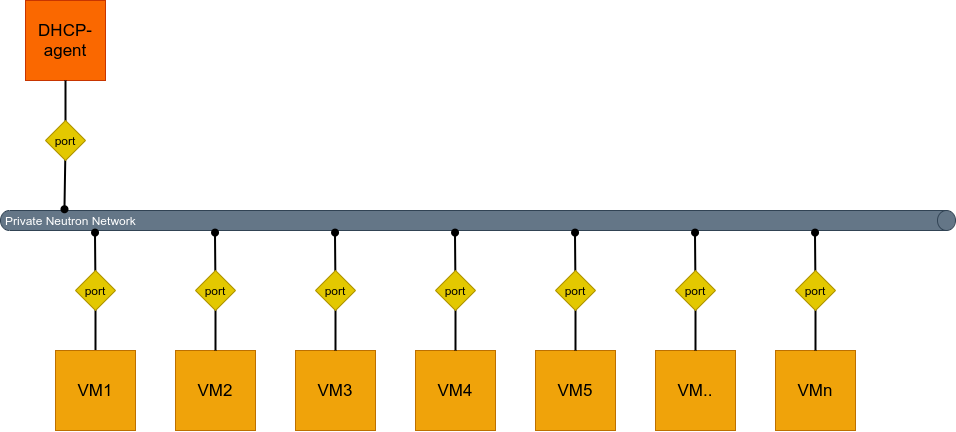
我想确保VM可以配置彼此之间的中继-VLAN连接。同时,这些连接的创建被控制在OS级别(这些连接和VM的计数是完全混乱和随机的)。
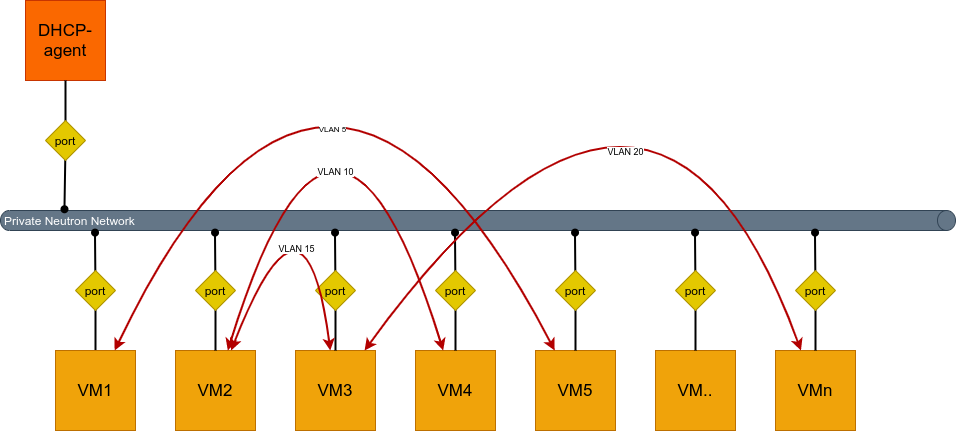
问题是:如果您在Centos上设置了几个VM,并试图通过ID设置一个VM与另一个VM之间的关系,例如5,中子网络就会完全丢弃这些通信量。
### Both VMs ###

[root@vlan-X centos]# modprobe bonding
[root@vlan-X centos]# modprobe 8021q
[root@vlan-X centos]# echo "8021q" > /etc/modules-load.d/8021q.conf
[root@vlan-X centos]# echo "bonding" > /etc/modules-load.d/bonding.conf

### VM1 ###

[root@vlan-1 centos]# vi /etc/sysconfig/network-scripts/ifcfg-eth1
NAME="eth1"
DEVICE="eth1"
ONBOOT="yes"
TYPE="Ethernet"
BOOTPROTO="none"

[root@vlan-1 centos]# vi /etc/sysconfig/network-scripts/ifcfg-eth1.5
ONBOOT=yes
VLAN=yes
DEVICE=eth1.5
BOOTPROTO=static
IPADDR=192.168.10.15
PREFIX=24

[root@vlan-1 centos]# systemctl restart network

### VM2 ###

[root@vlan-2 centos]# vi /etc/sysconfig/network-scripts/ifcfg-eth1
NAME="eth1"
DEVICE="eth1"
ONBOOT="yes"
TYPE="Ethernet"
BOOTPROTO="none"

[root@vlan-2 centos]# vi /etc/sysconfig/network-scripts/ifcfg-eth1.5
ONBOOT=yes
VLAN=yes
DEVICE=eth1.5
BOOTPROTO=static
IPADDR=192.168.10.16
PREFIX=24

[root@vlan-2 centos]# systemctl restart network
[root@vlan-2 centos]# ping 192.168.10.15
PING 192.168.10.15 (192.168.10.15) 56(84) bytes of data.
From 192.168.10.16 icmp_seq=1 Destination Host Unreachable
From 192.168.10.16 icmp_seq=2 Destination Host Unreachable
From 192.168.10.16 icmp_seq=3 Destination Host Unreachable
From 192.168.10.16 icmp_seq=4 Destination Host Unreachable
From 192.168.10.16 icmp_seq=5 Destination Host Unreachable
From 192.168.10.16 icmp_seq=6 Destination Host Unreachable
From 192.168.10.16 icmp_seq=7 Destination Host Unreachable
From 192.168.10.16 icmp_seq=8 Destination Host Unreachable
^C
--- 192.168.10.15 ping statistics ---
11 packets transmitted, 0 received, +8 errors, 100% packet loss, time 10001ms
pipe 4
同时,tcpdump看起来是这样的--也就是说,VLAN被成功地接受了,但是即使ARP也没有成功。
[root@vlan-2 centos]# tcpdump -e -nvvvti eth1
tcpdump: listening on eth1, link-type EN10MB (Ethernet), capture size 262144 bytes
fa:16:3e:8f:7f:df > Broadcast, ethertype 802.1Q (0x8100), length 46: vlan 5, p 0, ethertype ARP, Ethernet (len 6), IPv4 (len 4), Request who-has 192.168.10.15 tell 192.168.10.16, length 28
fa:16:3e:8f:7f:df > Broadcast, ethertype 802.1Q (0x8100), length 46: vlan 5, p 0, ethertype ARP, Ethernet (len 6), IPv4 (len 4), Request who-has 192.168.10.15 tell 192.168.10.16, length 28
fa:16:3e:8f:7f:df > Broadcast, ethertype 802.1Q (0x8100), length 46: vlan 5, p 0, ethertype ARP, Ethernet (len 6), IPv4 (len 4), Request who-has 192.168.10.15 tell 192.168.10.16, length 28
fa:16:3e:8f:7f:df > Broadcast, ethertype 802.1Q (0x8100), length 46: vlan 5, p 0, ethertype ARP, Ethernet (len 6), IPv4 (len 4), Request who-has 192.168.10.15 tell 192.168.10.16, length 28
^C
4 packets captured
4 packets received by filter
0 packets dropped by kernel
同时,在带有内部网络的VirtualBox上,同样的设计也很好。
我试图解决这个问题:
- 我尝试用“透明-vlan”选项创建一个网络,但没有什么改变。
- 我试着用“透明的-vlan-禁用-端口-安全”的选项创建一个网络--没有什么改变。
- 我尝试将"中继线“选项连接到中子,并配置其他实体,如”网络主干“和”子端口“--没有任何改变。我怀疑这一切都是为了在不同的网络上建立两个VM之间的通信,而在同一个网络上没有多少VM。
回答 1
Stack Overflow用户
发布于 2022-04-09 09:08:24
一般来说,这个选项有一个限制它只适用于Linuxbridge。
一个为我工作的配置:
vi /etc/neutron/neutron.conf
...
[DEFAULT]
vlan_transparent = true
...

vi /etc/neutron/plugins/ml2/ml2_conf.ini
...
[ml2]
type_drivers = flat,vlan,vxlan,gre
tenant_network_types = vxlan
mechanism_drivers = linuxbridge
...

vi /etc/neutron/plugin.ini
...
[ml2]
type_drivers = flat,vlan,vxlan,gre
mechanism_drivers = linuxbridge
...
只有在那时,我才能够创建一个具有"vlan_transparent“选项的网络,但不是通过CLI,而是通过API:
$ curl -s -X POST http://internal.mystack.net:9696/v2.0/networks -H "X-Auth-Token: <TOKEN>" -H "Content-Type: application/json" -d '{"network": {"name": "test", "admin_state_up": true, "tenant_id": "56b0cfe82ef94b2b8a60c53d72921a8b", "vlan_transparent": true}}'

$ openstack network show test --debug
...
{"networks": [{"provider:physical_network": null, "ipv6_address_scope": null, "dns_domain": null, "revision_number": 4, "port_security_enabled": true, "provider:network_type": "vxlan", "id": "78af4991-1b50-4b8d-9299-3a5dfaf689a2", "router:external": false, "availability_zone_hints": [], "availability_zones": [], "ipv4_address_scope": null, "shared": false, "project_id": "56b0cfe82ef94b2b8a60c53d72921a8b", "status": "ACTIVE", "subnets": [], "private_dns_domain": "mcs.local.", "description": "", "tags": [], "updated_at": "2022-03-29T13:22:00Z", "provider:segmentation_id": 88, "name": "test", "admin_state_up": true, "tenant_id": "56b0cfe82ef94b2b8a60c53d72921a8b", "created_at": "2022-03-29T13:22:00Z", "mtu": 1400, "vlan_transparent": true}]}
也就是说,如果向“mechanism_drivers”中的配置添加任何"openvswitch“或"mechanism_drivers",那么所有这些都会突然停止工作。
我没有进一步发展这个实验。意识到这不适合我
页面原文内容由Stack Overflow提供。腾讯云小微IT领域专用引擎提供翻译支持
原文链接:
https://stackoverflow.com/questions/71572561
复制相关文章
相似问题
腾讯云开发者

Copyright © 2013 - 2026 Tencent Cloud. All Rights Reserved. 腾讯云 版权所有
深圳市腾讯计算机系统有限公司 ICP备案/许可证号:粤B2-20090059  粤公网安备44030502008569号
腾讯云计算(北京)有限责任公司 京ICP证150476号 | 京ICP备11018762号