
在github操作ubuntu上接收“未找到输入键的缓存:缓存-剧作家-linux-1.20.0”-最新消息
在github操作ubuntu上接收“未找到输入键的缓存:缓存-剧作家-linux-1.20.0”-最新消息
提问于 2022-03-18 12:39:13
我遵循https://playwrightsolutions.com/playwright-github-action-to-cache-the/中提供的示例
在我的yml文件中,有以下代码
jobs:
test:
timeout-minutes: 60
runs-on: ubuntu-latest
steps:
- uses: actions/checkout@v2
- uses: actions/setup-node@v2
  with:
    node-version: '16.x
然后,我只编辑了这里的版本,以匹配当前的版本。
- name: Cache playwright binaries
  uses: actions/cache@v2
  id: playwright-cache
  with:
    path: |
      ~/.cache/ms-playwright
    key: cache-playwright-linux-1.20.0
在那之后我跑
- name: Install dependencies
  run: npm ci
- name: Install Playwright
  if: steps.playwright-cache.outputs.cache-hit != 'true'
  run: npx playwright install --with-deps
- name: Run Playwright tests
  run: npm run test
我收到“输入键找不到缓存:缓存-剧作家-linux-1.20.0”。
回答 2
Stack Overflow用户
发布于 2022-09-24 06:26:27
您可以通过使用os和package-lock.json文件来改进缓存密钥。键的后半部分可能会发生更多的变化,但适用于许多构建。
- uses: actions/cache@v2
  id: playwright-cache
  with:
    path: |
      ~/.cache/ms-playwright
    key: ${{ runner.os }}-playwright-${{ hashFiles('**/package-lock.json') }}
- run: npm ci
- run: npx playwright install --with-deps
  if: steps.playwright-cache.outputs.cache-hit != 'true'
- run: npx playwright install-deps
  if: steps.playwright-cache.outputs.cache-hit == 'true'
https://justin.poehnelt.com/posts/caching-playwright-in-github-actions/
Stack Overflow用户
发布于 2022-10-27 05:53:25
这个策略适用于我(对铬的依赖):
      - name: Install dependencies
        run: npm ci

      - name: Get installed Playwright version
        id: playwright-version
        run: echo "version=$(npm ls @playwright/test | grep @playwright | sed 's/.*@//')" >> $GITHUB_OUTPUT

      - name: Cache Playwright
        uses: actions/cache@v3
        id: playwright-cache
        with:
          path: ~/.cache/ms-playwright
          key: ${{ runner.os }}-playwright-${{ steps.playwright-version.outputs.version }}
          restore-keys: |
            ${{ runner.os }}-playwright-

      - name: Install Playwright and dependencies
        run: npx playwright install --with-deps chromium
        if: steps.playwright-cache.outputs.cache-hit != 'true'

      - name: Install only Playwright dependencies
        run: npx playwright install-deps chromium
        if: steps.playwright-cache.outputs.cache-hit == 'true'
结果:
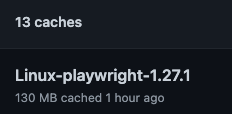
。
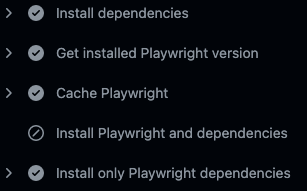
。
要查找更多信息,请参见GitHub discussion https://github.com/microsoft/playwright/issues/7249
页面原文内容由Stack Overflow提供。腾讯云小微IT领域专用引擎提供翻译支持
原文链接:
https://stackoverflow.com/questions/71527147
复制相关文章
相似问题
腾讯云开发者

Copyright © 2013 - 2026 Tencent Cloud. All Rights Reserved. 腾讯云 版权所有
深圳市腾讯计算机系统有限公司 ICP备案/许可证号:粤B2-20090059  粤公网安备44030502008569号
腾讯云计算(北京)有限责任公司 京ICP证150476号 | 京ICP备11018762号