
xtermjs不正确地显示并且显示不正确的文本
xtermjs不正确地显示并且显示不正确的文本
提问于 2022-03-17 16:26:09
我使用capture窗格将tmux会话中的数据保存到file.txt中,例如,我得到了这样的结果:
PC1:/path$ cd /usr
PC1:/usr$ ll
total 0
drwxr-xr-x 1 root root 4096 May 21  2019 [1;34m.[0;39m/
drwxr-xr-x 1 root root 4096 Aug  1  2019 [1;34m..[0;39m/
drwxr-xr-x 1 root root 4096 Mar 17 15:09 [1;34mbin[0;39m/
drwxr-xr-x 1 root root 4096 Apr 12  2016 [1;34mgames[0;39m/
drwxr-xr-x 1 root root 4096 Feb  8 09:44 [1;34minclude[0;39m/
drwxr-xr-x 1 root root 4096 Feb  8 09:44 [1;34mlib[0;39m/
drwxr-xr-x 1 root root 4096 Nov 26 14:52 [1;34mlocal[0;39m/
drwxr-xr-x 1 root root 4096 May 21  2019 [1;34msbin[0;39m/
drwxr-xr-x 1 root root 4096 Feb  8 09:44 [1;34mshare[0;39m/
drwxr-xr-x 1 root root 4096 May 21  2019 [1;34msrc[0;39m/
PC1:/usr$`如果我做了cat file.txt,它将正确地显示颜色。如果我把一些数据写到xtermjs,它就会显示出所有的扭曲:
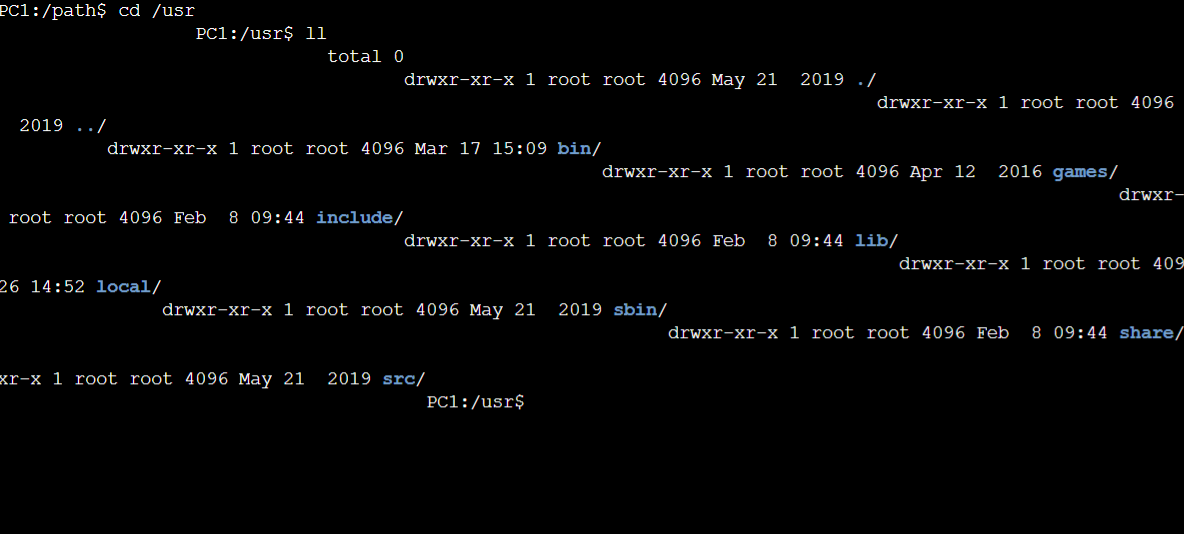
我试过:
- 调整终端选项上的cols、行(我在linux上使用
tput cols和tput lines获得当前的列和行) - 使用"xterm-addon-fit“
- 我尝试了几种加载文件的方法,只是为了看看是否在复制/粘贴中丢失了一些信息
- 我试着用xterm for-reacth包。
- 我也尝试过香草js,但也有同样的问题。
什么都没用。此时,我只想找到一种从tmux会话中获取文本并将其正确显示在xtermjs上的方法。
您可以在这个码箱中看到问题。
回答 1
Stack Overflow用户
发布于 2022-03-18 08:54:48
编辑:
xtermjs只接受CRLF (又名r\n),所以如果\r被转换为\r\n,就会使它工作。
我有几个错误的假设:
- xtermjs
write将处理行尾(当它处理其他所有内容时) - 我的短信上有标签
当我呈现行尾时,我才发现了这个问题,并且注意到在开始时没有标签。
上面图片中的奇怪之处仅仅是包裹这个词而已。xterm的工作重点是添加行,而不是加载全屏幕。
下面的示例虽然只用于测试目的,但仍然有效。
import { useEffect } from "react";
import { Terminal } from "xterm";
import "./styles.css";
import "xterm/css/xterm.css";

const txt = `
PC1:/path$ cd /usr
PC1:/usr$ ll
total 0
drwxr-xr-x 1 root root 4096 May 21  2019 [1;34m.[0;39m/
drwxr-xr-x 1 root root 4096 Aug  1  2019 [1;34m..[0;39m/
drwxr-xr-x 1 root root 4096 Mar 17 15:09 [1;34mbin[0;39m/
drwxr-xr-x 1 root root 4096 Apr 12  2016 [1;34mgames[0;39m/
drwxr-xr-x 1 root root 4096 Feb  8 09:44 [1;34minclude[0;39m/
drwxr-xr-x 1 root root 4096 Feb  8 09:44 [1;34mlib[0;39m/
drwxr-xr-x 1 root root 4096 Nov 26 14:52 [1;34mlocal[0;39m/
drwxr-xr-x 1 root root 4096 May 21  2019 [1;34msbin[0;39m/
drwxr-xr-x 1 root root 4096 Feb  8 09:44 [1;34mshare[0;39m/
drwxr-xr-x 1 root root 4096 May 21  2019 [1;34msrc[0;39m/
PC1:/usr$`;

let terminal;
export default function App() {
  useEffect(() => {
    terminal = new Terminal();
    terminal.open(document.getElementById("terminal"));
    const lines = txt.split(/\n/);

    lines.forEach((l) => terminal.write(l + "\r\n"));
  }, []);

  return (
    <div className="App">
      <h1>Hello CodeSandbox</h1>
      <div id="terminal" />
    </div>
  );
}页面原文内容由Stack Overflow提供。腾讯云小微IT领域专用引擎提供翻译支持
原文链接:
https://stackoverflow.com/questions/71515841
复制相关文章
相似问题
腾讯云开发者

Copyright © 2013 - 2026 Tencent Cloud. All Rights Reserved. 腾讯云 版权所有
深圳市腾讯计算机系统有限公司 ICP备案/许可证号:粤B2-20090059  粤公网安备44030502008569号
腾讯云计算(北京)有限责任公司 京ICP证150476号 | 京ICP备11018762号