
无法识别的配置部分system.net
无法识别的配置部分system.net
提问于 2022-03-17 07:51:14
嗨,我会尝试做TournamentTracker,它的工作很好,直到我储存邮件的教训。当我添加行:<system.net>和<mailsettings>时,<system.net>中出现了问题
<?xml version="1.0" encoding="utf-8" ?>
<configuration>
  <appSettings>
    <add key="filePath" value="C:\Users\gertl\Source\Repos\TournamentTracker\TextData"/>
    <add key="greaterWins" value="1"/>
    <add key="senderEmail" value="me@outlook.com "/>
    <add key="senderDisplayName" value="TournamentTracker "/>
  </appSettings>
  <connectionStrings>
    <add name="Tournaments" connectionString="Server=xxx;Database=Tournaments;Trusted_Connection=True;" providerName="System.Data.SqlClient"/>
  </connectionStrings>
  <system.net>
    <mailSettings>
      <smtp deliveryMethod="Network">
        <network host="127.0.0.1" userName="Tim" password="testing" port="25" enableSsl="false"/>
      </smtp>
    </mailSettings>
  </system.net>
  <!--<startup>
    <supportedRuntime version="v4.0" sku=".NETFrameWork,Version=v4.5.2"/>
  </startup>-->
</configuration>
当我注释掉system.net部分时,connectionString再次工作。
回答 2
Stack Overflow用户
发布于 2022-03-17 11:52:30
看看下面这些是否有帮助。
- 读取电子邮件设置
- 读取连接字符串
- 读取一个AppSetting值
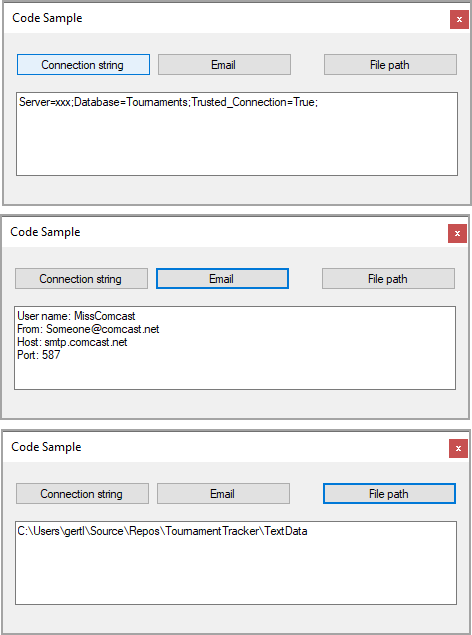
app.config
<?xml version="1.0" encoding="utf-8" ?>
<configuration>
    <configSections>
        <sectionGroup name="mailSettings">
            <section name="smtp_1" type="System.Net.Configuration.SmtpSection"/>
            <section name="smtp_2" type="System.Net.Configuration.SmtpSection"/>
        </sectionGroup>
    </configSections>

    <appSettings>
        <add key="filePath" value="C:\Users\gertl\Source\Repos\TournamentTracker\TextData"/>
        <add key="greaterWins" value="1"/>
        <add key="senderEmail" value="me@outlook.com "/>
        <add key="senderDisplayName" value="TournamentTracker "/>
    </appSettings>

    <connectionStrings>
        <add name="Tournaments" connectionString="Server=xxx;Database=Tournaments;Trusted_Connection=True;" providerName="System.Data.SqlClient"/>
    </connectionStrings>

    <startup>
        <supportedRuntime version="v4.0" sku=".NETFramework,Version=v4.5.2" />
    </startup>

    <mailSettings>
        <smtp_1 from="someone@gmail.com">
            <network
              host="smtp.gmail.com"
              port="587"
              enableSsl="true"
              userName="MssGMail"
              password="!@45cow"
              defaultCredentials="false" />
            <specifiedPickupDirectory pickupDirectoryLocation="MailDrop"/>
        </smtp_1>

        <smtp_2 from="karenpayneoregon@gmail.com">
            <network
              host="smtp.gmail.com"
              port="587"
              enableSsl="true"
              userName="oregon@gmail.com"
              password="password"
              defaultCredentials="false" />
            <specifiedPickupDirectory pickupDirectoryLocation="MailDrop"/>
        </smtp_2>

    </mailSettings>

    <system.net>
        <mailSettings>
            <smtp  from="Someone@comcast.net">
                <network
                  host="smtp.comcast.net"
                  port="587"
                  enableSsl="true"
                  userName="MissComcast"
                  password="d@45cat"
                  defaultCredentials="true" />
                <specifiedPickupDirectory pickupDirectoryLocation="MailDrop"/>
            </smtp>
        </mailSettings>
    </system.net>

</configuration>
类获取电子邮件设置。
using System;
using System.Configuration;
using System.IO;
using System.Net.Configuration;

namespace SmtpConfigurationExample.Classes
{
    public class MailConfiguration
    {
        private readonly SmtpSection _smtpSection;


        public MailConfiguration(string section = "system.net/mailSettings/smtp")
        {
            _smtpSection = (ConfigurationManager.GetSection(section) as SmtpSection);
        }

        public string FromAddress => _smtpSection.From;
        public string UserName => _smtpSection.Network.UserName;
        public string Password => _smtpSection.Network.Password;
        public bool DefaultCredentials => _smtpSection.Network.DefaultCredentials;
        public bool EnableSsl => _smtpSection.Network.EnableSsl;
        public string PickupFolder
        {
            get
            {
                var mailDrop = _smtpSection.SpecifiedPickupDirectory.PickupDirectoryLocation;

                if (mailDrop != null)
                {
                    mailDrop = Path.Combine(
                        AppDomain.CurrentDomain.BaseDirectory,
                        _smtpSection.SpecifiedPickupDirectory.PickupDirectoryLocation);
                }

                return mailDrop;
            }
        }
        /// <summary>
        /// Determine if pickup folder exists
        /// </summary>
        /// <returns></returns>
        public bool PickupFolderExists() => Directory.Exists(PickupFolder);

        /// <summary>
        /// Gets the name or IP address of the host used for SMTP transactions.
        /// </summary>
        public string Host => _smtpSection.Network.Host;

        /// <summary>
        /// Gets the port used for SMTP transactions
        /// </summary>
        public int Port => _smtpSection.Network.Port;

        /// <summary>
        /// Gets a value that specifies the amount of time after
        /// which a synchronous Send call times out.
        /// </summary>
        public int TimeOut => 2000;
        public override string ToString() => $"From: [ {FromAddress} ]" +
                                             $"Host: [{Host}] Port: [{Port}] " +
                                             $"Pickup: {Directory.Exists(PickupFolder)}";
    }
}
表单代码
using System;
using System.Text;
using System.Windows.Forms;
using SmtpConfigurationExample.Classes;
using static System.Configuration.ConfigurationManager;

namespace SmtpConfigurationExample
{
    public partial class Form1 : Form
    {
        public Form1()
        {
            InitializeComponent();
        }

        private void GetEmailSettingsButton_Click(object sender, EventArgs e)
        {
            var mc = new MailConfiguration();
            var builder = new StringBuilder();

            builder.AppendLine($"User name: {mc.UserName}");
            builder.AppendLine($"From: {mc.FromAddress}");
            builder.AppendLine($"Host: {mc.Host}");
            builder.AppendLine($"Port: {mc.Port}");

            ResultsTextBox.Text = builder.ToString();

        }

        private void GetConnectionButton_Click(object sender, EventArgs e)
        {
            ResultsTextBox.Text = ConnectionStrings["Tournaments"].ConnectionString;
        }

        private void FilePathButton_Click(object sender, EventArgs e)
        {
            ResultsTextBox.Text = AppSettings["filePath"];
        }
    }
}Stack Overflow用户
发布于 2022-08-23 21:56:41
这就是我在建立锦标赛追踪器时为解决同样的问题所做的事情。
- 我从appconfig文件中注释掉或删除了:app.config文件1:https://i.stack.imgur.com/8pMoW.png

我安装了Fluentemail SMTP NuGet包: Fluentemail SMTP 2:https://i.stack.imgur.com/nsttr.png

电子邮件Logic.cs
namespace TrackerLibrary {
     public class EmailLogic
    {
        public static void SendEmail(string sender, string recpient, string to, string subject, string body)
        {

            var client = new SmtpSender(() => new SmtpClient(host: "localhost")
            {

                EnableSsl = false,
                DeliveryMethod = SmtpDeliveryMethod.Network,
                Port = 25
            });

            Email.DefaultSender = client;

            var mail = Email
                .From(emailAddress: sender)
                .To(emailAddress: to, name: recpient)
                .Subject(subject)
                .Body(body)
                .Send();

        }
    }

TournamentLogic.cs

public static void AlertPlayerToNewRound(PlayersModel p, string teamName, MatchupEntryModel competitor)
        {
            if (p.EmailAddress.Length == 0)
            {
                return;
            }

            string sender = "";
            string to = "";
            string recpient = "";
            string subject = "";
            StringBuilder body = new StringBuilder();

            if (competitor != null)
            {
                subject = $"You have a new matchup with { competitor.TeamCompeting.TeamName  } !";

            body.Append("Hello ");
            body.Append(p.FirstName);
            body.AppendLine(", ");
            body.AppendLine();
            body.AppendLine("You have a new matchup !");
            body.Append("Competitor: ");
            body.Append(competitor.TeamCompeting.TeamName);
            body.AppendLine();
            body.AppendLine();
            body.AppendLine("Have a great tournament !");
            body.AppendLine("~Tournament Tracker");
        }
        else
        {
            subject = "You have a bye this round !";

            body.Append("Hello ");
            body.Append(p.FirstName);
            body.AppendLine(", ");
            body.AppendLine();
            body.AppendLine("Enjoy your bye round. ");
            body.AppendLine("~Tournament Tracker");
            }
            sender = GlobalConfig.AppKeyLookup("senderEmail");
            recpient = p.FullName;
            to = p.EmailAddress;


            EmailLogic.SendEmail(sender, recpient, to, subject, body.ToString());
在这些更改之后,我能够成功地发送电子邮件并在剪纸SMTP中接收。我希望这能帮到你。
页面原文内容由Stack Overflow提供。腾讯云小微IT领域专用引擎提供翻译支持
原文链接:
https://stackoverflow.com/questions/71508716
复制相关文章
相似问题
腾讯云开发者

Copyright © 2013 - 2026 Tencent Cloud. All Rights Reserved. 腾讯云 版权所有
深圳市腾讯计算机系统有限公司 ICP备案/许可证号:粤B2-20090059  粤公网安备44030502008569号
腾讯云计算(北京)有限责任公司 京ICP证150476号 | 京ICP备11018762号