
单独工作表中用户定义的范围和列表源单元/依赖单元的跟踪依赖性
单独工作表中用户定义的范围和列表源单元/依赖单元的跟踪依赖性
提问于 2022-03-16 15:13:56
我有一系列的单元格(用户定义的),我希望vba告诉我这些单元格链接到哪个单元格。每个源单元可以链接到一个或多个单元。
到目前为止,我已经有了密码
selected.
- counts
- 提示用户输入范围
- ,检查是否只有1行为范围内的单元格数量。
- 创建单独的工作表以列出依赖项。
我正在努力让每个源单元格水平地列出,在依赖单元格下面列出2行。
选项显式子ListDependents()
Dim rng As Range
Dim r As Range
Dim cell As Range
Dim n As Long, i As Long

Application.ScreenUpdating = False

'Use InputBox to prompt user for range.
'Test for cancel and a single-cell selection.

Set rng = Application.InputBox( _
    Title:="Please select a range", _
    Prompt:="Select range", _
    Type:=8)

On Error GoTo 0

'Test for cancel.
If rng Is Nothing Then Exit Sub

'Test for single-cell selection.
'Remove comment character if single-cell selection is okay.

If rng.Rows.Count > 1 Then
    MsgBox "You’ve selected more than 1 row. Please select contiguous cells per row only."

End If

'rng.Select to confirm selection
MsgBox rng.Address

'count cells to be reviewed for dependencies
For Each cell In rng.Areas
    n = n + cell.Cells.Count
Next cell

Sheets.Add().Name = "Dependents"

'add first cell of range in B1, second in C1 etc until end of range
'then add first dependent of first range cell in B3, second in C3 etc

If n > "0" Then
  i = 1 + i
   Sheets("Depentent Test").Cells(2, i) =


End Sub
源表
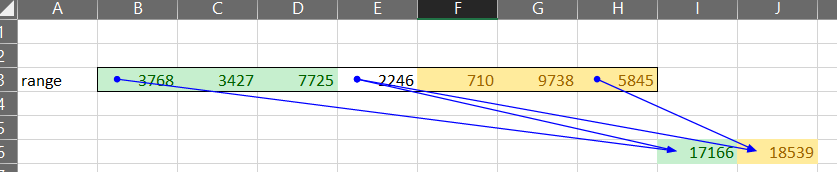
目标表

回答 2
Stack Overflow用户
回答已采纳
发布于 2022-03-16 16:20:41
尝尝这个。我建议用更有用的名字代替我的变量名。我还没有包括一个单元格是否有任何受抚养人的检查,这是明智的,否则它可能会出错。
Sub ListDependents()

Dim rng As Range
Dim r As Range
Dim cell As Range
Dim n As Long, i As Long, j As Long

Application.ScreenUpdating = False

'Use InputBox to prompt user for range.
'Test for cancel and a single-cell selection.

Set rng = Application.InputBox( _
    Title:="Please select a range", _
    Prompt:="Select range", _
    Type:=8)

On Error GoTo 0

'Test for cancel.
If rng Is Nothing Then Exit Sub

'Test for single-cell selection.
'Remove comment character if single-cell selection is okay.

If rng.Rows.Count > 1 Then
    MsgBox "You’ve selected more than 1 row. Please select contiguous cells per row only."
End If

'rng.Select to confirm selection
MsgBox rng.Address

Sheets.Add().Name = "Dependents"

'add first cell of range in B1, second in C1 etc until end of range
'then add first dependent of first range cell in B3, second in C3 etc
Dim ra As Range, r1 As Range, r2 As Range

j = 2
For Each ra In rng.Areas
    For Each r1 In ra
        Cells(1, j) = r1.Address
        i = 3
        For Each r2 In r1.Dependents
            Cells(i, j) = r2.Address
            i = i + 1
        Next r2
        j = j + 1
    Next r1
Next ra

End SubStack Overflow用户
发布于 2022-03-30 02:44:13
我找到了一个将头添加到每个依赖项之上的解决方案。我将行向下移动一行,以便为标题留出空间,然后使用偏移量来匹配相应的标题。
j = 2
For Each ra In rng.Areas
    For Each r1 In ra
       Cells(2, j) = r1.Address
       Cells(1, j) = r1.OffSet(-1, 0).Value

    i = 4

    For Each r2 In r1.Dependents

       Cells(i, j) = r2.Address
       Cells(i - 1, j) = r2.OffSet(-1, 0).Value

        i = i + 2
    Next r2
    j = j + 1
  Next r1
Next ra页面原文内容由Stack Overflow提供。腾讯云小微IT领域专用引擎提供翻译支持
原文链接:
https://stackoverflow.com/questions/71499605
复制相关文章
相似问题
腾讯云开发者

Copyright © 2013 - 2026 Tencent Cloud. All Rights Reserved. 腾讯云 版权所有
深圳市腾讯计算机系统有限公司 ICP备案/许可证号:粤B2-20090059  粤公网安备44030502008569号
腾讯云计算(北京)有限责任公司 京ICP证150476号 | 京ICP备11018762号