
自动化VBA中的会计分录
我想在VBA中为一个会计服务自动化一个过程。
每个月,我都会收到一份包含不同社团收入(总额、免税额和增值税)的文件。每个社会都有不同的商店,位于不同的地方。
输入示例:
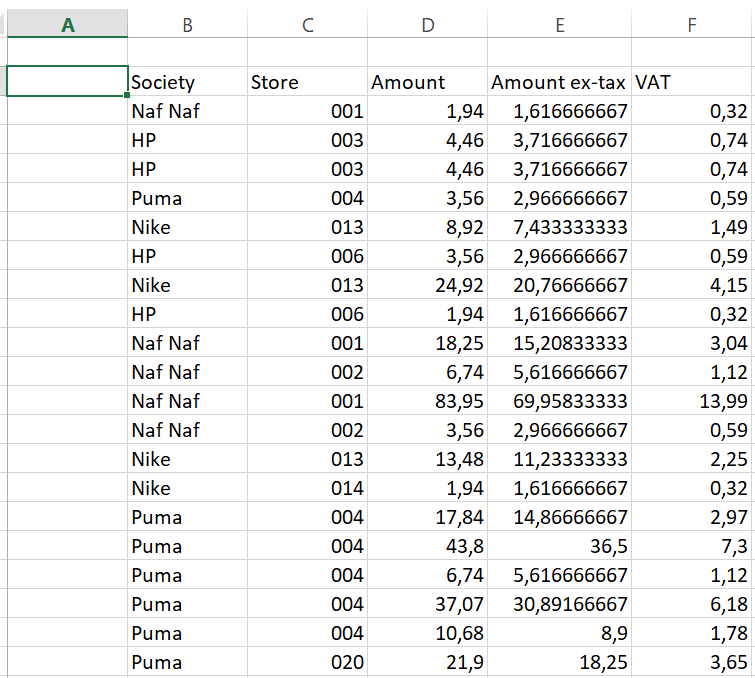
示例: society有2家商店(001和002):
- 商店销售3种产品: 1,94 + 18,25 + 83,95
- Store 002售出2种产品: 6,74 + 3,56
输出示例:表示输出,我必须通过以下模式得出每个商店的数量:
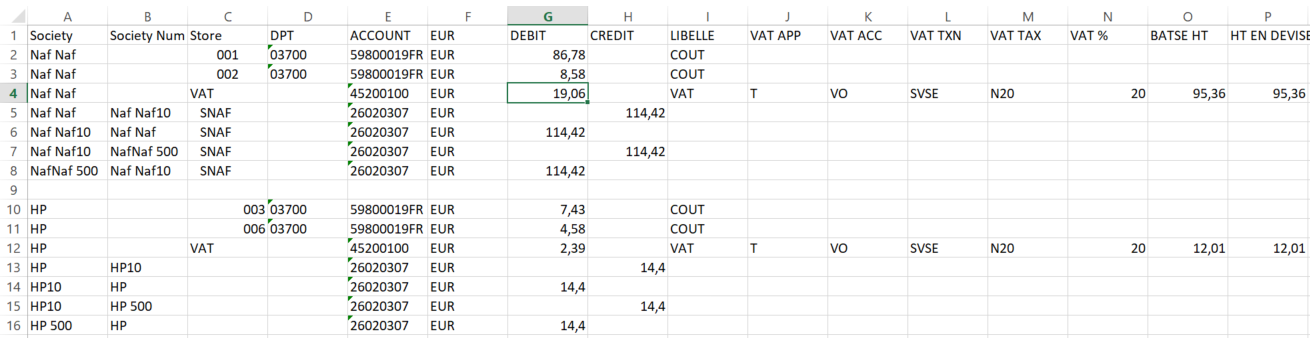
有些价值观不会改变:
F栏:“欧元”
关于增值税的行(这里是示例第3行):
45200100
- Column I:“增值税”
- 列J:“T”
- 列K:“VO”
- 列L:"SVSE"
- Column M:“N20”
H 125列N:“20”H 226F 227
Naf Naf社会的例子: Naf Naf有2家商店(001和002)。
第2行,G栏:所有第4行的税前金额(输入:E栏),第G栏: Naf Naf商店的增值税之和(输入:F栏)第4行,第O栏:所有商店的税前金额(输入:E栏),第5栏,H栏:税额(G2+G3+G4或G4+O4)
F 237
每个社会都有很多商店,所以我想让这个过程自动化。
你知道我该怎么做吗?
代码:I为Naf Naf Society做的,该协会有2家商店(3行有001 ID,2行有002 ID):
NAF NAF协会,001商店:
Sub Naf001()

Dim Naf As Range
Dim SUM_NAF As Double
Dim LastRow As Double

LastRow = Sheets("Feuil1").Range("A" & Rows.Count).End(xlUp).Row + 1 'last row
Set Naf = Sheets("Feuil1").Range("A1").CurrentRegion  'setting whole range of data
Sheets("Feuil1").AutoFilterMode = False 'turning off all filters
Naf.AutoFilter Field:=2, Criteria1:="001" 'filtering data - this data will change
SUM_NAF = Application.WorksheetFunction.Sum(Sheets("Feuil1").Range("D1:D" & LastRow).SpecialCells(xlCellTypeVisible)) 'summing filtered data

Sheets("Feuil2").Select
LastRow = Range("A" & Rows.Count).End(xlUp).Row + 1
Range("A" & LastRow).Value = "Naf Naf"
Range("C" & LastRow).Value = "001" ' this data will change
Range("D" & LastRow).Value = "03700"
Range("E" & LastRow).Value = "59800019FR"
Range("F" & LastRow).Value = "EUR"
Range("G" & LastRow).Value = SUM_NAF
Range("I" & LastRow).Value = "AQ SOLDE"
End Sub
NAF NAF协会002商店:
Sub Naf002()

    Dim Naf As Range
    Dim SUM_NAF As Double
    Dim LastRow As Double

    LastRow = Sheets("Feuil1").Range("A" & Rows.Count).End(xlUp).Row + 1 'last row
    Set Naf = Sheets("Feuil1").Range("A1").CurrentRegion  'setting whole range of data
    Sheets("Feuil1").AutoFilterMode = False 'turning off all filters
    Naf.AutoFilter Field:=2, Criteria1:="002" 'filtering data by store - this data will change
    SUM_NAF = Application.WorksheetFunction.Sum(Sheets("Feuil1").Range("D1:D" & LastRow).SpecialCells(xlCellTypeVisible)) 'summing filtered data

    Sheets("Feuil2").Select
    LastRow = Range("A" & Rows.Count).End(xlUp).Row + 1
    Range("A" & LastRow).Value = "Naf Naf"
    Range("C" & LastRow).Value = "002" ' this data will change
    Range("D" & LastRow).Value = "03700"
    Range("E" & LastRow).Value = "59800019FR"
    Range("F" & LastRow).Value = "EUR"
    Range("G" & LastRow).Value = SUM_NAF
    Range("I" & LastRow).Value = "AQ SOLDE"
End Sub
NAF NAF协会,增值税:
Sub Naf_Vat()

    Dim Naf_Vat As Range
    Dim SUM_Naf_Vat As Double
    Dim LastRow As Double

    LastRow = Sheets("Feuil1").Range("A" & Rows.Count).End(xlUp).Row + 1
    Set Naf_Vat = Sheets("Feuil1").Range("A1").CurrentRegion
    Sheets("Feuil1").AutoFilterMode = False
    Naf_Vat.AutoFilter Field:=1, Criteria1:="Naf Naf" 'filtering data by Society
    SUM_Naf_Vat = Application.WorksheetFunction.Sum(Sheets("Feuil1").Range("E1:E" & LastRow).SpecialCells(xlCellTypeVisible))

    LastRow = Range("A" & Rows.Count).End(xlUp).Row + 1
    Range("A" & LastRow).Value = "Naf Naf"
    Range("C" & LastRow).Value = "VAT"
    Range("E" & LastRow).Value = "45200100"
    Range("F" & LastRow).Value = "EUR"
    Range("G" & LastRow).Value = SUM_Naf_Vat
    Range("I" & LastRow).Value = "VAT 20%"
    Range("K" & LastRow).Value = "T"
    Range("L" & LastRow).Value = "VO"
    Range("M" & LastRow).Value = "SVSE"
    Range("N" & LastRow).Value = "N20"
    Range("O" & LastRow).Value = "20.00"
    Range("P" & LastRow).FormulaR1C1 = "=R[-2]C[-9]+R[-1]C[-9]"
    Range("Q" & LastRow).FormulaR1C1 = "=RC[-1]"
End Sub回答 1
Stack Overflow用户
发布于 2022-03-17 13:13:37
请试试下一个代码。它将在一个工作簿上工作(正如您发送的那样),其中包含从A列开始的数据:a,在两个涉及的工作表中。输出表必须将每个社会数据与其他社会数据用一个空行分隔开。每个社会都必须在D:D (DPT)栏中有这么多的代码,因为它有很多商店。我的意思是,对于一个有两家商店的社会来说,03700 (或其他东西)应该存在两次,就像你的例子一样。但对于另一个有三家商店的商店,必须插入另一行,在第一个“社团名称10”前面加上一个额外的“社团名称”。四个这样的名字而不是两个。代码使用数组和字典,并且应该非常快。我对它的评论是为了使它的算法易于理解:
Sub AutomateAccouontingEntries()
 Dim shInp As Worksheet, lastR1 As Long, shOut As Worksheet, lastR2 As Long, rngSoc As Range
 Dim dictS As Object, A As Range, cel As Range, i As Long, j As Long
 Dim dictSt As Object, arr, arrOut, arrItem, El, ElIt, arrIt, arrDict, noRows As Long

 Set shInp = Worksheets("Feuil1")
 Set shOut = Worksheets("Feuil2")
 'check if the active workbook is the appropriate one:
  If shInp.Range("A1") <> "Society" Or shOut.Range("A1") <> "Society" Then _
       MsgBox "The active workbook is not appropriate!" & vbCrLf & _
                  "It must contain the header ""Society"" in ""AA1"" for both used sheets...": Exit Sub

  lastR1 = shInp.Range("A" & shInp.Rows.Count).End(xlUp).Row   'last row in input sheet
  lastR2 = shOut.Range("A" & shOut.Rows.Count).End(xlUp).Row  'last row in output sheet
  arr = shInp.Range("A2:E" & lastR1).Value          'place the range in an array for faster iteration
  arrOut = shOut.Range("A2:O" & lastR2).Value       'place the range in an array for faster iteration

  Set dictS = CreateObject("Scripting.Dictionary")   'set the dictionary keeping unique societies
  Set dictSt = CreateObject("Scripting.Dictionary")  'set the dictionary keeping society|store

  'load the dictionary with unique societies:
  Set rngSoc = shOut.Range("A2:A" & lastR2).SpecialCells(xlCellTypeBlanks)
  dictS(shOut.Range("A2").Value) = Array(2, 0, 0, 0) 'place the first row of the first society (second row)
  For Each A In rngSoc.Areas
        'a unique key as the cell down the empty row value and 3 zero values to be used
        'for keeping: number of stores existing occurrences, summarized VAT and summarized ex-tax
        dictS(A.Cells(1).Offset(1).Value) = Array(A.Cells(1).Offset(1).Row, 0, 0, 0)
  Next A

  'load dictionary with concatenation between unique societies and their store, then fill data:
  For Each El In dictS.Keys       'iterate between the previous created dictionaries keys:
    For i = 1 To UBound(arr)      'iterate between the first sheet arr rows:
        If arr(i, 1) = El Then    'if array element in first column is equal with the dictionary keys:
            If Not dictSt.Exists(arr(i, 1) & "|" & arr(i, 2)) Then   'if the concatenated dictionary key does not exist:
                dictSt(arr(i, 1) & "|" & arr(i, 2)) = Array(arr(i, 3), arr(i, 4), arr(i, 5))    'create the key and fill it with data
                arrIt = dictS(arr(i, 1)): arrIt(1) = arrIt(1) + 1: dictS(arr(i, 1)) = arrIt 'fill the number of occurrences
            Else                          'for the next occurrences update the values by summing them:
                arrItem = dictSt(arr(i, 1) & "|" & arr(i, 2))
                  arrItem(0) = arrItem(0) + arr(i, 3)
                  arrItem(1) = arrItem(1) + arr(i, 4)
                  arrItem(2) = arrItem(2) + arr(i, 5)
                dictSt(arr(i, 1) & "|" & arr(i, 2)) = arrItem
            End If
        End If
    Next i
 Next El
 ReDim arrDict(dictSt.Count - 1) 'ReDim the array keeping the already processed dictionaries
 Dim k As Long, mtch

 'fill the final array (arrOut) with the values extracted from dictionaries:
 For i = 1 To UBound(arrOut)               'iterate between the array rows:
    For j = 0 To dictSt.Count - 1          'iterate between the dictionaries (concatenated keys) elements:
        If arrOut(i, 1) = Split(dictSt.Keys()(j), "|")(0) And dictS.Exists(arrOut(i, 1)) Then 'if in A:A is a string equal to left
                                                                                                                   'concatenated dictionary key:
            mtch = Application.Match(dictSt.Keys()(j), arrDict, 0) 'check if the dictionary key exists in the array of processed dicts
            If IsError(mtch) Then                                  'if the dictionary concatenated key has not been used, yet:
                If dictS(arrOut(i, 1))(1) > 0 Then                 'if still not used stores exists:
                    arrOut(dictS(arrOut(i, 1))(0) - 1, 3) = Split(dictSt.Keys()(j), "|")(1) 'place the Store in C:C
                    arrOut(dictS(arrOut(i, 1))(0) - 1, 7) = dictSt.items()(j)(1)     'place ex-tax sum, per store, in G:G
                    arrItem = dictS(arrOut(i, 1)): arrItem(0) = arrItem(0) + 1 'increment the row where next time to place the store
                    arrItem(1) = arrItem(1) - 1                            'decrease the number of existing occurrences
                    arrItem(2) = arrItem(2) + dictSt.items()(j)(2)         'sumarize the VAT per society, all stores
                    arrItem(3) = arrItem(3) + dictSt.items()(j)(1)         'sumarize ex-tax per society, all stores
                    dictS(arrOut(i, 1)) = arrItem                          'place the updated array back in dictionary
                    'after the last store has been used, place also the total VAT and ex-tax amounts, per society:
                    If dictS(arrOut(i, 1))(1) = 0 Then
                        arrOut(dictS(arrOut(i, 1))(0) - 1, 7) = dictS(arrOut(i, 1))(2)    'place total VAT per society, in G:G
                        arrOut(dictS(arrOut(i, 1))(0) - 1, 15) = dictS(arrOut(i, 1))(3)  'place total ex-tax per society, in O:O
                        arrOut(dictS(arrOut(i, 1))(0), 8) = dictS(arrOut(i, 1))(2) + dictS(arrOut(i, 1))(3) 'ex-tax + VAT in H:H
                    End If
                    arrDict(k) = dictSt.Keys()(j): k = k + 1    'place the processed dict keys in the arrDict array
                    Exit For
                End If
            End If
        End If
    Next
 Next i
 'drop the final array content, at once:
 shOut.Range("A2").Resize(UBound(arrOut), UBound(arrOut, 2)).Value = arrOut
 MsgBox "Ready...", vbInformation, "Job done"
End Sub
如有不清楚之处,请立即要求澄清。
为了初步确定每个社会的商店数量,您可以使用下面的功能:
Function NumberOfStores(sh As Worksheet) As String
   Dim dict As Object, arr, arrIt, lastR As Long, i As Long, mtch, strTxt As String

   Set dict = CreateObject("Scripting.Dictionary")
   lastR = sh.Range("A" & sh.Rows.Count).End(xlUp).Row
   arr = sh.Range("A2:B" & lastR).Value
   For i = 1 To UBound(arr)
        If Not dict.Exists(arr(i, 1)) Then
            dict.Add arr(i, 1), Array(arr(i, 2))
        Else
            mtch = Application.Match(arr(i, 2), dict(arr(i, 1)), 0)
            If IsError(mtch) Then
                arrIt = dict(arr(i, 1)): ReDim Preserve arrIt(UBound(arrIt) + 1)
                arrIt(UBound(arrIt)) = arr(i, 2)
                dict(arr(i, 1)) = arrIt
            End If
        End If
   Next i
   'Prepare the output
   For i = 0 To dict.Count - 1
        strTxt = strTxt & dict.Keys()(i) & ": " & UBound(dict.items()(i)) + 1 & vbCrLf
   Next
   NumberOfStores = strTxt
End Function它将在Immediate Window中显示社团名称和商店数量。您可以通过在VBE中按“`Ctrl +G”来查看此窗口。
函数可以简单地以这种方式调用:
Sub testNumberOfStoresPerSociety()
   Debug.Print NumberOfStores(Worksheets("Feuil1"))
   MsgBox "Please, open Visual Basic for Application Editor (Ctrl + F11) and press Ctrl + G to see the number of stores for each society", _
              vbInformation, "Prepare each society for a specific number of stores"
End Subhttps://stackoverflow.com/questions/71496220
复制相似问题
腾讯云开发者

Copyright © 2013 - 2026 Tencent Cloud. All Rights Reserved. 腾讯云 版权所有
深圳市腾讯计算机系统有限公司 ICP备案/许可证号:粤B2-20090059  粤公网安备44030502008569号
腾讯云计算(北京)有限责任公司 京ICP证150476号 | 京ICP备11018762号