
如何设置多个提供商的AngularFire?为供应商提供的材料按钮?
是否有一种方法可以使用视图中的单个AngularFire按钮和组件中的单个login()函数来设置多个提供程序?还是在视图中设置单独的按钮,在组件中为每个提供程序设置单独的loginGoogle()、loginFacebook()、loginTwitter()等功能?
这样做是可行的:
  login() {
    this.auth.signInWithPopup(new firebase.auth.GoogleAuthProvider())
      .then((result) => {
        this.loggedIn = true;
        console.log("Logged in!");
        console.log(result);
        this.userFullName = result.user?.displayName;
        this.userPhotoUrl = result.user?.photoURL;
        this.router.navigate(['/', 'home']);
      })
      .catch((error) => {
        console.error(error);
      });
  }
这不管用:
 login() {
    this.auth.signInWithPopup(new firebase.auth.GoogleAuthProvider()) // √
    this.auth.signInWithPopup(new firebase.auth.TwitterAuthProvider()) // √
    this.auth.signInWithPopup(new firebase.auth.GithubAuthProvider()) // √
    this.auth.signInWithPopup(new firebase.auth.FacebookAuthProvider()) // "Facebook Login is currently unavailable for this app."
    this.auth.signInWithPopup(new firebase.auth.EmailAuthProvider()) // "FirebaseError: Firebase: Error (auth/argument-error)."
    this.auth.signInWithPopup(new firebase.auth.PhoneAuthProvider()) // "FirebaseError: Firebase: Error (auth/argument-error)."
    this.auth.signInWithPopup(new firebase.auth.YahooAuthProvider()) // Property 'YahooAuthProvider' does not exist on type 'typeof auth'.
    this.auth.signInWithPopup(new firebase.auth.MicrosoftAuthProvider()) // Property 'MicrosoftAuthProvider' does not exist on type 'typeof auth'.
      .then((result) => {
        this.loggedIn = true;
        console.log("Logged in!");
        console.log(result);
        this.userFullName = result.user?.displayName;
        this.userPhotoUrl = result.user?.photoURL;
        this.router.navigate(['/', 'home']);
      })
      .catch((error) => {
        console.error(error);
      });
}下面的代码应该可以工作,但是有很多代码。我在问是否有DRYer的方法。HTML有一个用于loginGoogle()的按钮,一个用于loginFacebook()的按钮,一个用于loginTwitter()的按钮,等等。
loginGoogle() {
    this.auth.signInWithPopup(new firebase.auth.GoogleAuthProvider())
      .then((result) => {
        this.loggedIn = true;
        console.log("Logged in!");
        console.log(result);
        this.userFullName = result.user?.displayName;
        this.userPhotoUrl = result.user?.photoURL;
        this.router.navigate(['/', 'home']);
      })
      .catch((error) => {
        console.error(error);
      });
  }

loginFacebook() {
    this.auth.signInWithPopup(new firebase.auth.FaceAuthProvider())
      .then((result) => {
        this.loggedIn = true;
        console.log("Logged in!");
        console.log(result);
        this.userFullName = result.user?.displayName;
        this.userPhotoUrl = result.user?.photoURL;
        this.router.navigate(['/', 'home']);
      })
      .catch((error) => {
        console.error(error);
      });
  }

loginTwitter() {
    this.auth.signInWithPopup(new firebase.auth.TwitterAuthProvider())
      .then((result) => {
        this.loggedIn = true;
        console.log("Logged in!");
        console.log(result);
        this.userFullName = result.user?.displayName;
        this.userPhotoUrl = result.user?.photoURL;
        this.router.navigate(['/', 'home']);
      })
      .catch((error) => {
        console.error(error);
      });
  }
再问三个问题。
- 是否有为auth提供商提供的一组角材质按钮?我做了这个,但看起来不太好:
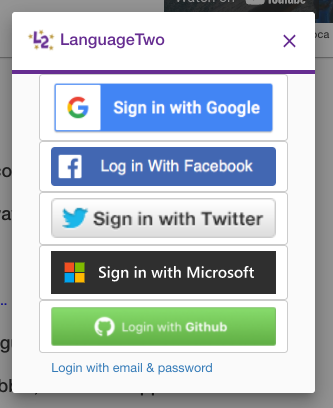
- 为什么
EmailAuthProvider()和PhoneAuthProvider()不能工作?错误消息是
FirebaseError: Firebase: Error (auth/argument-error).- 为什么
YahooAuthProvider()和MicrosoftAuthProvider()不能工作?错误消息是:
Property 'YahooAuthProvider' does not exist on type 'typeof auth'.AngularFire不支持雅虎和微软吗?
谷歌、推特和GitHub都起作用了(一次一个)。我的Facebook证书似乎出了什么问题,我会调查的。这里是我的Firebase控制台Auth页面:
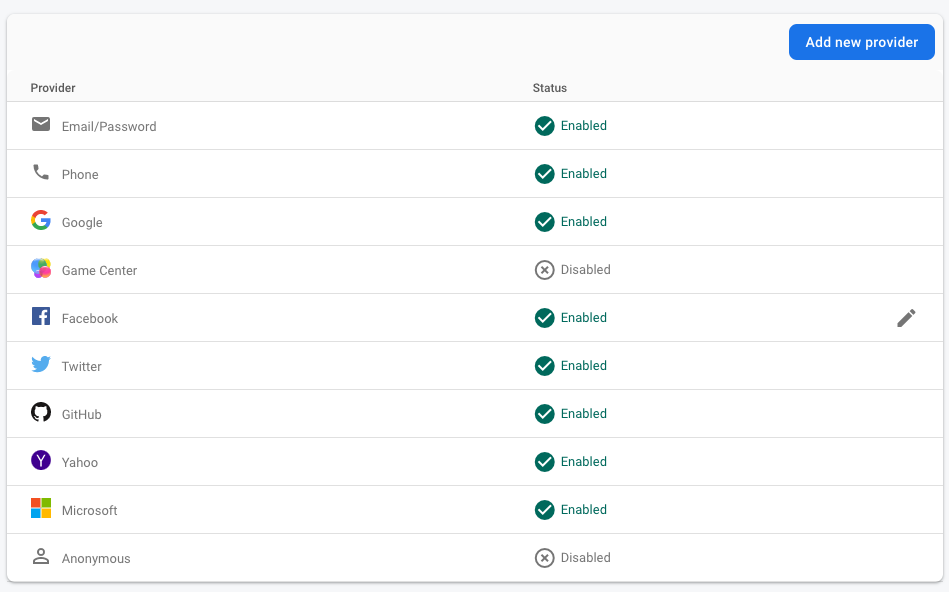
回答 1
Stack Overflow用户
发布于 2022-03-18 16:07:26
谷歌只为网络提供.png,不提供.svg https://developers.google.com/identity/branding-guidelines。
Facebook为index.html提供了代码,为您提供了一个从互联网调用图形的类。我无法使代码工作,所以我采取了一个屏幕截图的脸谱按钮,并将它转换为.png。https://developers.facebook.com/docs/facebook-login/web/login-button/
Twitter提供了一个.png。https://developer.twitter.com/en/docs/authentication/guides/log-in-with-twitter
Github提供一个.png:https://blog.oauth.io/how-to-add-github-social-login-button/
我为按钮做了下拉菜单。看上去不像我想的那么好。我更喜欢使用.svg文件。
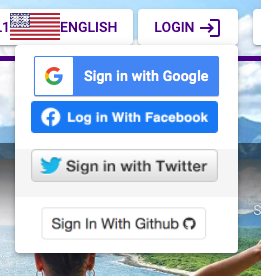
<button mat-raised-button [matMenuTriggerFor]="loginButtons" *ngIf="!loggedIn" class="text-purple" aria-label="Login">LOGIN
    <mat-icon>login</mat-icon>
</button>
<mat-menu #loginButtons="matMenu">
    <button mat-menu-item (click)="loginGoogle()"><img src="../assets/signin-buttons/google-signin-buttons/web/1x/btn_google_signin_dark_normal_web.png"></button>
    <button mat-menu-item (click)="loginFacebook()"><img src="../assets/signin-buttons/facebook-signin-buttons/facebook_signin.png" width="187px"></button>
    <button mat-menu-item (click)="loginTwitter()"><img src="../assets/signin-buttons/twitter-signin-buttons/sign-in-with-twitter-gray.png.twimg.1920.png" width="187px"></button>
    <button mat-menu-item (click)="loginGithub()"><img src="../assets/signin-buttons/github-signin-buttons/github.png" width="187px"></button>
</mat-menu>
控制器功能简单。
loginGoogle() {
    this.auth.signInWithPopup(new firebase.auth.GoogleAuthProvider())
      .then((result) => {
        this.loggedIn = true;
        this.userFullName = result.user?.displayName;
        this.userPhotoUrl = result.user?.photoURL;
        this.router.navigate(['/', 'home']);
      })
      .catch((error) => {
        console.error(error);
      });
  }

  loginFacebook() {
    this.auth.signInWithPopup(new firebase.auth.FacebookAuthProvider())
      .then((result) => {
        this.loggedIn = true;
        this.userFullName = result.user?.displayName;
        this.userPhotoUrl = result.user?.photoURL;
        this.router.navigate(['/', 'home']);
      })
      .catch((error) => {
        console.error(error);
      });
  }

  loginTwitter() {
    this.auth.signInWithPopup(new firebase.auth.TwitterAuthProvider())
      .then((result) => {
        this.loggedIn = true;
        this.userFullName = result.user?.displayName;
        this.userPhotoUrl = result.user?.photoURL;
        this.router.navigate(['/', 'home']);
      })
      .catch((error) => {
        console.error(error);
      });
  }

  loginGithub() {
    this.auth.signInWithPopup(new firebase.auth.GithubAuthProvider())
      .then((result) => {
        this.loggedIn = true;
        this.userFullName = result.user?.displayName;
        this.userPhotoUrl = result.user?.photoURL;
        this.router.navigate(['/', 'home']);
      })
      .catch((error) => {
        console.error(error);
      });
  }

  logout() {
    this.auth.signOut()
      .then((result) => {
        this.loggedIn = false;
        this.router.navigate(['/', 'landing']);
      })
      .catch((error) => {
        console.error(error);
      });
}https://stackoverflow.com/questions/71488822
复制相似问题
腾讯云开发者

Copyright © 2013 - 2026 Tencent Cloud. All Rights Reserved. 腾讯云 版权所有
深圳市腾讯计算机系统有限公司 ICP备案/许可证号:粤B2-20090059  粤公网安备44030502008569号
腾讯云计算(北京)有限责任公司 京ICP证150476号 | 京ICP备11018762号