
设计这个按钮在颤栗?
设计这个按钮在颤栗?
提问于 2022-03-15 07:42:59
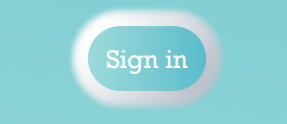
我怎么设计这种扣子呢?
回答 3
Stack Overflow用户
回答已采纳
发布于 2022-03-15 08:06:27
给你,适应你的需要:
Container(
            color:  Color.fromRGBO(133,208,212,1),
            padding: const EdgeInsets.all(15),
            child: Container(
              padding: EdgeInsets.all(8),
              decoration: ShapeDecoration(
                shape: StadiumBorder(),
                color:  Color.fromRGBO(133,208,212,1),
                shadows: <BoxShadow>[
                  BoxShadow(
                    color: Colors.white,
                    spreadRadius: 8,
                    blurRadius: 3,
                    offset: Offset(0, 0),
                  ),
                  BoxShadow(
                    color: Colors.grey.shade300,
                    spreadRadius: 3,
                    blurRadius: 3,
                    offset: Offset(5, 2),
                  ),
                ],
              ),
              child: Text(
                'Sign in',
                style: TextStyle(color: Colors.white),
              ),
            ),
          ),
第一个容器的存在只是为了突出显示它的子容器,所以它并不重要
Stack Overflow用户
发布于 2022-03-15 07:48:26
您可以使用带有透明颜色和白色边框和阴影的高电平按钮。
Stack Overflow用户
发布于 2022-03-15 08:00:14
尝试下面的代码,希望它对你有帮助。
Container(
      padding: EdgeInsets.all(10),
      height: 80,
      width: 200,
      decoration: BoxDecoration(
        color: Colors.white,
        borderRadius: BorderRadius.circular(80),
      ),
      child: InkWell(
        onTap: () {
          //Write your onPressed function here
          print('Button Pressed');
        },
        child: Card(
          color: Colors.teal[100],
          shape: RoundedRectangleBorder(
            borderRadius: BorderRadius.circular(70),
          ),
          child: Center(
            child: Text(
              'Sign In',
              style: TextStyle(
                color: Colors.white,
                fontSize: 20,
              ),
            ),
          ),
        ),
      ),
    ),
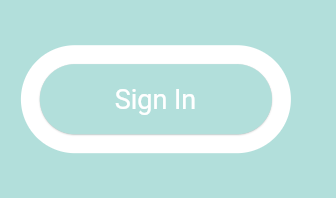
结果屏幕->
页面原文内容由Stack Overflow提供。腾讯云小微IT领域专用引擎提供翻译支持
原文链接:
https://stackoverflow.com/questions/71478536
复制相关文章
相似问题
腾讯云开发者

Copyright © 2013 - 2026 Tencent Cloud. All Rights Reserved. 腾讯云 版权所有
深圳市腾讯计算机系统有限公司 ICP备案/许可证号:粤B2-20090059  粤公网安备44030502008569号
腾讯云计算(北京)有限责任公司 京ICP证150476号 | 京ICP备11018762号