
如何在JavaFx中创建双向独占的单选按钮
如何在JavaFx中创建双向独占的单选按钮
提问于 2022-03-14 21:50:43
我想要构建类似这的东西。从k值和Map我想构建一个评分系统,k值是最大投票数,地图上有一些人的名字作为键,还有人的名字列表的值。
在这里,我们使用k=3进行了一个丑陋的、不工作的预览。
<table>
<tr>
    <th></th>
    <th>1</th>
    <th>2</th>
    <th>3</th>
</tr>
Group1
<tr>
    <td>Name11</td>
    <td><input type="radio" name="row-1"></td>
    <td><input type="radio" name="row-1"></td>
    <td><input type="radio" name="row-1"></td>
</tr>
<tr>
    <td>Name12</td>
    <td><input type="radio" name="row-2"></td>
    <td><input type="radio" name="row-2"></td>
    <td><input type="radio" name="row-2"></td>
</tr>
<tr>
    <td>Name13</td>
    <td><input type="radio" name="row-3"></td>
    <td><input type="radio" name="row-3"></td>
    <td><input type="radio" name="row-3"></td>
</tr>
</table>

<table>
<tr>
    <th></th>
    <th>1</th>
    <th>2</th>
    <th>3</th>
</tr>
<br>
Group2
<tr>
    <td>Name21</td>
    <td><input type="radio" name="row-4"></td>
    <td><input type="radio" name="row-4"></td>
    <td><input type="radio" name="row-4"></td>
</tr>
<tr>
    <td>Name22</td>
    <td><input type="radio" name="row-5" name="col-1"></td>
    <td><input type="radio" name="row-5"></td>
    <td><input type="radio" name="row-5"></td>
</tr>

</table>
回答 1
Stack Overflow用户
回答已采纳
发布于 2022-03-14 23:37:29
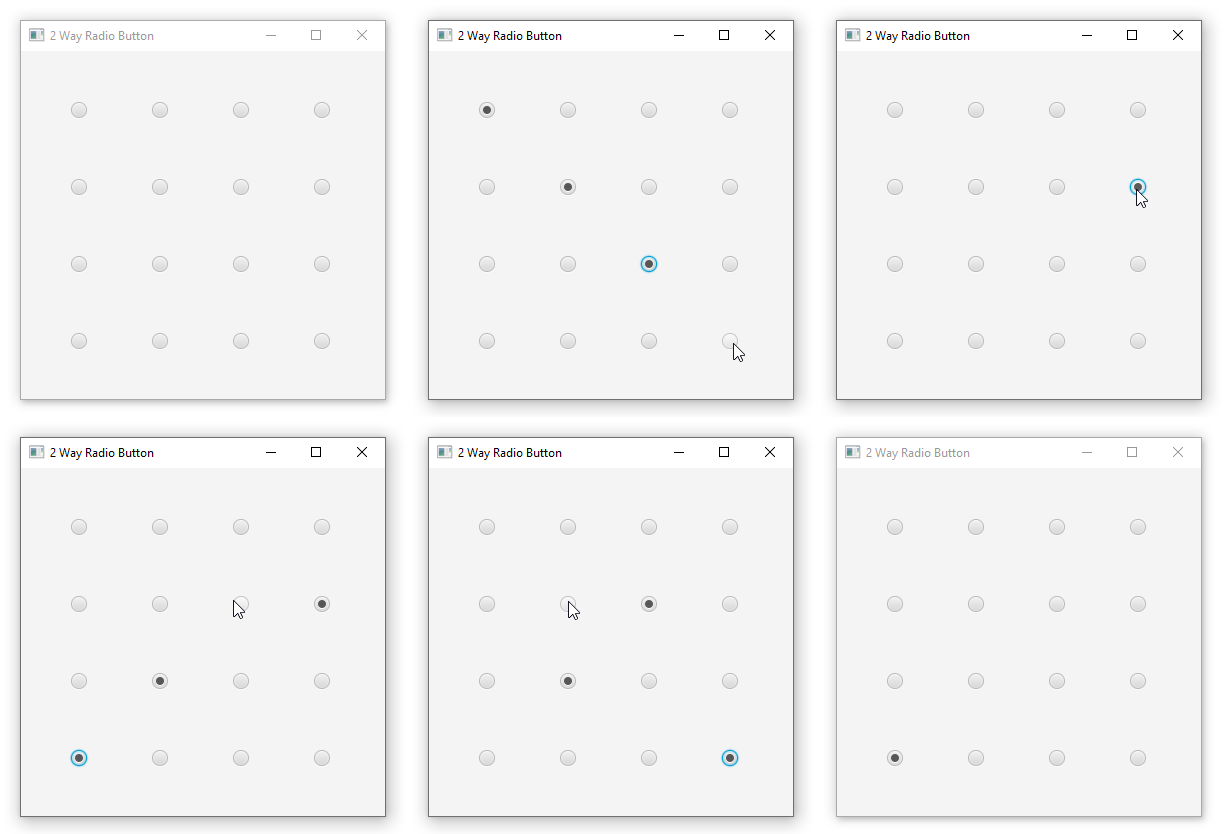
我同意评论中提到的@珠宝莉。尽管如此,在浏览了链接中的演示之后,我想尝试一下,看看这是如何实现的。
到目前为止,我使用的技巧是:
- 按行或列设置组。
- 创建一个二维数组,与您选择的图格组相反。我是说,
- 如果选择按行切换组,则按列创建2D数组作为第一维度。
- 如果选择按列切换组,则按行创建二维数组(第一维度)。
现在,当选择单选按钮时,切换组将处理一个维度的toggling..and,您只需要检查另一个维度的radioButtons并选择正确的一个。
下面是逻辑的代码:
import javafx.application.Application;
import javafx.geometry.Insets;
import javafx.scene.Scene;
import javafx.scene.control.RadioButton;
import javafx.scene.control.ToggleGroup;
import javafx.scene.layout.GridPane;
import javafx.stage.Stage;

public class TwoWayRadioButtonDemo extends Application {
    @Override
    public void start(Stage stage) throws Exception {
        int k = 4;
        GridPane root = new GridPane();
        root.setPadding(new Insets(50));
        root.setHgap(60);
        root.setVgap(60);

        RadioButton[][] buttons = new RadioButton[k][k];
        for (int i = 0; i < k; i++) {
            ToggleGroup tg = new ToggleGroup();
            double r = i;
            for (int j = 0; j < k; j++) {
                RadioButton radio = new RadioButton();
                radio.setToggleGroup(tg);
                buttons[j][i] = radio;
                int c = j;
                radio.selectedProperty().addListener((obs, old, val) -> {
                    if (val) {
                        for (int t = 0; t < buttons[c].length; t++) {
                            buttons[c][t].setSelected(t == r);
                        }
                    }
                });
                root.add(radio, j, i);
            }
        }
        Scene scene = new Scene(root);
        stage.setScene(scene);
        stage.setTitle("2 Way Radio Button");
        stage.show();
    }
}页面原文内容由Stack Overflow提供。腾讯云小微IT领域专用引擎提供翻译支持
原文链接:
https://stackoverflow.com/questions/71474636
复制相关文章
相似问题
腾讯云开发者

Copyright © 2013 - 2026 Tencent Cloud. All Rights Reserved. 腾讯云 版权所有
深圳市腾讯计算机系统有限公司 ICP备案/许可证号:粤B2-20090059  粤公网安备44030502008569号
腾讯云计算(北京)有限责任公司 京ICP证150476号 | 京ICP备11018762号