
如何利用尾风CSS定制制作背景图像
如何利用尾风CSS定制制作背景图像
提问于 2022-03-14 19:51:56
有人能告诉我用尾风CSS制作背景图像的正确方法吗?我想创建一个圆圈作为纹理的背景。我很成功,但正如你在图片中看到的,背景有一个边框。
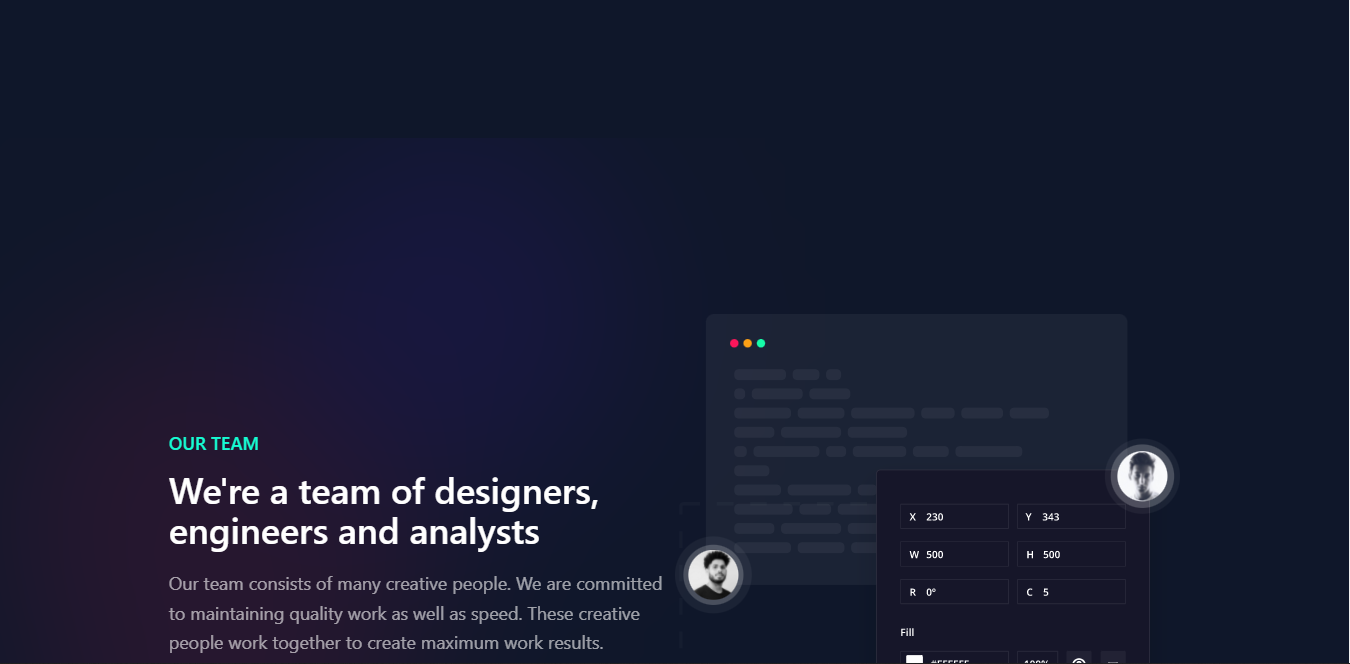
我不太确定我的方式是否正确,请告诉我。谢谢。
<div class="overlay__about">
    <section style="backdrop-filter: blur(80px);" class="container-2xl bg-slate-900 bg-opacity-90 bg-clip-padding mx-auto" id="home__about">
        <div class="flex lg:items-center md:items-start flex-wrap xl:w-9/12 mx-auto py-44">
            <div class="md:w-6/12 w-full mb-10 md:mb-0 mx-7 sm:mx-7 md:mx-0 lg:mx-0 xl:mx-0">
                <img src="img/how-we-works.svg" class="w-full" />
            </div>
            <div class="md:w-6/12 w-full mx-7 sm:mx-7 md:mx-0 lg:mx-0 xl:mx-0">
                <h2 class="text-sm md:text-sm lg:text-lg xl:text-lg text-text-primary font-medium font-sans leading-relaxed">HOW WE WORKS</h2>
                <h1 class="text-2xl md:text-4xl lg:text-4xl xl:text-4xl text-white font-medium font-sans leading-relaxed mb-5 mt-3">Everything is well planned, well designed and developed wholeheartedly</h1>
                <p class="text-white text-opacity-60 text-lg leading-relaxed">Careful planning makes us confident, developed with best practices so that the project can be maintained. We always test projects before they are shipped.</p>
            </div>
        </div>
    </section>
</div>

<div class="overlay__team">
    <section style="backdrop-filter: blur(80px);" class="container-2xl bg-slate-900 bg-opacity-90 bg-clip-padding mx-auto" id="home__team">
        <div class="flex lg:items-center md:items-start flex-wrap xl:w-9/12 mx-auto py-44">
            <div class="md:w-6/12 w-full mx-7 sm:mx-7 md:mx-0 lg:mx-0 xl:mx-0">
                <h2 class="text-sm md:text-sm lg:text-lg xl:text-lg text-text-primary font-medium font-sans leading-relaxed">OUR TEAM</h2>
                <h1 class="text-2xl md:text-4xl lg:text-4xl xl:text-4xl text-white font-medium font-sans leading-relaxed mb-5 mt-3">We're a team of designers, engineers and analysts</h1>
                <p class="text-white text-opacity-60 text-lg leading-relaxed">Our team consists of many creative people. We are committed to maintaining quality work as well as speed. These creative people work together to create maximum work results.</p>
            </div>
            <div class="md:w-6/12 w-full mb-10 md:mb-0 mx-7 sm:mx-7 md:mx-0 lg:mx-0 xl:mx-0">
                <img src="img/team.svg" class="w-full" />
            </div>
        </div>
    </section>
</div>
CSS
.overlay__about {
    background-image: url('../img/pattern__works.svg');
    @apply bg-slate-900;
    background-repeat: no-repeat;
    position: left;
}

.overlay__team {
    background-image: url('../img/pattern__team.svg');
    @apply bg-slate-900;
    background-repeat: no-repeat;
    position: right;
}回答 1
Stack Overflow用户
发布于 2022-03-14 20:27:28
你可以在时间上使用顺风。
<div class="bg-[url('../img/pattern__works.svg')]">此外,您还可以使用它并在css代码中@应用它。
.overlay__about {
    @apply bg-[url('../img/pattern__works.svg')] bg-slate-900 bg-no-repeat bg-left bg-cover;
}另外,如果您想在整个项目中使用这一点,可以将其添加到您的顺风配置中,并为其添加一个自定义的顺风类。您可以访问在顺风文献中自定义主题部分
页面原文内容由Stack Overflow提供。腾讯云小微IT领域专用引擎提供翻译支持
原文链接:
https://stackoverflow.com/questions/71473477
复制相关文章
相似问题
腾讯云开发者

Copyright © 2013 - 2026 Tencent Cloud. All Rights Reserved. 腾讯云 版权所有
深圳市腾讯计算机系统有限公司 ICP备案/许可证号:粤B2-20090059  粤公网安备44030502008569号
腾讯云计算(北京)有限责任公司 京ICP证150476号 | 京ICP备11018762号