
我们能否仅在电子和剧作家自动化测试失败时保存屏幕截图?
我们能否仅在电子和剧作家自动化测试失败时保存屏幕截图?
提问于 2022-03-14 17:55:42
const app = await electron.launch({
    args: ['--integration-testing'],
    executablePath: AppPaths[process.platform],
    bypassCSP: true,
    env: {
      CICD,
      ...process.env,
    },
    timeout: 100000,
    recordVideo: { dir: '/home/ubuntu', size: { width: 1420, height: 850 } },
  } as Parameters<typeof electron['launch']>[0]);
录制视频的问题在于它不必要地为每个测试用例保存,占用了很大的空间。
另外,录制的视频保存在目录中,而不需要在适当的测试标题中保存文件。因此,这变得非常困难,因为它以随机文件格式保存,并且很难调试。
我们可以选择截图
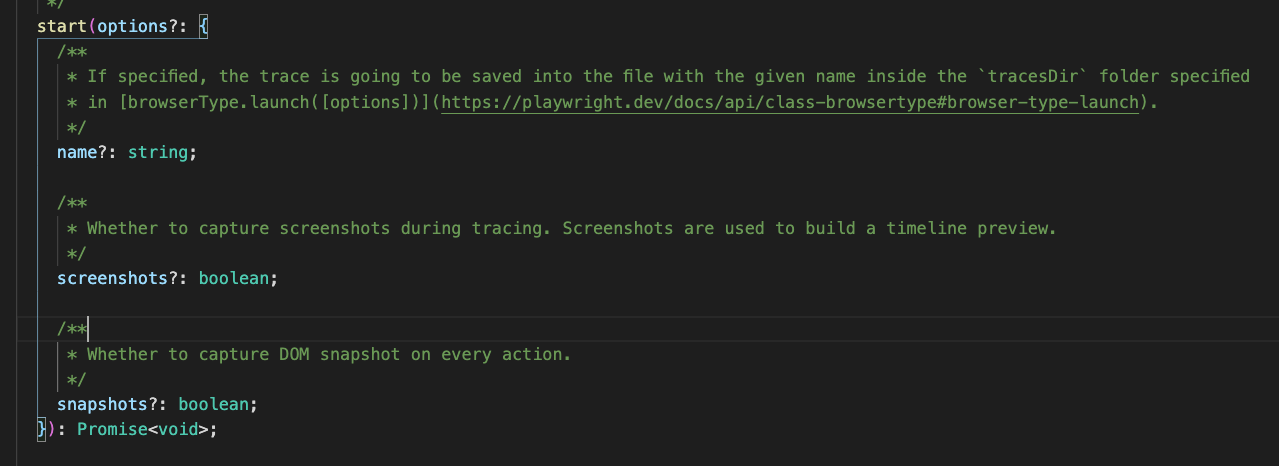
即使这看起来也是不可配置的。并没有找到任何选择,以保存屏幕截图只有在失败。
期待仅仅是截图来捕捉,只有在失败的时候才能捕捉到。有可能吗?
回答 1
Stack Overflow用户
回答已采纳
发布于 2022-03-14 20:26:10
您需要创建一个名为playwright.config.ts的配置文件,其内容如下:
// playwright.config.ts
import { PlaywrightTestConfig } from '@playwright/test';

const config: PlaywrightTestConfig = {
    screenshot: 'only-on-failure',
    video: 'retain-on-failure',
};

export default config您可以在这里查看评语:https://playwright.dev/docs/test-configuration#record-video
页面原文内容由Stack Overflow提供。腾讯云小微IT领域专用引擎提供翻译支持
原文链接:
https://stackoverflow.com/questions/71472191
复制相关文章
相似问题
腾讯云开发者

Copyright © 2013 - 2026 Tencent Cloud. All Rights Reserved. 腾讯云 版权所有
深圳市腾讯计算机系统有限公司 ICP备案/许可证号:粤B2-20090059  粤公网安备44030502008569号
腾讯云计算(北京)有限责任公司 京ICP证150476号 | 京ICP备11018762号