
如何使身体的高度始终保持100%
这是身体边缘的照片
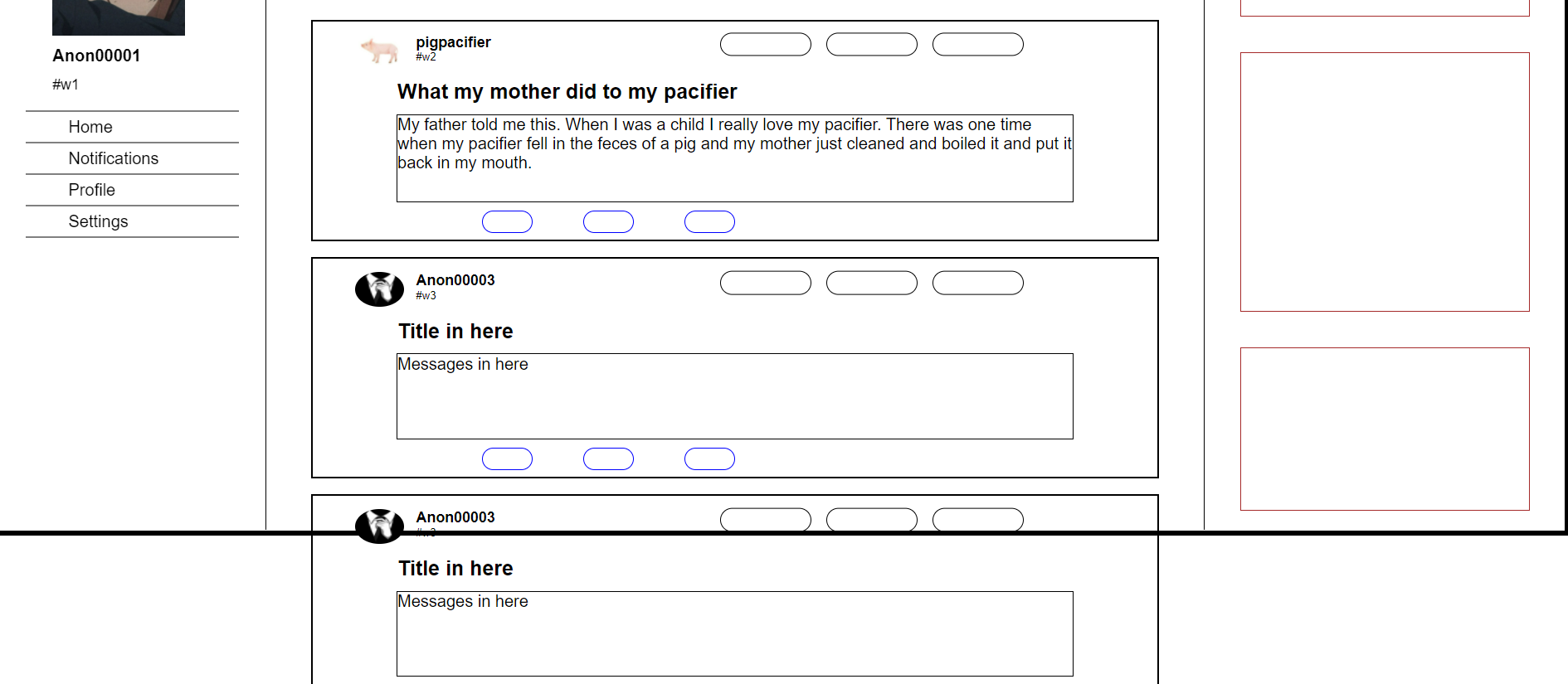
正如你所看到的,身体不是100%高。以下是HTML和Body的CSS代码
        html{
            height: 100%;
            min-height: 100vh;
        }
        body{
            height: 100%;
            min-height: 100vh;
            font-family: sans-serif;
            min-width: 400px;
            position: relative;
            display: flex;
            justify-content: center;
            border: 5px solid black;
            padding: 0;
            margin: 0;
        }
我试着把html和body的高度分开,但是它仍然不起作用。我试着搜索,他们说让最小高度和高度在100%或100‘t,所以我做了,但仍然没有工作。我想是因为身体上的那些东西从容器里溢出来了?
编辑:我忘了添加这个,但是我想让主体随溢出一起扩展的原因是因为左边和右边的容器定位为粘粘的。所以我不能使用溢出:隐藏;
我可以尝试将左容器和右容器放在位置:;但是它不占用空间,所以我必须调整所有的大小,并且我想知道发生了什么,这样我就可以避免这个问题。
这是整个代码https://codepen.io/n01knowz/pen/qBpBapV,我对CSS很陌生,所以我不知道那里是否有任何写作问题,所以请告诉我我能修复什么。
更新:好的,所以身体没有伸展,是因为容器溢出了,技术上没有变大,所以身体没有膨胀,因为它的孩子的身高也没有膨胀。所以当你设置容器的高度时,这就是使用的危险。
解决方案:让容器的高度是,让容器的子组件决定它的高度。
回答 1
Stack Overflow用户
发布于 2022-03-12 14:23:41
添加溢出属性。可以用不止一个方法。如果不希望滚动条使用隐藏,如果希望保留内容,则可以使用滚动。
body {
  overflow: hidden; /*any content that would overflow would be hidden and there is no scroll bar, NOTE, this will not stop the containers from overflowing. */
  overflow: scroll; /* this would place scroll bar once the content overflows */
  overflow: auto; /*will only add the scroll bar only after content over flows but will not add if it the content does not overflow */
  }
https://stackoverflow.com/questions/71450159
复制相似问题
腾讯云开发者

Copyright © 2013 - 2026 Tencent Cloud. All Rights Reserved. 腾讯云 版权所有
深圳市腾讯计算机系统有限公司 ICP备案/许可证号:粤B2-20090059  粤公网安备44030502008569号
腾讯云计算(北京)有限责任公司 京ICP证150476号 | 京ICP备11018762号