
Visual代码中未定义函数the_field
Visual代码中未定义函数the_field
提问于 2022-03-12 13:23:04
我试图显示ACF的数据,但是在Visual代码中得到了这个错误:

这是全部代码。我尝试重新安装插件,添加PHP到路径,但似乎没有任何工作。
Single.php
<?php get_header();?>

    <div class="container">

        <div class="row">
            <div>

            <img src="<?php the_post_thumbnail_url('thumbnail'); ?>" id="single_header">


                        <div id="single_content">
                            <?php if (have_posts()):while (have_posts()):the_post(); ?>
                                <?php
                                    $fn=get_the_author_meta('first_name');
                                    $lname=get_the_author_meta('last_name');
                                    $email=get_the_author_meta('email');
                                ?>

                                    <h1 class="text=cenetr nt-3 mb-5 text-primary"><?php the_title();?></h1>
                                    <small>Publishor:<?php echo $fn; ?></small>

                                        <p><?php the_content();?></p>

                                    <?php
                                            endwhile;
                                        endif;

                                    ?>

                                    <?php previous_post_link(); ?>
                                    <?php next_post_link(); ?>
                        </div>

                        <div id="single_extraInfo">
                            <p>Company: <?php the_field('flight_company'); ?></p>
                            <p>Date: <?php the_field('flight_date'); ?></p>
                            <p>Capacity: <?php the_field('flight_capacity'); ?></p>

                        </div>
            </div>


        </div>
    </div>

<?php get_footer(); ?>回答 3
Stack Overflow用户
发布于 2022-03-12 15:58:11
在intelephense中,确保将wordpress添加到列表中。
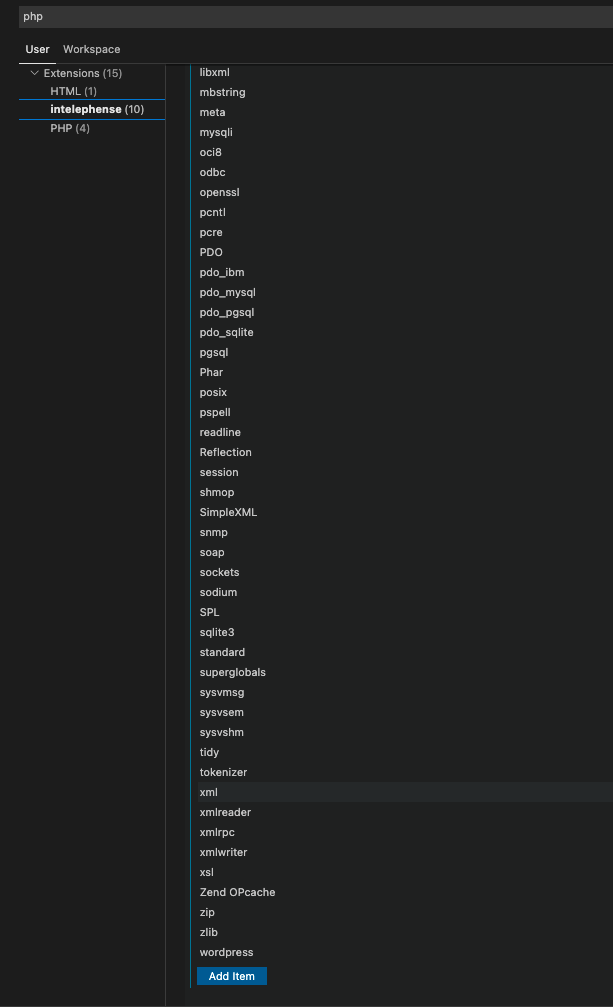
Stack Overflow用户
发布于 2022-07-19 11:34:56
最重要的是上面的建议..。
确保包含acf插件的目录在Vs代码中。例如,不要只打开您可能正在使用的Vs代码中的主题目录,而是打开VS代码中的整个wp_content目录。这样,当智能在后台运行时,它将能够到达plugins文件夹和acf插件文件夹中的acf函数。
Stack Overflow用户
发布于 2022-10-20 13:53:45
@james用一个工作解决方案回答说,ACF插件文件夹应该与您正在处理的代码在同一个工作区中打开,并且警告将消失。
或者,如果不方便,可以将ACF存根添加到VSCode中。这有点乱七八糟,但当它完成了,它就完成了。见此解释。
页面原文内容由Stack Overflow提供。腾讯云小微IT领域专用引擎提供翻译支持
原文链接:
https://stackoverflow.com/questions/71450068
复制相关文章
相似问题
腾讯云开发者

Copyright © 2013 - 2026 Tencent Cloud. All Rights Reserved. 腾讯云 版权所有
深圳市腾讯计算机系统有限公司 ICP备案/许可证号:粤B2-20090059  粤公网安备44030502008569号
腾讯云计算(北京)有限责任公司 京ICP证150476号 | 京ICP备11018762号