
为什么CSS不在我的React电子应用程序中加载?
为什么CSS不在我的React电子应用程序中加载?
提问于 2022-03-11 02:59:49
我已经建立了一个电子应用程序,使用electron-react-boilerplate包进行反应,然后用npm导入react-bootstrap库。
我编辑了默认的App.tsx内容,以测试引导组件。以下是代码:
import { Alert, Col, Container, Row } from 'react-bootstrap';
import { MemoryRouter as Router, Routes, Route } from 'react-router-dom';

const Hello = () => {

  console.log('hello there')
  return (
    <Container>
      <Row>
        <Alert variant={'primary'}>
          This is a alert, check it out!
        </Alert>
      </Row>
      <Row>
        <Col xs={2}>My First Column</Col>
        <Col xs={5}>My Second Xolumn!</Col>
        <Col xs={5}>My Last Column </Col>
      </Row>
    </Container>
  );
};

export default function App() {
  return (
    <Router>
      <Routes>
        <Route path="/" element={<Hello />} />
      </Routes>
    </Router>
  );
}
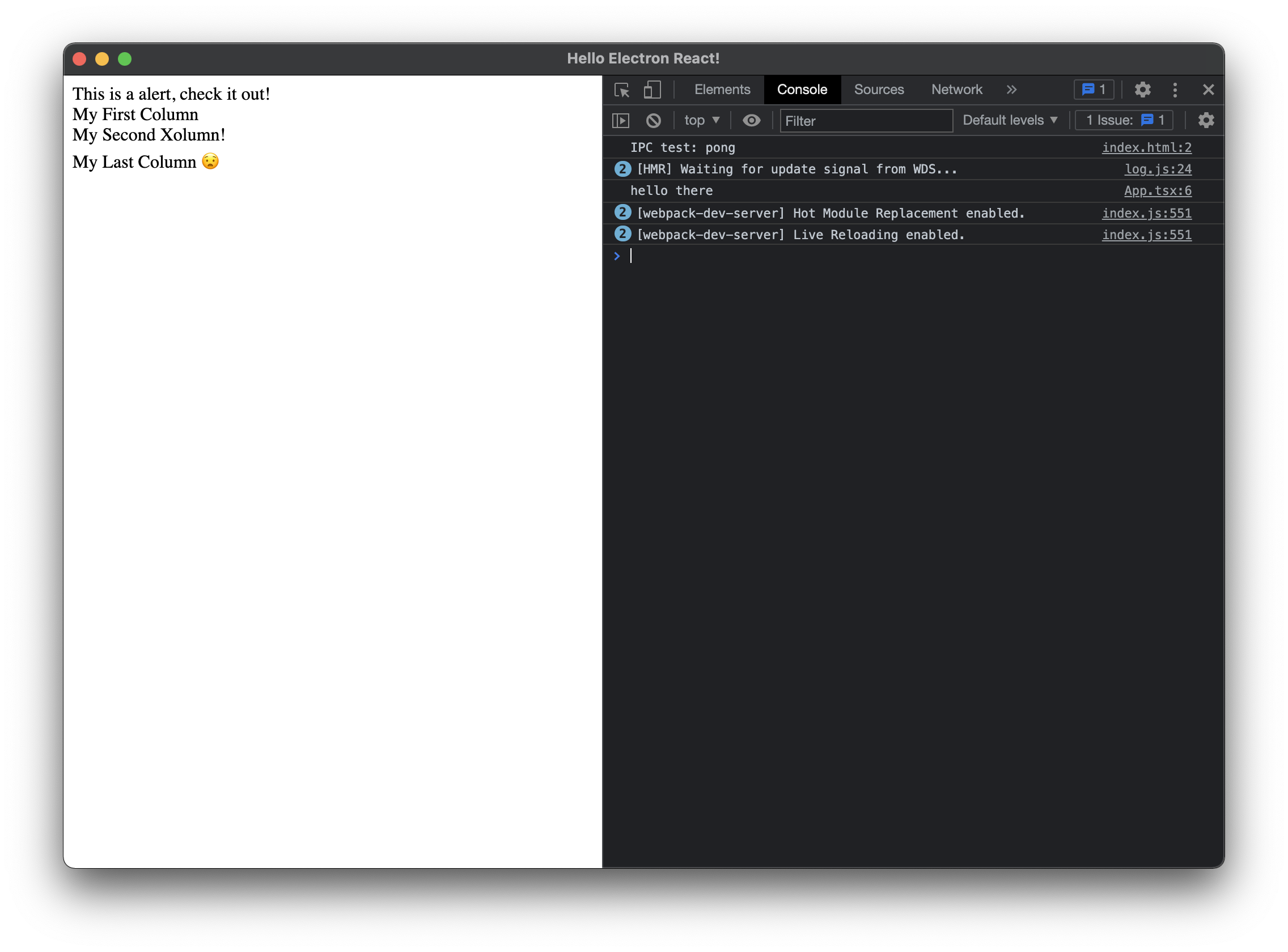
这就是我的应用程序运行时的样子。正如您可以看到的,内容在那里,但没有一个引导CSS正在加载。
回答 1
Stack Overflow用户
回答已采纳
发布于 2022-03-11 08:00:34
您需要同时安装bootstrap和react-bootstrap
npm install react-bootstrap bootstrap@5.1.3
然后在bootstrap.min.css中导入App.tsx
import 'bootstrap/dist/css/bootstrap.min.css';
请参阅:https://react-bootstrap.github.io/getting-started/introduction
页面原文内容由Stack Overflow提供。腾讯云小微IT领域专用引擎提供翻译支持
原文链接:
https://stackoverflow.com/questions/71433156
复制相关文章
相似问题
腾讯云开发者

Copyright © 2013 - 2026 Tencent Cloud. All Rights Reserved. 腾讯云 版权所有
深圳市腾讯计算机系统有限公司 ICP备案/许可证号:粤B2-20090059  粤公网安备44030502008569号
腾讯云计算(北京)有限责任公司 京ICP证150476号 | 京ICP备11018762号