
浅蓝管道-诗的正确使用方式
使用poetry为Azure管道安装您的软件包依赖项的推荐方法是什么?我看到人们只通过poetry下载pip,这是一个大的不-不。
- script: |
    python -m pip install -U pip
    pip install poetry
    poetry install
displayName: Install dependencies我可以使用curl下载poetry。
  - script: |
      curl -sSL https://raw.githubusercontent.com/python-poetry/poetry/master/get-poetry.py | python -
      export PATH=$PATH:$HOME/.poetry/bin
      poetry install --no-root
displayName: 'Install dependencies'但是在接下来的每一步中,我不得不再次为PATH添加诗歌.
  - script: |
      curl -sSL https://raw.githubusercontent.com/python-poetry/poetry/master/get-poetry.py | python -
      export PATH=$PATH:$HOME/.poetry/bin
      poetry install --no-root
    displayName: 'Install dependencies'

  - script: |
      # export PATH=$PATH:$HOME/.poetry/bin
      poetry run flake8 src
    displayName: 'Linter'

  - script: |
      # export PATH=$PATH:$HOME/.poetry/bin
      poetry add pytest-azurepipelines
      poetry run pytest src
displayName: 'Tests'在Azure管道中有什么正确的方式来使用诗歌吗?
回答 2
Stack Overflow用户
发布于 2022-03-14 14:41:33
和一位大学学生商量过这个问题。他建议采取单独的步骤,在这条道路上增加诗歌。
  - task: UsePythonVersion@0
    inputs:
      versionSpec: '3.8'
    displayName: 'Use Python 3.8'

  - script: |
      curl -sSL https://raw.githubusercontent.com/python-poetry/poetry/master/get-poetry.py | python -
      export PATH=$PATH:$HOME/.poetry/bin
      poetry install --no-root
    displayName: 'Install dependencies'

  - script: echo "##vso[task.prependpath]$HOME/.poetry/bin"
    displayName: Add poetry to PATH

  - script: |
      poetry run flake8 src
    displayName: 'Linter'

  - script: |
      poetry add pytest-azurepipelines
      poetry run pytest src
displayName: 'Tests'Stack Overflow用户
发布于 2022-03-11 09:05:31
根据您的描述,我认为您使用的代理是Microsoft代理吗?
我查看了微软代理的官方文件,没有提供任何诗歌。因此,如果您使用Microsoft-host代理并希望使用诗歌,则在管道运行期间安装诗歌是不可避免的。
因此,我建议您在自主机代理上运行管道。
您可以使用VM或已经有诗歌的本地机器,然后在其上设置一个自主机代理。
在此之后,您可以在上面运行管道,这一次您不再需要安装诗歌了。
详细步骤:
1,在VM或本地计算机上运行以下命令.
pip install poetry
2,安装配置,并在上面的VM或机器.中运行代理。
在我这边,我在VM上设置了一个代理:
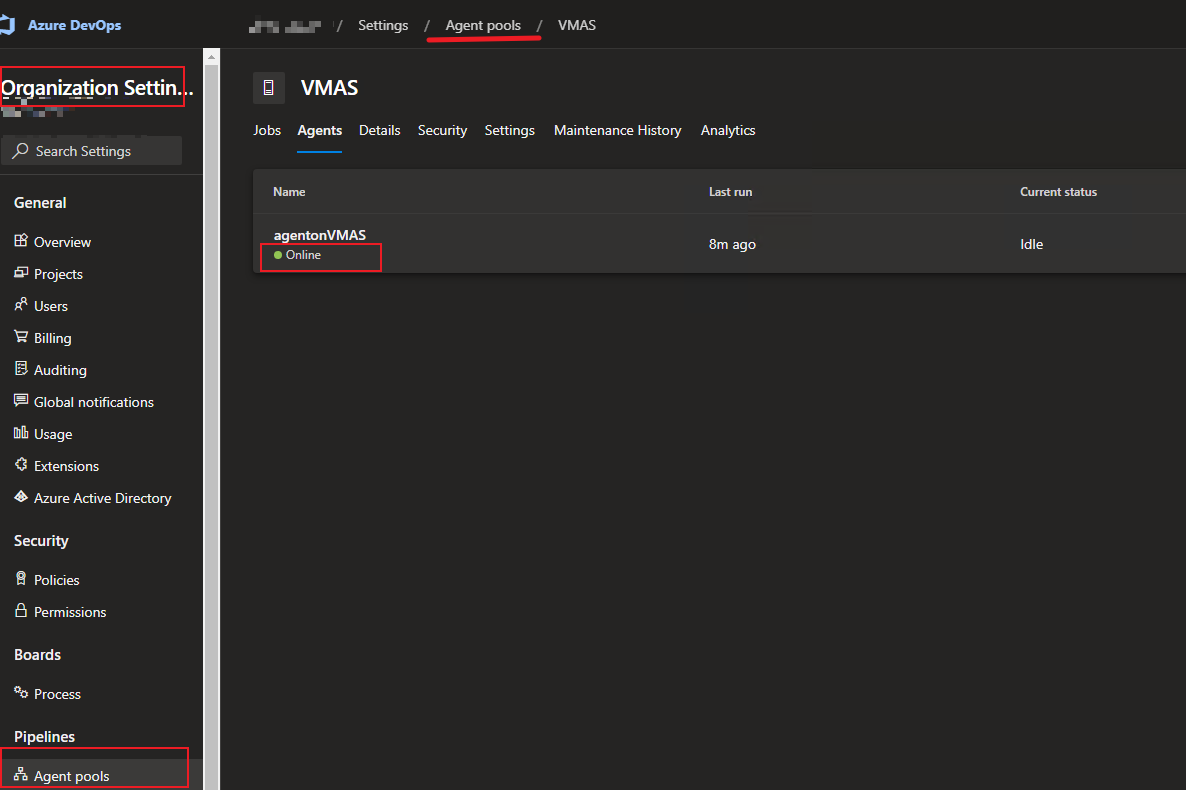
请参阅本正式文件,此文档将告诉您如何在您的侧安装和运行自主机代理:
https://learn.microsoft.com/en-us/azure/devops/pipelines/agents/v2-windows?view=azure-devops
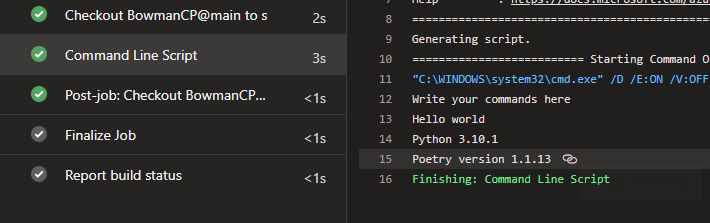
3,基于上面运行的代理运行管道。
pool:
  name: VMAS
steps:
- script: |
   echo Write your commands here

   echo Hello world

   python --version

   poetry --version

  displayName: 'Command Line Script'
那么你不需要每次都安装它。
如果你有更多的担忧请告诉我。
https://stackoverflow.com/questions/71423949
复制相似问题
腾讯云开发者

Copyright © 2013 - 2026 Tencent Cloud. All Rights Reserved. 腾讯云 版权所有
深圳市腾讯计算机系统有限公司 ICP备案/许可证号:粤B2-20090059  粤公网安备44030502008569号
腾讯云计算(北京)有限责任公司 京ICP证150476号 | 京ICP备11018762号