
如何计算文件夹中的文件
如何计算文件夹中的文件
提问于 2022-03-10 10:36:09
我想用Excel计算文件夹中的文件。
速度对我现在非常重要,所以我首先列出所有的文件(从文件夹和子文件夹)到"A“列,我想在所有的行,并计数多少文件在文件夹。
我在"A“栏中的名单:
D:\Steam\libraryfolder.vdf
D:\Steam\steam.dll
D:\Steam\config\appconfig.json
D:\Steam\config\chaperone_info.vrchap
D:\Steam\config\steamvr.vrsettings
D:\Steam\config\lighthouse\lighthousedb.json
D:\Steam\config\lighthouse\lhr-eebe0f79\config.json
D:\Steam\config\lighthouse\lhr-eebe0f79\userdata\Green_46GA163X002581_mura_analyzes.mc
D:\Steam\config\lighthouse\lhr-eebe0f79\userdata\Green_46HA163P000228_mura_analyzes.mc
我想了解一下"B“列的文件号。因此,"B“列应该如下所示:
2
2
3
3
3
1
1
2
2
目前,我有这个小代码,用来计数"",但不幸的是,我不知道如何计算这些文件。
Sub test()

Dim S As String

S = "D:\Steam\config\lighthouse\lhr-eebe0f79\config.json"

MsgBox "count = " & UBound(Split(S, "\"))

End Sub回答 2
Stack Overflow用户
回答已采纳
发布于 2022-03-10 11:11:53
为此您不需要VBA,标准Excel函数可以计算这些计数。
列B用于从路径中提取文件名:
=MID(A1,FIND("*",SUBSTITUTE(A1,"\","*",LEN(A1)-LEN(SUBSTITUTE(A1,"\",""))))+1,LEN(A1))然后使用C列提取路径:
=LEFT(A1,LEN(A1)-LEN(B1))最后,D列可以计算驻留在同一目录中的文件数:
=COUNTIF(C:C,$C1)如果您确实需要在VBA中这样做,那么下面的几个函数将提取给定完整路径的文件名或目录:
' Returns the file name given a full file path
Function BaseName(FilePath)
    BaseName = Mid(FilePath, InStrRev(FilePath, "\") + 1)
End Function

' Returns the directory path given a full file path
Function DirName(FilePath)
    DirName = Mid(FilePath, 1, Len(FilePath) - Len(BaseName(FilePath)))
End FunctionStack Overflow用户
发布于 2022-03-11 03:55:43
从文件路径列表中计数文件夹中的文件
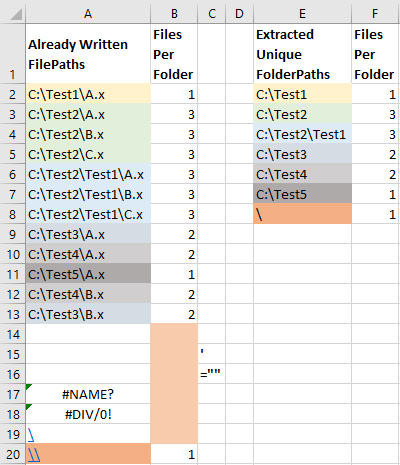
给定的文件路径列表在第一个过程的A2:A20.
- The结果中,
CountFilesPerFolder,在第二个过程的B2:B20.
- The结果中,
ListFilesCountPerFolder在E2:F8.
中。
获取文件夹路径(**Evaluate**)的公式
=LEFT(A2,FIND("*",SUBSTITUTE(A2,"\","*",LEN(A2)-LEN(SUBSTITUTE(A2,"\",""))))-1)代码
Option Explicit


Sub CountFilesPerFolder()

    ' Source
    Const sCol As String = "A"
    ' Destination
    Const dCol As String = "B"
    ' Both
    Const fRow As Long = 2

    ' Reference the worksheet.
    Dim ws As Worksheet: Set ws = ActiveSheet ' improve!

    ' Reference the one-column range containing the file paths by using
    ' the End property to calculate the last row.
    Dim slRow As Long: slRow = ws.Cells(ws.Rows.Count, sCol).End(xlUp).Row
    Dim rCount As Long: rCount = slRow - fRow + 1
    If rCount < 1 Then Exit Sub ' column range is empty
    Dim srg As Range: Set srg = ws.Cells(fRow, sCol).Resize(rCount)
    Dim sAddress As String: sAddress = srg.Address

    ' Write the folder paths to an array by using the Evaluate method.
    Dim Data As Variant
    Data = ws.Evaluate("LEFT(" & sAddress & ",FIND(""*"",SUBSTITUTE(" _
        & sAddress & ",""\"",""*"",LEN(" & sAddress & ")-LEN(SUBSTITUTE(" _
        & sAddress & ",""\"",""""))))-1)")

    ' Write the folder paths from the array to the keys of a dictionary
    ' using its items to count the files.
    Dim dict As Object: Set dict = CreateObject("Scripting.Dictionary")
    dict.CompareMode = vbTextCompare
    Dim Key As Variant
    Dim r As Long
    For r = 1 To rCount
        Key = Data(r, 1)
        If Not IsError(Key) Then
            If Len(Key) > 0 Then
                dict(Key) = dict(Key) + 1
            End If
        End If
    Next r
    If dict.Count = 0 Then Exit Sub ' only blanks and error values

    ' Write the files count from the items of the dictionary
    ' to the array (overwriting the folder paths).
    For r = 1 To rCount
        Key = Data(r, 1)
        If dict.Exists(Key) Then
            Data(r, 1) = dict(Key)
        Else
            Data(r, 1) = Empty
        End If
    Next r

    ' Write the files count from the array to the destination one-column range
    ' and clear the contents below.
    With srg.EntireRow.Columns(dCol)
        .Resize(rCount).Value = Data
        .Resize(ws.Rows.Count - .Row - rCount + 1).Offset(rCount).ClearContents
    End With

End Sub


Sub ListFilesCountPerFolder()

    ' Source
    Const sCol As String = "A"
    ' Destination
    Const dCol As String = "E"
    ' Both
    Const fRow As Long = 2

    ' Reference the worksheet.
    Dim ws As Worksheet: Set ws = ActiveSheet ' improve!

    ' Reference the one-column range containing the file paths by using
    ' the End property to calculate the last row.
    Dim slRow As Long: slRow = ws.Cells(ws.Rows.Count, sCol).End(xlUp).Row
    Dim rCount As Long: rCount = slRow - fRow + 1
    If rCount < 1 Then Exit Sub ' column range is empty
    Dim srg As Range: Set srg = ws.Cells(fRow, sCol).Resize(rCount)
    Dim sAddress As String: sAddress = srg.Address

    ' Write the folder paths to an array by using the Evaluate method.
    Dim Data As Variant
    Data = ws.Evaluate("LEFT(" & sAddress & ",FIND(""*"",SUBSTITUTE(" _
        & sAddress & ",""\"",""*"",LEN(" & sAddress & ")-LEN(SUBSTITUTE(" _
        & sAddress & ",""\"",""""))))-1)")

    ' Write the folder paths from the array to the keys of a dictionary
    ' using its items to count the files.
    Dim dict As Object: Set dict = CreateObject("Scripting.Dictionary")
    dict.CompareMode = vbTextCompare
    Dim Key As Variant
    Dim r As Long
    For r = 1 To rCount
        Key = Data(r, 1)
        If Not IsError(Key) Then
            If Len(Key) > 0 Then
                dict(Key) = dict(Key) + 1
            End If
        End If
    Next r
    rCount = dict.Count
    If rCount = 0 Then Exit Sub ' only blanks and error values

    ' Resize the array according to the number of key-value pairs
    ' of the dictionary and write the data from the dictionary to the array.
    ReDim Data(1 To rCount, 1 To 2)
    r = 0
    For Each Key In dict.Keys
        r = r + 1: Data(r, 1) = Key: Data(r, 2) = dict(Key)
    Next Key

    ' Write the data from the array to the destination two-column range
    ' and clear the contents below.
    With srg.EntireRow.Columns(dCol).Resize(, 2)
        .Resize(rCount).Value = Data
        .Resize(ws.Rows.Count - .Row - rCount + 1).Offset(rCount).ClearContents
    End With

End Sub页面原文内容由Stack Overflow提供。腾讯云小微IT领域专用引擎提供翻译支持
原文链接:
https://stackoverflow.com/questions/71422694
复制相关文章
相似问题
腾讯云开发者

Copyright © 2013 - 2026 Tencent Cloud. All Rights Reserved. 腾讯云 版权所有
深圳市腾讯计算机系统有限公司 ICP备案/许可证号:粤B2-20090059  粤公网安备44030502008569号
腾讯云计算(北京)有限责任公司 京ICP证150476号 | 京ICP备11018762号