
如何在xul文件中设置复选框标签宽度?
如何在xul文件中设置复选框标签宽度?
提问于 2022-03-08 02:54:32
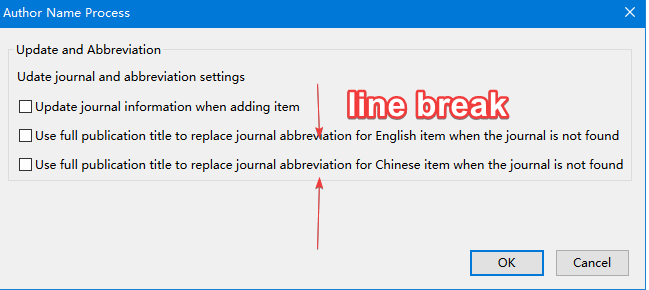
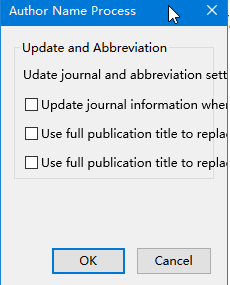
我正在开发一个zotero插件,并想画一个对话框。dialog、groupbox、hbox、checkbox等的宽度已经试过,minwidth、maxwidth也试过了,但没有工作。我想在标签的适当位置放一个线。
非常感谢!
代码:
<?xml version="1.0"?>
<?xml-stylesheet href="chrome://global/skin/" type="text/css"?>
<?xml-stylesheet href="chrome://zotero-platform/content/preferences.css"?>

<!DOCTYPE window SYSTEM "chrome://zoteroupdateifs/locale/options.dtd">

<!--给作者加粗加星-->

<dialog xmlns="http://www.mozilla.org/keymaster/gatekeeper/there.is.only.xul"
    xmlns:html="http://www.w3.org/1999/xhtml"
    id="updateifs-test"
    title="&author-process-win;"
    width="200"
    height="300"
    style="padding: 10px;"
    buttons="accept,cancel"
    ondialogaccept=" window.close();"
    ondialogcancel="window.close();">

    <stringbundleset id="stringbundleset">
            <stringbundle id="updateifs-options" src="chrome://zotero-updateifs/locale/options.properties"/>
      </stringbundleset>

            <groupbox  width="200">
              <caption label="&update-abbr;"/>
              <separator class='thin'/>
              <description style="width: 220px">&update-journal-abbr;</description>
              <separator class='thin'/>
              <hbox style="margin: 0" width="200">
                <checkbox id="id-updateifs-add-update" label="&add-update;" />
              </hbox>
              <separator class='thin'/>
              <hbox style="margin: 0" maxwidth="200">
                <checkbox id="id-updateifs-en-abbr" minwidth ='200' label="&en_abbr;"/>
              </hbox>
              <separator class='thin'/>
              <hbox style="margin: 0" maxwidth="200">
                <checkbox id="id-updateifs-ch-abbr" minwidth ='200' label="&ch_abbr;" />
              </hbox>
            </groupbox>

  <script src="options.js"/>

  <script
    type="application/x-javascript"
    src="chrome://zoteroupdateifs/content/scripts/options.js"/>

  <script src="chrome://zotero/content/include.js"/>


</dialog>
回答 1
Stack Overflow用户
发布于 2022-03-08 06:11:14
当我使用width设置checkbox时,这是很奇怪的,现在起作用了。
页面原文内容由Stack Overflow提供。腾讯云小微IT领域专用引擎提供翻译支持
原文链接:
https://stackoverflow.com/questions/71389521
复制相关文章
相似问题
腾讯云开发者

Copyright © 2013 - 2026 Tencent Cloud. All Rights Reserved. 腾讯云 版权所有
深圳市腾讯计算机系统有限公司 ICP备案/许可证号:粤B2-20090059  粤公网安备44030502008569号
腾讯云计算(北京)有限责任公司 京ICP证150476号 | 京ICP备11018762号