
下划线ListTile
下划线ListTile
提问于 2022-03-07 15:03:19
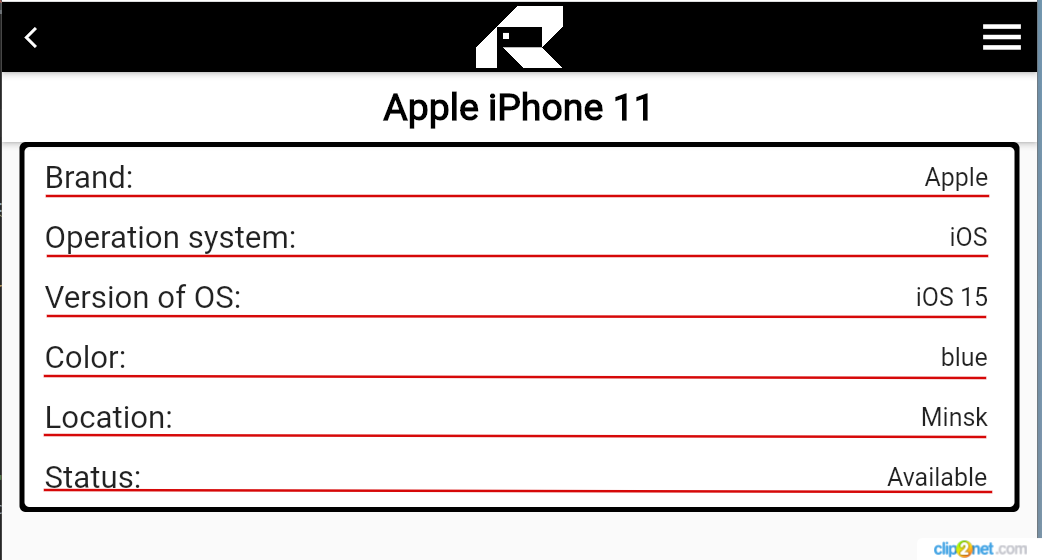
下面的代码负责显示设备的特性(为了便于演示,我缩短了代码,但问题的本质是可见的)。这很简单。告诉我如何添加我在照片中用红色标出的线条。正是这个长度,和文本的这个距离。
return Scaffold(
  body: Align(
      alignment: Alignment.topCenter,
      child: Container(
          constraints: BoxConstraints(maxWidth: 800, maxHeight: 300),
          decoration: BoxDecoration(
            color: Colors.black,
            borderRadius: BorderRadius.circular(5.0),
          ),
          child: SingleChildScrollView(
              child: Card(
                      child: Column(
                        children: [
                          ListTile(
                            title: const Text('Brand:', style: TextStyle(fontWeight: FontWeight.w400, fontSize: 25)),
                            trailing: Text('${device.brand} ', style: const TextStyle(fontWeight: FontWeight.w400, fontSize: 20 ))),

                          ListTile(
                            title: const Text('Operation system:', style: TextStyle(fontWeight: FontWeight.w400, fontSize: 25)),
                            trailing: Text('${device.operation_system} ', style: const TextStyle(fontWeight: FontWeight.w400, fontSize: 20 ))),
                        ],),)))));}}
回答 2
Stack Overflow用户
回答已采纳
发布于 2022-03-07 15:18:49
您可以在Divider小部件之间使用ListTile。
ListTile(..),
Divider(color: Colors.red, endIndent: 16, indent: 16), // THIS
ListTile(...)即使在ListTile上使用了Transform.translate之后,它也会得到一些空间,但是我们可以在Divider上使用Transform.translate。
Transform.translate(
    offset: Offset(0, -18), //adjust based on your need
child: Divider(...)如果您使用Container作为分隔符,则还将得到transfom。
Container(
  transform: Matrix4.translationValues(0, -16, 0),
   ....
),更多关于Transform.translate的信息。您还可以查看ListView.separated。
Stack Overflow用户
发布于 2022-03-07 15:37:19
我们也可以使用带有颜色的Container
Container(height: 1, color: Colors.grey)喜欢
 ListTile(
        leading: Icon(Icons.home),
        title: Text('Home'),
 ),
 Container(height: 1, color: Colors.grey), //divider
 ListTile(
        leading: Icon(Icons.logout),
        title: Text('Logout'),
),Divider在cupertino.dart中不可用。因此,即使在这方面,我们也可以在ListView.separated中使用相同的容器技术
 ListView.separated(
   itemCount: 100,
   itemBuilder: (context, index) {
     return row;
   },
   separatorBuilder: (context, index) {
     return Container(
             height: 1,
             color: Styles.productRowDivider, // Custom style
           );
   },
);页面原文内容由Stack Overflow提供。腾讯云小微IT领域专用引擎提供翻译支持
原文链接:
https://stackoverflow.com/questions/71383046
复制相关文章
相似问题
腾讯云开发者

Copyright © 2013 - 2026 Tencent Cloud. All Rights Reserved. 腾讯云 版权所有
深圳市腾讯计算机系统有限公司 ICP备案/许可证号:粤B2-20090059  粤公网安备44030502008569号
腾讯云计算(北京)有限责任公司 京ICP证150476号 | 京ICP备11018762号