
在WPF中动态查看UpTime
在WPF中动态查看UpTime
提问于 2022-03-06 06:50:37
我想要像下面的图片一样的
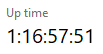
我使用NetFrameWork 3,我使用这段代码来显示UpTime for Windows
PerformanceCounter upTime = new PerformanceCounter("System", "System Up Time");
upTime.NextValue();
TimeSpan ts = TimeSpan.FromSeconds(upTime.NextValue());
UpTime.Text = "UpTime: " + ts.Days + ":" + ts.Hours + ":" + ts.Minutes + ":" + ts.Seconds;
但是我收到的是固定的,没有更新的,我想同时改变Windows的正常运行时间,请指导我
回答 1
Stack Overflow用户
回答已采纳
发布于 2022-03-06 07:43:44
你的代码看起来不错。唯一缺少的是,您应该定期调用它来更新UI。
请注意,因为您想更新UI:
为了访问用户界面(UI)线程上的对象,必须使用Invoke或BeginInvoke将操作发布到用户界面(UI)线程的Dispatcher上。使用DispatcherTimer而不是System.Timers.Timer的原因是DispatcherTimer运行在与Dispatcher相同的线程上。
然后,您只需稍微修改一下代码,就会看到如下所示:
DispatcherTimer dispatcherTimer;

public MainWindow()
{
    InitializeComponent();
    DispatcherTimer_Tick(null, EventArgs.Empty);
    dispatcherTimer = new DispatcherTimer();
    dispatcherTimer.Interval = TimeSpan.FromSeconds(1);
    dispatcherTimer.Tick += DispatcherTimer_Tick;
    dispatcherTimer.Start();
}

private void DispatcherTimer_Tick(object? sender, EventArgs e)
{
    PerformanceCounter upTime = new PerformanceCounter("System", "System Up Time");
    upTime.NextValue();
    TimeSpan ts = TimeSpan.FromSeconds(upTime.NextValue());
    UpTime.Text = "UpTime: " + ts.Days + ":" + ts.Hours + ":" + ts.Minutes + ":" + ts.Seconds;
}页面原文内容由Stack Overflow提供。腾讯云小微IT领域专用引擎提供翻译支持
原文链接:
https://stackoverflow.com/questions/71368237
复制相关文章
相似问题
腾讯云开发者

Copyright © 2013 - 2026 Tencent Cloud. All Rights Reserved. 腾讯云 版权所有
深圳市腾讯计算机系统有限公司 ICP备案/许可证号:粤B2-20090059  粤公网安备44030502008569号
腾讯云计算(北京)有限责任公司 京ICP证150476号 | 京ICP备11018762号