
拉威尔分页风格被打破了
拉威尔分页风格被打破了
提问于 2022-03-04 15:01:02
“我的项目”中的分页显示如下:

并呈现以下HTML:
<nav role="navigation" aria-label="Pagination Navigation" class="flex items-center justify-between">
<div class="flex justify-between flex-1 sm:hidden">
<span
class="relative inline-flex items-center px-4 py-2 text-sm font-medium text-gray-500 bg-white border border-gray-300 cursor-default leading-5 rounded-md">
« Précédent
</span>
<a href="http://127.0.0.1:8000/clients?page=2"
class="relative inline-flex items-center px-4 py-2 ml-3 text-sm font-medium text-gray-700 bg-white border border-gray-300 leading-5 rounded-md hover:text-gray-500 focus:outline-none focus:ring ring-gray-300 focus:border-blue-300 active:bg-gray-100 active:text-gray-700 transition ease-in-out duration-150">
Suivant »
</a>
</div>
<div class="hidden sm:flex-1 sm:flex sm:items-center sm:justify-between">
<div>
<p class="text-sm text-gray-700 leading-5">
Showing
<span class="font-medium">1</span>
to
<span class="font-medium">10</span>
of
<span class="font-medium">11</span>
results
</p>
</div>
<div>
<span class="relative z-0 inline-flex shadow-sm rounded-md">
<span aria-disabled="true" aria-label="&laquo; Précédent">
<span
class="relative inline-flex items-center px-2 py-2 text-sm font-medium text-gray-500 bg-white border border-gray-300 cursor-default rounded-l-md leading-5"
aria-hidden="true">
<svg class="w-5 h-5" fill="currentColor" viewBox="0 0 20 20">
<path fill-rule="evenodd"
d="M12.707 5.293a1 1 0 010 1.414L9.414 10l3.293 3.293a1 1 0 01-1.414 1.414l-4-4a1 1 0 010-1.414l4-4a1 1 0 011.414 0z"
clip-rule="evenodd" />
</svg>
</span>
</span>
<span aria-current="page">
<span
class="relative inline-flex items-center px-4 py-2 -ml-px text-sm font-medium text-gray-500 bg-white border border-gray-300 cursor-default leading-5">1</span>
</span>
<a href="http://127.0.0.1:8000/clients?page=2"
class="relative inline-flex items-center px-4 py-2 -ml-px text-sm font-medium text-gray-700 bg-white border border-gray-300 leading-5 hover:text-gray-500 focus:z-10 focus:outline-none focus:ring ring-gray-300 focus:border-blue-300 active:bg-gray-100 active:text-gray-700 transition ease-in-out duration-150"
aria-label="Go to page 2">
2
</a>
<a href="http://127.0.0.1:8000/clients?page=2" rel="next"
class="relative inline-flex items-center px-2 py-2 -ml-px text-sm font-medium text-gray-500 bg-white border border-gray-300 rounded-r-md leading-5 hover:text-gray-400 focus:z-10 focus:outline-none focus:ring ring-gray-300 focus:border-blue-300 active:bg-gray-100 active:text-gray-500 transition ease-in-out duration-150"
aria-label="Suivant &raquo;">
<svg class="w-5 h-5" fill="currentColor" viewBox="0 0 20 20">
<path fill-rule="evenodd"
d="M7.293 14.707a1 1 0 010-1.414L10.586 10 7.293 6.707a1 1 0 011.414-1.414l4 4a1 1 0 010 1.414l-4 4a1 1 0 01-1.414 0z"
clip-rule="evenodd" />
</svg>
</a>
</span>
</div>
</div>
</nav>
在我的项目中的孤立环境中,结果是:

上一次在我的项目中看到分页是在一个月前,之后我:
- 从Laravel 8升级到Laravel 9。
- 从尾风2.6^升级到尾风3^。
- 升级Mix
- 删除了默认情况下与Breeze scafolding一起提供的一些组件。
编辑
当我使用以下方法将分页视图导出到resources\views时:
php artisan vendor:publish --tag=laravel-pagination然后跑:
npm run dev分页是固定的!
但是当我删除resources\views\vendor\pagination并重新运行npm run dev时,分页又被破坏了!
这使我认为Mix缺少了分页元素中使用的CSS类。在我升级之前不是这样的。
那我该怎么解决呢?(导出感觉像是修补程序,而不是解决方案)。
回答 1
Stack Overflow用户
回答已采纳
发布于 2022-03-04 16:14:13
通过回到指南将尾风CSS项目从v2升级到v3,我注意到:
如果您还没有在您的项目中使用清除选项,那么非常重要,您现在必须配置模板路径,否则编译后的CSS将为空。
我通过在tailwind.config.js中引用tailwind.config.js并运行npm run dev来解决这个问题
const defaultTheme = require("tailwindcss/defaultTheme");

module.exports = {
    content: [
        "./resources/**/*.blade.php",
        "./resources/**/*.js",
        "./resources/**/*.vue",
        "./vendor/laravel/framework/src/Illuminate/Pagination/resources/views/*.blade.php",
    ],
// ...
}
检查升级提交
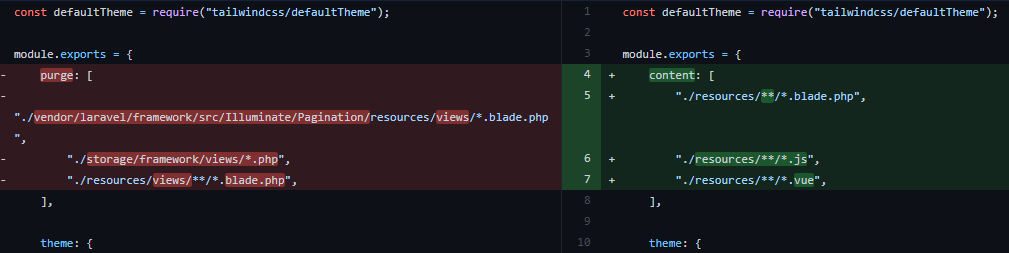
因为我盲目地遵循"Laravel with Tailwind 3 docs/posts“,而没有注意到他们没有考虑分页。
页面原文内容由Stack Overflow提供。腾讯云小微IT领域专用引擎提供翻译支持
原文链接:
https://stackoverflow.com/questions/71353260
复制相关文章
相似问题
腾讯云开发者

Copyright © 2013 - 2026 Tencent Cloud. All Rights Reserved. 腾讯云 版权所有
深圳市腾讯计算机系统有限公司 ICP备案/许可证号:粤B2-20090059  粤公网安备44030502008569号
腾讯云计算(北京)有限责任公司 京ICP证150476号 | 京ICP备11018762号