
从.Net 5 Windows服务发出SQL问题,但不是从通过安装的控制台发出
从.Net 5 Windows服务发出SQL问题,但不是从通过安装的控制台发出
提问于 2022-03-04 03:48:13
我有一个连接到本地SQL数据库实例的.Net 5 Windows服务(WindowsBackgroundService)。此数据库实例和应用程序将在本地系统上运行,因此我试图为SQL执行Windows身份验证,而不是设置登录名。
该服务还使用Wix3.11安装程序安装。该服务安装良好并完成(我的服务和添加/删除程序中也列出了它),但是服务不会启动。在事件查看器日志中,它是这样写的:
登录失败的用户'NT权限\系统‘。原因:未能打开显式指定的数据库“MyDatabase”。客户:
现在,我理解错误通常指向登录问题,但我感到困惑的是,正如我提到的那样,我使用的是Windows身份验证,但更令人困惑的是,当我在已安装的文件夹中运行可执行文件时,它运行良好,并连接到我的SQL数据库。
我猜这指向了Wix安装时服务的权限,而这些权限还不足以满足Windows Auth for SQL的要求?
因此,我想问题是,如何配置Wix来安装服务(希望不要求用户在安装过程中提供凭据),以便它可以使用Windows访问SQL?下面是服务如何处理它的安装:
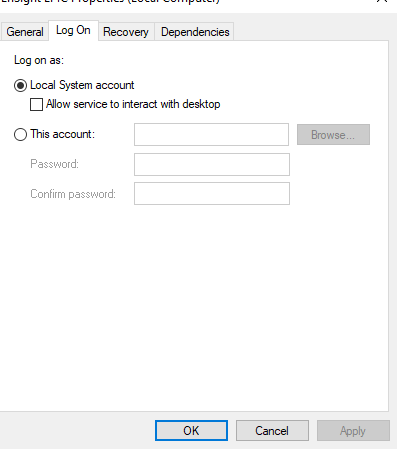
下面是Wix .wxs配置的相关部分:
          <ServiceInstall
            Id="ServiceInstaller"
            Type="ownProcess"
            Name="MyService"
            Vital="yes"
            DisplayName="My Test Service"
            Description="My Test Service"
            Start="auto"
            ErrorControl="normal"
            Account="LocalSystem"
            Interactive="no" >
            <util:ServiceConfig
              FirstFailureActionType="restart"
              SecondFailureActionType="restart"
              ThirdFailureActionType="restart"
              ResetPeriodInDays="1"
              RestartServiceDelayInSeconds="30" />
            <util:PermissionEx
              User="Everyone"
              ServicePauseContinue="yes"
              ServiceQueryStatus="yes"
              ServiceStart="yes"
              ServiceStop="yes"
              ServiceUserDefinedControl="yes" />
          </ServiceInstall>
            <ServiceControl Id="StartService" Start="install" Stop="both" Remove="uninstall" Name="MyService" Wait="yes" />
谢谢!!
回答 1
Stack Overflow用户
发布于 2022-03-04 15:41:24
页面原文内容由Stack Overflow提供。腾讯云小微IT领域专用引擎提供翻译支持
原文链接:
https://stackoverflow.com/questions/71346399
复制相关文章
相似问题
腾讯云开发者

Copyright © 2013 - 2026 Tencent Cloud. All Rights Reserved. 腾讯云 版权所有
深圳市腾讯计算机系统有限公司 ICP备案/许可证号:粤B2-20090059  粤公网安备44030502008569号
腾讯云计算(北京)有限责任公司 京ICP证150476号 | 京ICP备11018762号