
在pyqt中如何调用mousePressEvent在paintEvent的if & under下?
在PyQt5中,我正在开发一个基于传感器的图形用户界面,在该界面中,我绘制一个开关电源/开关按钮,其中我想添加一个功能,在其中我切换电源按钮,而我的桌面GUI应该在这个按钮上关闭。就像我们在gui的关闭X按钮中所做的那样。
这是toggle.py代码,并调用我的main.py代码
main.py
类MainWindow(QMainWindow):
def __init__(self):
    super().__init__()
    # main dialog box
    self.turning_Icon = None
    self.setWindowTitle("Hatchery System")
    self.setStyleSheet("background-color: #2c313c;")
    self.setFixedWidth(1400)
    self.setFixedHeight(950)
    self.setWindowFlags(Qt.FramelessWindowHint)

    # Create Container and Layout
    self.container = QFrame(self)
    self.container.move(100, 50)
    self.container.resize(100, 50)
    self.container.setStyleSheet("background-color: #2c313c;")
    self.container.layout = QVBoxLayout()

    # toggle_power_button
    self.toggle = PyToggle()
    self.toggle.setStyleSheet("background-color: white")
    self.toggle.move(50, 50)
    self.container.layout.addWidget(self.toggle, Qt.AlignCenter, Qt.AlignCenter)
    self.container.setLayout(self.container.layout)
toggle.py代码:
进口吡咯烷酮
从PyQt5.QtCore导入*
从PyQt5.QtGui进口*
从PyQt5.QtWidget导入*
类PyToggle(QCheckBox):
def __init__(
        self,
        width=60,
        # height=50,
        bg_color="#777",
        circle_color="#fff",
        active_color="#00BCff"
        # active_color="red"

):
    QCheckBox.__init__(self)

    self.setFixedSize(width, 28)
    # self.setFixedSize(height, 40)
    self.setCursor(Qt.PointingHandCursor)

    # colors
    self._bg_color = bg_color
    self._circle_color = circle_color
    self._active_color = active_color

    # connect state changed
    self.stateChanged.connect(self.debug)

def debug(self):
    print(f"status: {self.isChecked()}")

def hitButton(self, pos: QPoint):
    return self.contentsRect().contains(pos)

def paintEvent(self, e):
    # SET painter
    p = QPainter(self)
    p.setRenderHint(QPainter.Antialiasing)
    p.setPen(Qt.NoPen)

    rect = QRect(0, 0, self.width(), self.height())

    p.setBrush(QColor(self._bg_color))
    p.drawRoundedRect(0, 0, rect.width(), self.height(), self.height() / 2, self.height() / 2)
    p.end()

def paintEvent(self, e):
    # SET painter
    p = QPainter(self)
    p.setRenderHint(QPainter.Antialiasing)

    # SET as No PEN
    p.setPen(Qt.NoPen)

    # draw rect
    rect = QRect(0, 0, self.width(), self.height())

    if not self.isChecked():
        # draw BG
        p.setBrush(QColor(self._bg_color))
        p.drawRoundedRect(0, 0, rect.width(), self.height(), self.height()/2, self.height()/2)

        p.setBrush(QColor(self._circle_color))
        p.drawEllipse(3, 3, 22, 22)
        p.mousePressEvent = self.clickLine
    else:
        p.setBrush(QColor(self._active_color))
        p.drawRoundedRect(0, 0, rect.width(), self.height(), self.height() / 2, self.height() / 2)

        p.setBrush(QColor(self._circle_color))
        p.drawEllipse(self.width() - 26, 3, 22, 22)

def clickLine(self, mouseEvent):
    p.clicked.connect(self.close)
在这里,在如果条件下,我调用mousePressEvent,但它不能工作
输出:
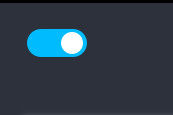

在未选中的情况下,我的桌面gui应该是接近的。
回答 1
Stack Overflow用户
发布于 2022-03-03 18:54:00
由于要求只在复选框再次未选中时才关闭窗口,因此解决方案是连接到只有在这种情况下才会关闭的函数。请注意,您不应该将stateChanged信号用于双重状态复选框,因为它返回一个Qt.CheckState枚举,其中包含3个状态。使用toggled信号代替。
        self.toggled.connect(self.checkForClose)

    def checkForClose(self, state):
        if not state:
            self.close()
一个关于你的尝试的重要笔记。
首先,油漆函数不应该尝试做一些与绘图无关的事情。这一点很重要,因为这些函数经常被调用,可能每秒钟调用数十次,在某些情况下,甚至在每次鼠标移动到小部件上方时也是如此。
最重要的是,您的覆盖方法只是连接clicked信号,这是错误的,原因有两个:
除了连接信号之外,您的重写不会做任何其他事情,而且由于checked/unchecked;
- every需要处理鼠标事件才能正确地更改其状态(并最终发出
clicked信号),因此您将阻止所有这些--而且信号永远不会发出,因为它永远不会发出任何鼠标按钮都会被按下,信号将被连接的时间;基于上述原因,它将完全没有结果,但这在概念上仍然是错误的,因为连接函数的调用次数总是与连接到信号的次数相同:连接它两次?函数将被调用两次;假设发出信号(仍然可以使用键盘进行),相关函数将被调用的次数与用户试图单击它的次数一样多。
需要记住的另一个重要方面是,PyQt对函数使用引用缓存;在第一次使用默认实现调用虚拟函数之后,覆盖实例属性将没有任何效果。
如果您想做相反的事情(当状态为True时连接信号),它就不会起作用,因为那时默认的mousePressEvent处理程序已经被调用了,而覆盖根本没有效果。
https://stackoverflow.com/questions/71328221
复制相似问题
腾讯云开发者

Copyright © 2013 - 2026 Tencent Cloud. All Rights Reserved. 腾讯云 版权所有
深圳市腾讯计算机系统有限公司 ICP备案/许可证号:粤B2-20090059  粤公网安备44030502008569号
腾讯云计算(北京)有限责任公司 京ICP证150476号 | 京ICP备11018762号