
如何使用ROS服务和串行通信在python中使用“多线程”?
我想在我的机器人中使用ROS服务和串行通信(在Raspberry和ESP32单片机之间)在python中运行多个进程。这张图片显示了机器人的软件原理图。
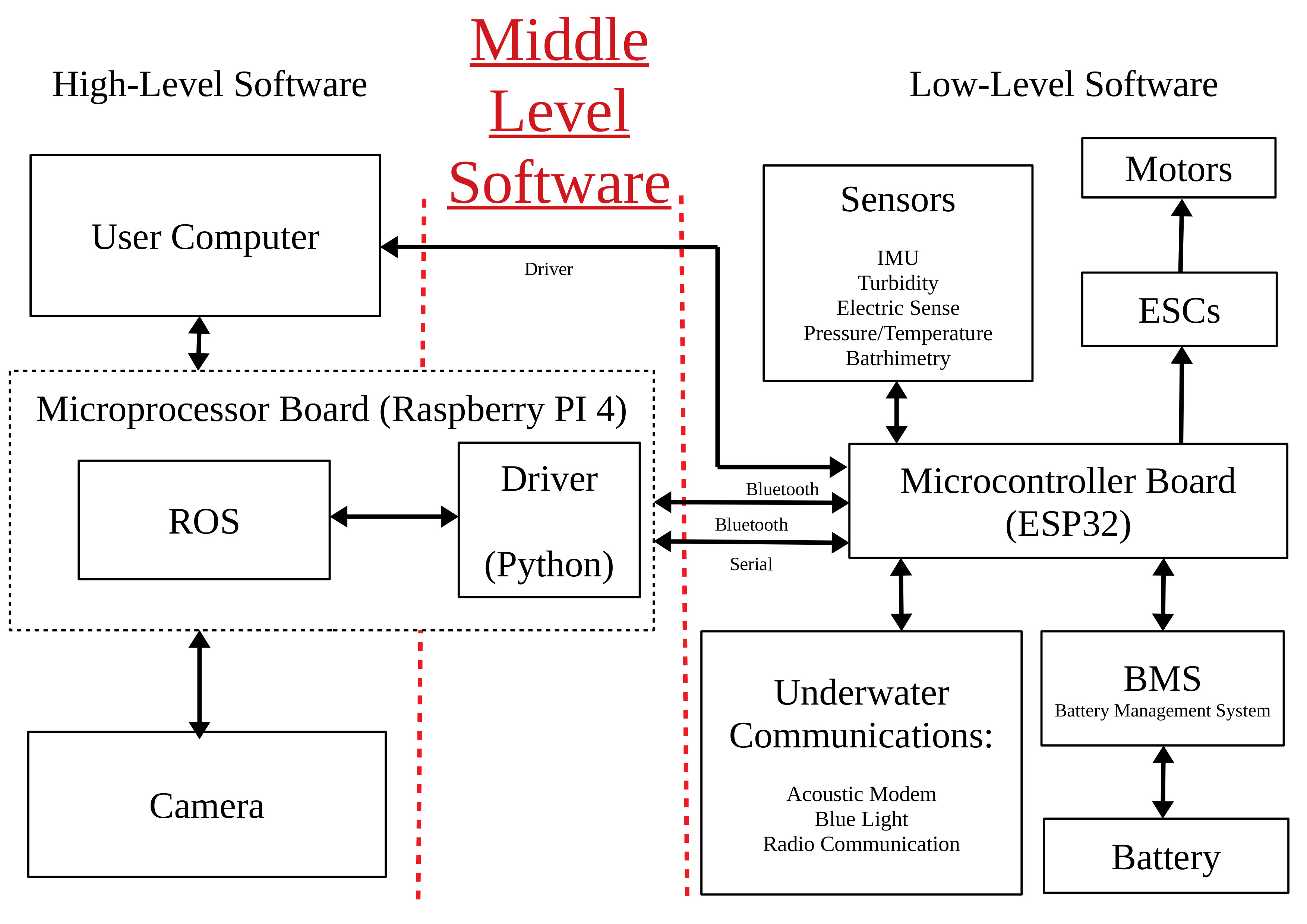
我开始在C++中做,从这个链接中可以看到如何在C++中使用ROS服务和与posix和信号量的串行通信?,但是我意识到我的串行通信模块和ODOM(压力,IMU)读模块都在python中。
因此,程序的结构应该是下面的结构。首先,我打开串口( Raspberry PI 4的串行通信)。当串行打开时,两个进程正在运行
首先,主线程自动运行并执行以下操作:线程请求ODOM更新(来自微控制器的压力和IMU )并发布它们。同样,每0.3秒检查调制解调器收件箱,如果有新的东西,它就会发布。
另一个仅根据ROS服务的要求检测到调制解调器收件箱中有新消息,请停止(在第一个主进程上)并在串行端口上执行(发布)。然后,第一个过程恢复正常工作。
因此,我首先尝试做一些类似于这些的伪python代码,但是我需要帮助,因为我对python和多线程很陌生。就是这里
#!/usr/bin/env python3

from sys import ps1
import rospy
import numpy as np
from os import system
import time
import threading
import Microcontroller_Manager_Serial as Serial
import IMU_Functions as IMU
import Pressure_Functions as Pressure
from std_msgs.msg import Float32

mutex = threading.Lock()

from std_msgs.msg import String
Communication_Mode_ = 0 # Serial Communication

pub_pressure = rospy.Publisher('depth',Float32,queue_size=1)

P0 = 1.01325 #Default Pressure


def callback(data):
    global P0
    mutex.acquire()
    while (Serial.Serial_Port_Standard()): # While serial Port is open

        try:
            data_received_pressure = Pressure.Pressure_Get_Final_Values(1,1)
            data_received_imu = IMU.IMU_Get_Values(1, 1)
            P1 = (np.int16((data_received_pressure[6]<<24) | (data_received_pressure[7]<<16) | (data_received_pressure[8]<<8) | (data_received_pressure[9])))/10000
            P0 = (np.int16((data_received_pressure[6]<<24) | (data_received_pressure[7]<<16) | (data_received_pressure[8]<<8) | (data_received_pressure[9])))/10000

            P = P1 - P0 # Relative Measured Pressure
            pressure = P
            pub_pressure.publish(pressure)
         except:
             print ("pressure not obtained")

        Modem.Send_Data(Communication_Mode, receiver_ID, data_size, data_to_send)

def listener():

# Not sure how to check every 0.3 seconds the modem inbox and if something new it publish. And also the  DEMAND from ROS Services detect that there is new message in the modem inbox do HALT( on the first main Process) and execute (publish) on the serial Port. Then the first process resume with normal work
对于调制解调器的检查,我虽然需要这样的东西,但我不确定。
def callback_modem(data_in):

        data_in = Serial.Serial_Port_Receive_Data(20,0.2)
        if (data_in[0] == 91) # Received data from acoustic modem
        rt = RepeatedTimer(1, data_in, "Recieved Data") # it auto-starts, no need of rt.start()
        modem_data= data_in
        pub_modem.publish(modem_data)

        try:
            sleep(0.3) # your long-running job goes here...
        finally:
            rt.stop() # better in a try/finally block to make sure the program ends!
ROS服务回调的第三个线程应该是这样的吗?
def handle_ros_service(req):
    data_received_temperature = TEMPERATURE.TEMPERATURE_Get_Values(1, 1)
    Tempetrature = (np.int16((data_received_imu[6]<<24) | (data_received_imu[7]<<16) | (data_received_imu[8]<<8) | (data_received_imu[9])))/10000
    mutex.acquire(blocking=True)
    return handle_ros_service(req.Tempetrature)


def publish_on_serial():
    # send temperature over serial port
mutex.release()回答 1
Stack Overflow用户
发布于 2022-03-08 12:10:28
您可以构建一个带有两个回调的默认简单节点,其中一个是订阅的ROS主题的消息回调,另一个是对TimerEvent的回调,该回调可以每0.3秒重复调用一次。您主要需要在TimerEvent之前启动rospy.spin()。
代码可以如下所示:
#!/usr/bin/env python

import threading
import rospy
from std_msgs.msg import String

mutex = threading.Lock()


def msg_callback(msg):
    # reentrang processing
    mutex.acquire(blocking=True)
    # work serial port here, e.g. send msg to serial port
    mutex.release()
    # reentrant processing

def timer_callback(event):
    # reentrant processing
    mutex.acquire(blocking=True)
    # work serial port here, e.g. check for incoming data
    mutex.release()
    # reentrant processing, e.g. publish the data from serial port

def service_callback(req):
    # read out temperature
    mutex.acquire(blocking=True)
    # send temperature over serial port
    mutex.release()


if __name__ == '__main__':
    # initialize serial port here
    rospy.init_node('name')
    rospy.Subscriber('/test_in', String, msg_callback)
    rospy.Service('on_req', Empty, service_callback)
    rospy.Timer(rospy.Duration(0.3), timer_callback)
rospy.spin()实际上,ro间谍为回调启动了两个不同的线程。但是,由于吉尔的原因,这些线程不是在不同的内核上并行运行,而是在某些系统调用(例如,调用IO操作时)进行调度和切换执行。因此,您仍然需要将线程与锁同步,就像您在问题中所做的那样。
https://stackoverflow.com/questions/71322517
复制相似问题
腾讯云开发者

Copyright © 2013 - 2026 Tencent Cloud. All Rights Reserved. 腾讯云 版权所有
深圳市腾讯计算机系统有限公司 ICP备案/许可证号:粤B2-20090059  粤公网安备44030502008569号
腾讯云计算(北京)有限责任公司 京ICP证150476号 | 京ICP备11018762号