
函数不打印两个单独的打印语句
函数不打印两个单独的打印语句
提问于 2022-03-01 03:53:43
我对个人项目很陌生,我正在通过python终端开发一个图书馆图书管理系统。
我遇到了一个已经拖延了一段时间的问题。
我试着把我的代码打印到控制台
-主菜
- All Books
- 签出
- 签出
- 查找
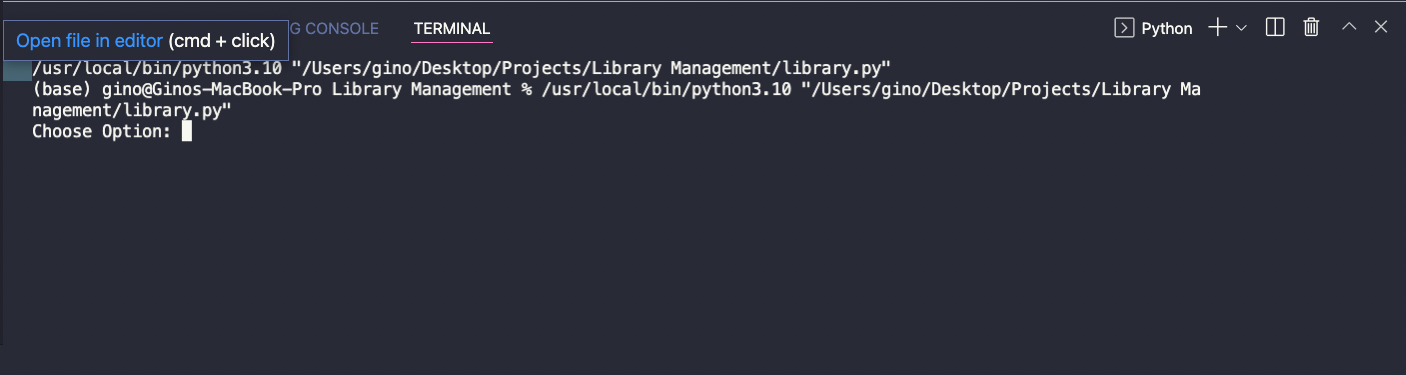
但是它却给了我一次又一次的“选择选择”。我不知道我做错了什么,因为我已经尝试了多次迭代,但我找不到分辨率。
源代码:
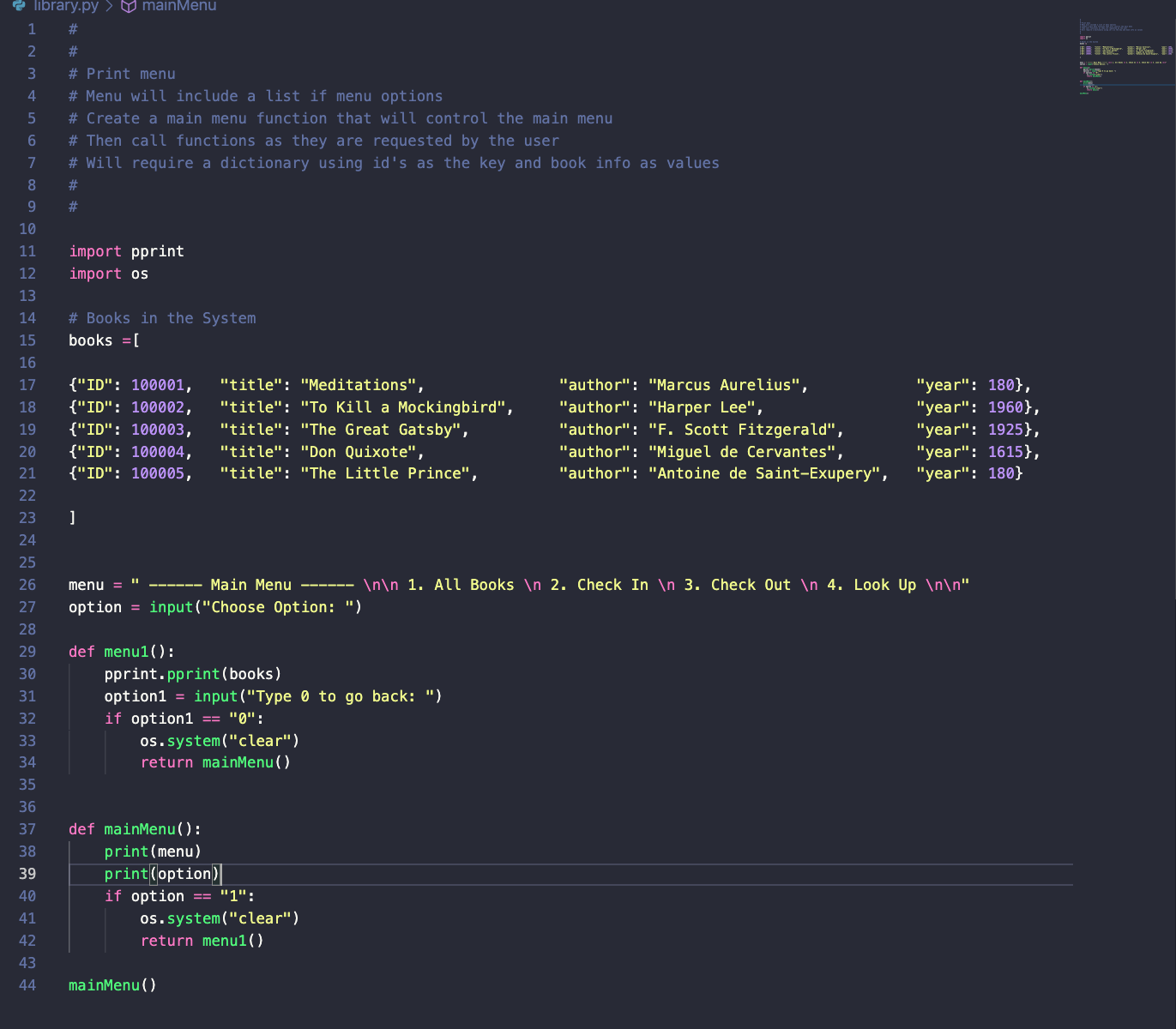
终端输出:
回答 1
Stack Overflow用户
回答已采纳
发布于 2022-03-01 04:30:57
将来,试着把你的代码直接粘贴到你的问题中,而不是作为一个图像。
无论如何,尝试移动以option开头的行,即:
option = input("Choose options: ")进入mainMenu函数内部(在下面尝试重建的尝试中使用main_menu):
#
#
# Print menu
# Menu will include a list if menu options
# Create a main menu function that will control the main menu
# Then call functions as they are requested by the user
# Will require a dictionary using id's as the key and book info as values
#
#

import pprint
import os

# Books in the System
books = [
    {"ID": 100001, "title": "Meditations", "author": "Marcus Aurelius", "year": 180},
    {"ID": 100002, "title": "To Kill a Mockingbird", "author": "Harper Lee", "year": 1960},
    {"ID": 100003, "title": "The Great Gatsby", "author": "F. Scott Fitzgerald", "year": 1925},
    {"ID": 100004, "title": "Don Quixote", "author": "Miguel de Cervantes", "year": 1615},
    {"ID": 100005, "title": "The Little Prince", "author": "Antoine de Saint-Exupery", "year": 180}
]

menu = " ------ Main Menu ------ \n\n 1. All Books \n 2. Check In \n 3. Check Out \n 4. Look Up \n"


def menu1():
    pprint.pprint(books)
    option1 = input("Type 0 to go back: ")
    if option1 == "0":
        os.system("clear")
        return main_menu()


def main_menu():
    print(menu)
    option = input("Choose option: ")
    if option == "1":
        os.system("clear")
        return menu1()


if __name__ == '__main__':
    main_menu()
示例用法:
 ------ Main Menu ------

 1. All Books
 2. Check In
 3. Check Out
 4. Look Up

Choose option: 1
[{'ID': 100001,
  'author': 'Marcus Aurelius',
  'title': 'Meditations',
  'year': 180},
 {'ID': 100002,
  'author': 'Harper Lee',
  'title': 'To Kill a Mockingbird',
  'year': 1960},
 {'ID': 100003,
  'author': 'F. Scott Fitzgerald',
  'title': 'The Great Gatsby',
  'year': 1925},
 {'ID': 100004,
  'author': 'Miguel de Cervantes',
  'title': 'Don Quixote',
  'year': 1615},
 {'ID': 100005,
  'author': 'Antoine de Saint-Exupery',
  'title': 'The Little Prince',
'year': 180}]页面原文内容由Stack Overflow提供。腾讯云小微IT领域专用引擎提供翻译支持
原文链接:
https://stackoverflow.com/questions/71303551
复制相关文章
相似问题
腾讯云开发者

Copyright © 2013 - 2026 Tencent Cloud. All Rights Reserved. 腾讯云 版权所有
深圳市腾讯计算机系统有限公司 ICP备案/许可证号:粤B2-20090059  粤公网安备44030502008569号
腾讯云计算(北京)有限责任公司 京ICP证150476号 | 京ICP备11018762号