
GPU没有出现在GKE节点上,即使它们出现在GKE NodePool中
我正在尝试安装Google引擎集群,GPU在节点中松散地跟随这些指示,因为我正在使用Python编程部署。
出于某种原因,我可以创建一个包含GPU的NodePool的集群
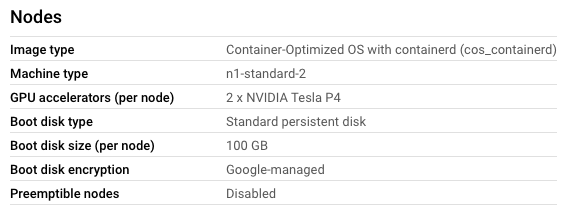
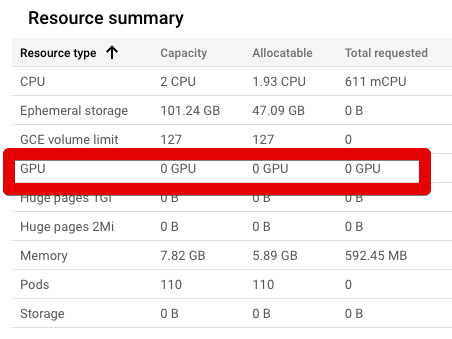
...But,NodePool中的节点无法访问这些GPU。
我已经用这个yaml文件安装了NVIDIA DaemonSet:https://raw.githubusercontent.com/GoogleCloudPlatform/container-engine-accelerators/master/nvidia-driver-installer/cos/daemonset-preloaded.yaml
你可以看到它就在这张图片里:
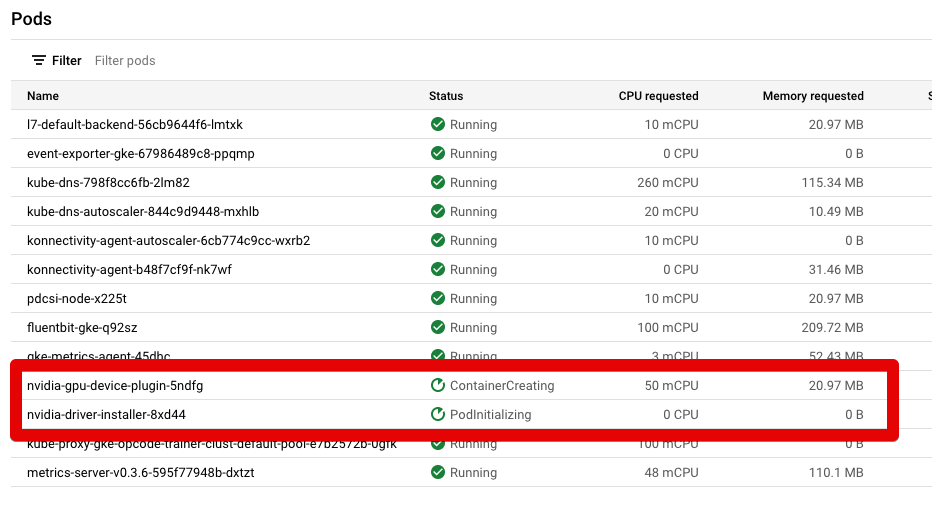
出于某种原因,这2行似乎总是处于"ContainerCreating“和"PodInitializing”状态。他们从不把绿色变成“奔跑”。如何使NodePool中的GPU在节点中可用?
更新:
基于评论,我在2个NVIDIA吊舱上运行了以下命令:kubectl describe pod POD_NAME --namespace kube-system。
为此,我在节点上打开了UI命令终端。然后运行以下命令:
gcloud container clusters get-credentials CLUSTER-NAME --zone ZONE --project PROJECT-NAME
然后,我调用了kubectl describe pod nvidia-gpu-device-plugin-UID --namespace kube-system并得到了这个输出:
Name:                 nvidia-gpu-device-plugin-UID
Namespace:            kube-system
Priority:             2000001000
Priority Class Name:  system-node-critical
Node:                 gke-mycluster-clust-default-pool-26403abb-zqz6/X.X.X.X
Start Time:           Wed, 02 Mar 2022 20:19:49 +0000
Labels:               controller-revision-hash=79765599fc
                      k8s-app=nvidia-gpu-device-plugin
                      pod-template-generation=1
Annotations:          <none>
Status:               Pending
IP:
IPs:                  <none>
Controlled By:        DaemonSet/nvidia-gpu-device-plugin
Containers:
  nvidia-gpu-device-plugin:
    Container ID:
    Image:         gcr.io/gke-release/nvidia-gpu-device-plugin@sha256:aa80c85c274a8e8f78110cae33cc92240d2f9b7efb3f53212f1cefd03de3c317
    Image ID:
    Port:          2112/TCP
    Host Port:     0/TCP
    Command:
      /usr/bin/nvidia-gpu-device-plugin
      -logtostderr
      --enable-container-gpu-metrics
      --enable-health-monitoring
    State:          Waiting
      Reason:       ContainerCreating
    Ready:          False
    Restart Count:  0
    Limits:
      cpu:     50m
      memory:  50Mi
    Requests:
      cpu:     50m
      memory:  20Mi
    Environment:
      LD_LIBRARY_PATH:  /usr/local/nvidia/lib64
    Mounts:
      /dev from dev (rw)
      /device-plugin from device-plugin (rw)
      /etc/nvidia from nvidia-config (rw)
      /proc from proc (rw)
      /usr/local/nvidia from nvidia (rw)
      /var/lib/kubelet/pod-resources from pod-resources (rw)
      /var/run/secrets/kubernetes.io/serviceaccount from default-token-qnxjr (ro)
Conditions:
  Type              Status
  Initialized       True
  Ready             False
  ContainersReady   False
  PodScheduled      True
Volumes:
  device-plugin:
    Type:          HostPath (bare host directory volume)
    Path:          /var/lib/kubelet/device-plugins
    HostPathType:
  dev:
    Type:          HostPath (bare host directory volume)
    Path:          /dev
    HostPathType:
  nvidia:
    Type:          HostPath (bare host directory volume)
    Path:          /home/kubernetes/bin/nvidia
    HostPathType:  Directory
  pod-resources:
    Type:          HostPath (bare host directory volume)
    Path:          /var/lib/kubelet/pod-resources
    HostPathType:
  proc:
    Type:          HostPath (bare host directory volume)
    Path:          /proc
    HostPathType:
  nvidia-config:
    Type:          HostPath (bare host directory volume)
    Path:          /etc/nvidia
    HostPathType:
  default-token-qnxjr:
    Type:        Secret (a volume populated by a Secret)
    SecretName:  default-token-qnxjr
    Optional:    false
QoS Class:       Burstable
Node-Selectors:  <none>
Tolerations:     :NoExecute op=Exists
                 :NoSchedule op=Exists
                 node.kubernetes.io/disk-pressure:NoSchedule op=Exists
                 node.kubernetes.io/memory-pressure:NoSchedule op=Exists
                 node.kubernetes.io/not-ready:NoExecute op=Exists
                 node.kubernetes.io/pid-pressure:NoSchedule op=Exists
                 node.kubernetes.io/unreachable:NoExecute op=Exists
                 node.kubernetes.io/unschedulable:NoSchedule op=Exists
Events:
    Type     Reason       Age                   From               Message
    ----     ------       ----                  ----               -------
  Normal   Scheduled    8m55s                 default-scheduler  Successfully assigned kube-system/nvidia-gpu-device-plugin-hxdwx to gke-opcode-trainer-clust-default-pool-26403abb-zqz6
  Warning  FailedMount  6m42s                 kubelet            Unable to attach or mount volumes: unmounted volumes=[nvidia], unattached volumes=[nvidia-config default-token-qnxjr device-plugin dev nvidia pod-resources proc]: timed out waiting for the condition
  Warning  FailedMount  4m25s                 kubelet            Unable to attach or mount volumes: unmounted volumes=[nvidia], unattached volumes=[proc nvidia-config default-token-qnxjr device-plugin dev nvidia pod-resources]: timed out waiting for the condition
  Warning  FailedMount  2m11s                 kubelet            Unable to attach or mount volumes: unmounted volumes=[nvidia], unattached volumes=[pod-resources proc nvidia-config default-token-qnxjr device-plugin dev nvidia]: timed out waiting for the condition
Warning FailedMount 31s (x12 over 8m45s) kubelet MountVolume.SetUp failed for volume "nvidia" : hostPath type check failed: /home/kubernetes/bin/nvidia is not a directory然后,我调用了kubectl describe pod nvidia-driver-installer-UID --namespace kube-system并得到了这个输出:
Name:         nvidia-driver-installer-UID
Namespace:    kube-system
Priority:     0
Node:         gke-mycluster-clust-default-pool-26403abb-zqz6/X.X.X.X
Start Time:   Wed, 02 Mar 2022 20:20:06 +0000
Labels:       controller-revision-hash=6bbfc44f6d
              k8s-app=nvidia-driver-installer
              name=nvidia-driver-installer
              pod-template-generation=1
Annotations:  <none>
Status:       Pending
IP:           10.56.0.9
IPs:
  IP:           10.56.0.9
Controlled By:  DaemonSet/nvidia-driver-installer
Init Containers:
  nvidia-driver-installer:
    Container ID:
    Image:          gke-nvidia-installer:fixed
    Image ID:
    Port:           <none>
    Host Port:      <none>
    State:          Waiting
      Reason:       ImagePullBackOff
    Ready:          False
    Restart Count:  0
    Requests:
      cpu:        150m
    Environment:  <none>
    Mounts:
      /boot from boot (rw)
      /dev from dev (rw)
      /root from root-mount (rw)
      /var/run/secrets/kubernetes.io/serviceaccount from default-token-qnxjr (ro)
Containers:
  pause:
    Container ID:
    Image:          gcr.io/google-containers/pause:2.0
    Image ID:
    Port:           <none>
    Host Port:      <none>
    State:          Waiting
      Reason:       PodInitializing
    Ready:          False
    Restart Count:  0
    Environment:    <none>
    Mounts:
      /var/run/secrets/kubernetes.io/serviceaccount from default-token-qnxjr (ro)
Conditions:
  Type              Status
  Initialized       False
  Ready             False
  ContainersReady   False
  PodScheduled      True
Volumes:
  dev:
    Type:          HostPath (bare host directory volume)
    Path:          /dev
    HostPathType:
  boot:
    Type:          HostPath (bare host directory volume)
    Path:          /boot
    HostPathType:
  root-mount:
    Type:          HostPath (bare host directory volume)
    Path:          /
    HostPathType:
  default-token-qnxjr:
    Type:        Secret (a volume populated by a Secret)
    SecretName:  default-token-qnxjr
    Optional:    false
QoS Class:       Burstable
Node-Selectors:  <none>
Tolerations:     op=Exists
                 node.kubernetes.io/disk-pressure:NoSchedule op=Exists
                 node.kubernetes.io/memory-pressure:NoSchedule op=Exists
                 node.kubernetes.io/not-ready:NoExecute op=Exists
                 node.kubernetes.io/pid-pressure:NoSchedule op=Exists
                 node.kubernetes.io/unreachable:NoExecute op=Exists
                 node.kubernetes.io/unschedulable:NoSchedule op=Exists
Events:
  Type     Reason     Age                    From               Message
  ----     ------     ----                   ----               -------
  Normal   Scheduled  4m20s                  default-scheduler  Successfully assigned kube-system/nvidia-driver-installer-tzw42 to gke-opcode-trainer-clust-default-pool-26403abb-zqz6
  Normal   Pulling    2m36s (x4 over 4m19s)  kubelet            Pulling image "gke-nvidia-installer:fixed"
  Warning  Failed     2m34s (x4 over 4m10s)  kubelet            Failed to pull image "gke-nvidia-installer:fixed": rpc error: code = Unknown desc = failed to pull and unpack image "docker.io/library/gke-nvidia-installer:fixed": failed to resolve reference "docker.io/library/gke-nvidia-installer:fixed": pull access denied, repository does not exist or may require authorization: server message: insufficient_scope: authorization failed
  Warning  Failed     2m34s (x4 over 4m10s)  kubelet            Error: ErrImagePull
  Warning  Failed     2m22s (x6 over 4m9s)   kubelet            Error: ImagePullBackOff
Normal BackOff 2m7s (x7 over 4m9s) kubelet Back-off pulling image "gke-nvidia-installer:fixed"回答 1
Stack Overflow用户
发布于 2022-03-03 08:30:42
根据容器正在试图提取的对接器映像(gke-nvidia-installer:fixed),看起来您正在尝试使用Ubuntu而不是cos。
您应该运行kubectl apply -f https://raw.githubusercontent.com/GoogleCloudPlatform/container-engine-accelerators/master/nvidia-driver-installer/cos/daemonset-preloaded.yaml
这将为您的cos节点池应用正确的守护进程,如声明的这里。
此外,请验证您的节点池是否具有提取图像所需的https://www.googleapis.com/auth/devstorage.read_only范围。您应该可以在GCP控制台的节点池页面中的安全->访问范围(相关的服务是存储)中看到它。
https://stackoverflow.com/questions/71272241
复制相似问题
腾讯云开发者

Copyright © 2013 - 2026 Tencent Cloud. All Rights Reserved. 腾讯云 版权所有
深圳市腾讯计算机系统有限公司 ICP备案/许可证号:粤B2-20090059  粤公网安备44030502008569号
腾讯云计算(北京)有限责任公司 京ICP证150476号 | 京ICP备11018762号