
切换黑暗模式按钮在点击事件侦听器(所有逻辑封装在一个生命)中的AJAX调用之后停止工作。
对于我在Cloudflare页面后面提供服务的个人博客站点(https://victorfeight.com/),我使用的是11个带有自定义脚本的脚本,其中包括暗模式切换逻辑、带有AJAX的SPA类页面切换以及使用Elasticlunr和JavaScript的搜索功能。由于我对JavaScript Web开发很陌生,并且选择不使用框架来实现SPA页面切换,所以我决定将所有的逻辑都实现到一个文件中,封装在一个文件中(传入窗口和文档)。我想知道这是否是一起实现这种逻辑的标准方式,还是我应该使用webpack或者更现代的解决方案。我还想知道是否有可能加载暗模式/光模式脚本逻辑和每个页面的搜索模式逻辑,尽管使用AJAX url转换逻辑。
第一个问题:某些单击事件处理逻辑似乎打断了我在同一文件中引入的新的黑暗模式切换。我在这里为暗模式实现了逻辑:https://jec.fyi/blog/supporting-dark-mode和我使用以下逻辑实现了搜索功能:https://www.belter.io/eleventy-search/
我的液体模板中有以下HTML,默认情况下加载:
  <div class="col-xl-6 px-0">
    <div class="p-0 p-md-0 m-0 text-white">
    <object type="text/html"
        style="width: 100%;height: 30rem;min-width: 378px;" id="icosahedron"
        data="scripts/icosahedron.html">
    </object>
    </div>
      <!-- <iframe style="width: 100%;height: 30rem;min-width: 378px;" scrolling="no" id="icosahedron"
        src="scripts/icosahedron.html" frameBorder="0" allowfullscreen></iframe> -->
  </div>
我有一个轻量级的脚本/icosahedron.html版本,它通过scripts/script.js (轻型版本)和脚本/二十面体_DRON.html加载脚本/script_dark. of (黑暗版本)。
我想有选择地切换哪个脚本被加载,这取决于我的轻模/暗模式按钮。
我为页面切换实现的逻辑(它似乎中断了我从这里找到的封装在同一生活中的黑暗模式切换):https://github.com/learosema/eleventy-mini-spa
  /**
   * Load content into page without a whole page reload
   * @param {string} href URL to route to
   * @param {boolean} pushState whether to call history.pushState or not
   */
  function load(href, pushState) {
    const container = $("main");

    const xhr = new XMLHttpRequest();
    xhr.onload = function () {
      fetchJSON();
      const d = xhr.responseXML;
      const dTitle = d.title || "";
      const dContainer = $("main", d);
      container.innerHTML = (dContainer && dContainer.innerHTML) || "";
      document.title = dTitle;
      if (pushState) {
        history.pushState({}, dTitle, href);
      }
      container.focus();
      window.scrollTo(0, 0);
    };
    xhr.onerror = function () {
      // fallback to normal link behaviour
      document.location.href = href;
      return;
    };
    xhr.open("GET", href);
    xhr.responseType = "document";
    xhr.send();
  }

  function $(sel, con) {
    return (con || document).querySelector(sel);
  }

  /**
   * Search for a parent anchor tag outside a clicked event target
   *
   * @param {HTMLElement} el the clicked event target.
   * @param {number} maxNests max number of levels to go up.
   * @returns the anchor tag or null
   */
  function findAnchorTag(el, maxNests = 3) {
    for (let i = maxNests; el && i > 0; --i, el = el.parentNode) {
      if (el.nodeName === "A") {
        return el;
      }
    }
    return null;
  }

  const links = document.getElementsByClassName("nav-link");
  // Loop through the buttons and add the active class to the current/clicked button
  for (var i = 0; i < links.length; i++) {
    links[i].addEventListener("click", function () {
      var current = document.getElementsByClassName("active");
      if (current[0]) {
        current[0].className = current[0].className.replace(" active", "");
        this.className += " active";
      }
    });
  }

  window.addEventListener("click", function (evt) {
    let baseUrl = $('meta[name="x-base-url"]')?.getAttribute("content") || "/";
    const el = findAnchorTag(evt.target);
    const href = el?.getAttribute("href");
    if (el && href) {
      if (
        href.startsWith("#") ||
        el.getAttribute("target") === "_blank" ||
        /\.\w+$/.test(href)
      ) {
        // eleventy urls in this configuration do not have extensions like .html
        // if they have, or if target _blank is set, or they are a hash link,
        // then do nothing.
        return;
      }

      if (href.startsWith("/")) {
        icosa.setAttribute("data", "scripts/icosahedron_dark.html");
      }

      // if the URL starts with the base url, do the SPA handling
      if (href.startsWith(baseUrl)) {
        evt.preventDefault();
        load(href, true);
      }
    }
  });

  window.addEventListener("popstate", function (e) {
    load(document.location.pathname, false);
  });

  fetchJSON();
作为附带说明,我发现我还必须在每个页面开关上重复我的fetchJSON()函数,为了使搜索工作正常,我想知道这方面的最佳实践是什么,因为我还得到了"Uncaught (in promise) TypeError: document.getElementById(.)是在调用搜索逻辑之前在错误堆栈中引导的空fetchJSON https://victorfeight.com/scripts/mini-spa.js:9"“。
注意,我添加了以下内容来单击事件侦听器进行测试,但它似乎什么也做不了:
if (href.startsWith("/")) {
        icosa.setAttribute("data", "scripts/icosahedron_dark.html");
}
以下是单击处理逻辑:
  window.addEventListener("click", function (evt) {
    let baseUrl = $('meta[name="x-base-url"]')?.getAttribute("content") || "/";
    const el = findAnchorTag(evt.target);
    const href = el?.getAttribute("href");
    if (el && href) {
      if (
        href.startsWith("#") ||
        el.getAttribute("target") === "_blank" ||
        /\.\w+$/.test(href)
      ) {
        // eleventy urls in this configuration do not have extensions like .html
        // if they have, or if target _blank is set, or they are a hash link,
        // then do nothing.
        return;
      }

      if (href.startsWith("/")) {
        icosa.setAttribute("data", "scripts/icosahedron_dark.html");
      }

      // if the URL starts with the base url, do the SPA handling
      if (href.startsWith(baseUrl)) {
        evt.preventDefault();
        load(href, true);
      }
    }
  });
我尝试过的是,这是我的全色模式逻辑:
  "use strict";
  const icosa = document.getElementById("icosahedron");
  function changeColor() {
    const bodyEl = document.body;
    const themeStylesheet = document.getElementById("theme");
    const themeToggle = document.getElementById("moon-1");
    const DARK = "dark";
    const LIGHT = "light";
    const COLOR_SCHEME_CHANGED = "colorSchemeChanged";

    themeToggle.addEventListener("click", () => {
      const isDark = bodyEl.classList.toggle("dark-mode");
      const mode = isDark ? DARK : LIGHT;
      sessionStorage.setItem("jec.color-scheme", mode);

      if (isDark) {
        icosa.setAttribute("data", "scripts/icosahedron_dark.html");
        themeToggle.className = "far fa-sun fa-2x";
        themeToggle.title = themeToggle.title.replace(DARK, LIGHT);
        if (themeStylesheet)
          themeStylesheet.href = themeStylesheet.href.replace(LIGHT, DARK);
      } else {
        icosa.setAttribute("data", "scripts/icosahedron.html");
        themeToggle.className = "far fa-moon fa-2x";
        themeToggle.title = themeToggle.title.replace(LIGHT, DARK);
        if (themeStylesheet)
          themeStylesheet.href = themeStylesheet.href.replace(DARK, LIGHT);
      }

      themeToggle.dispatchEvent(
        new CustomEvent(COLOR_SCHEME_CHANGED, { detail: mode })
      );
    });
  }

  changeColor();
  function init() {
    const DARK = "dark";
    const LIGHT = "light";
    const isSystemDarkMode =
      matchMedia && window.matchMedia("(prefers-color-scheme: dark)").matches;

    let mode = sessionStorage.getItem("jec.color-scheme");

    if (!mode && isSystemDarkMode) {
      mode = DARK;
    } else {
      mode = mode || LIGHT;
    }

    if (mode === DARK) {
      icosa.setAttribute("data", "scripts/icosahedron_dark.html");
      document.getElementById("moon-1").click();
    }
  }

  // run the code
  init();
  const pressEnter = (e) => {
    const searchField = document.getElementById("searchField");
    if (e.key === "Enter") {
      if (searchField) {
        searchField && searchField.blur();
      }
    }
  };
为了使颜色模式工作,我在init()函数中修改了数据属性,以指向正确的文件:
if (mode === DARK) {
  icosa.setAttribute("data", "scripts/icosahedron_dark.html");
在我的相关更改颜色功能:
  if (isDark) {
    icosa.setAttribute("data", "scripts/icosahedron_dark.html");
    themeToggle.className = "far fa-sun fa-2x";
    themeToggle.title = themeToggle.title.replace(DARK, LIGHT);
    if (themeStylesheet)
      themeStylesheet.href = themeStylesheet.href.replace(LIGHT, DARK);
  } else {
    icosa.setAttribute("data", "scripts/icosahedron.html");
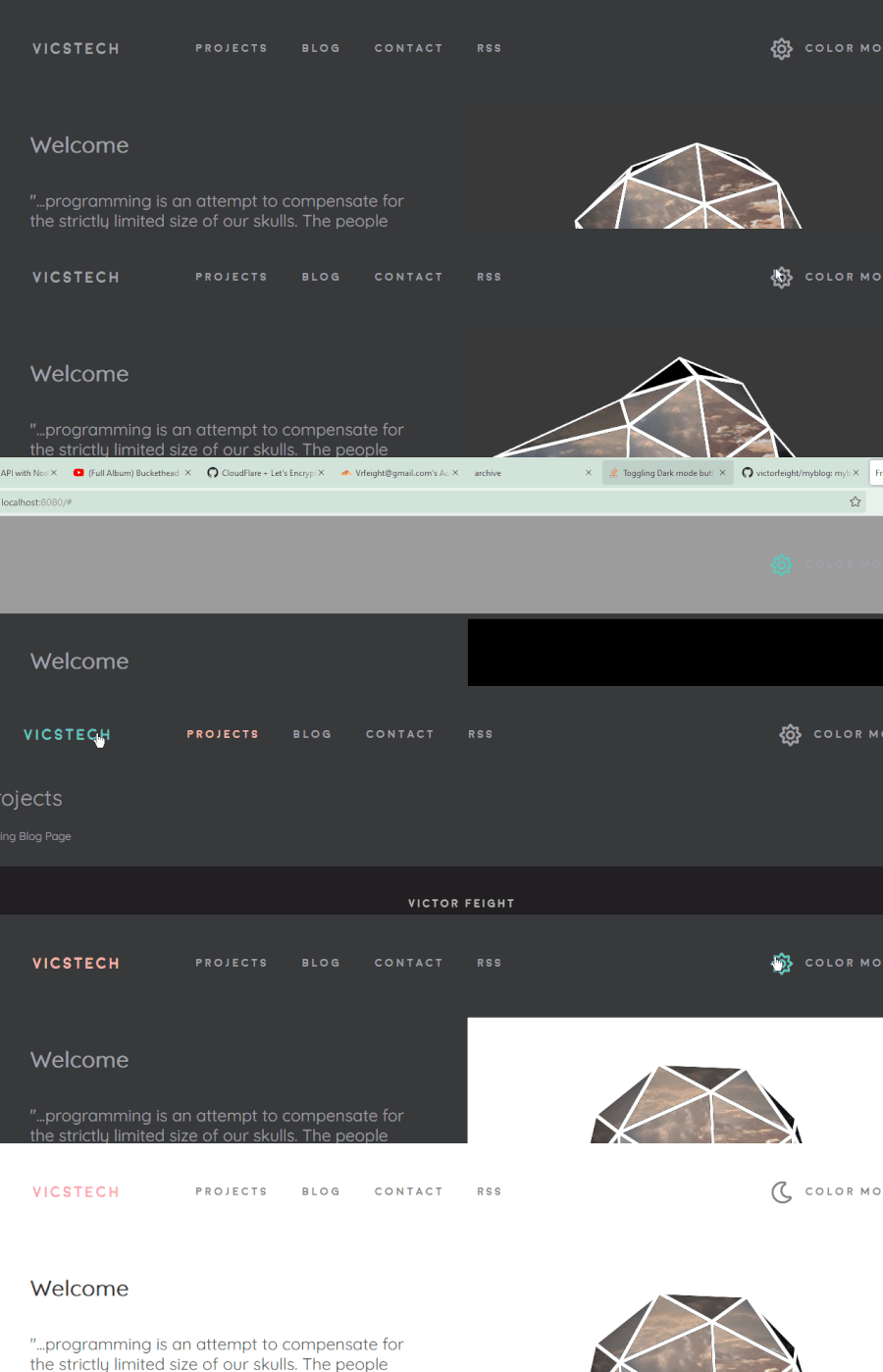
现在,逻辑在首页上工作。但是,一旦我使用顶部导航切换页面,并返回到主页,选择性加载脚本的逻辑就会停止工作,我就假设存在范围问题。
所以我的问题是,如何才能让这个黑暗模式脚本切换逻辑与这个链接页面切换逻辑很好地工作呢?是将所有三个脚本的逻辑封装在IIFE中是最好的方法,还是我应该寻找其他更好地模块化这一点的技术?目前,通过Cloudflare页面提供的产品构建根本没有加载选择性暗模式脚本逻辑,只有本地加载。包括的截图来自当地。我还对如何在黑暗模式下选择性地加载搜索背景图像的CSS感兴趣。我很感激你的建议。
为了完成任务,下面是完整的脚本:
(function (window, document) {
"use strict";
const icosa = document.getElementById("icosahedron");
function changeColor() {
const bodyEl = document.body;
const themeStylesheet = document.getElementById("theme");
const themeToggle = document.getElementById("moon-1");
const DARK = "dark";
const LIGHT = "light";
const COLOR_SCHEME_CHANGED = "colorSchemeChanged";
themeToggle.addEventListener("click", () => {
const isDark = bodyEl.classList.toggle("dark-mode");
const mode = isDark ? DARK : LIGHT;
sessionStorage.setItem("jec.color-scheme", mode);
if (isDark) {
icosa.setAttribute("data", "scripts/icosahedron_dark.html");
themeToggle.className = "far fa-sun fa-2x";
themeToggle.title = themeToggle.title.replace(DARK, LIGHT);
if (themeStylesheet)
themeStylesheet.href = themeStylesheet.href.replace(LIGHT, DARK);
} else {
icosa.setAttribute("data", "scripts/icosahedron.html");
themeToggle.className = "far fa-moon fa-2x";
themeToggle.title = themeToggle.title.replace(LIGHT, DARK);
if (themeStylesheet)
themeStylesheet.href = themeStylesheet.href.replace(DARK, LIGHT);
}
themeToggle.dispatchEvent(
new CustomEvent(COLOR_SCHEME_CHANGED, { detail: mode })
);
});
}
changeColor();
function init() {
const DARK = "dark";
const LIGHT = "light";
const isSystemDarkMode =
matchMedia && window.matchMedia("(prefers-color-scheme: dark)").matches;
let mode = sessionStorage.getItem("jec.color-scheme");
if (!mode && isSystemDarkMode) {
mode = DARK;
} else {
mode = mode || LIGHT;
}
if (mode === DARK) {
icosa.setAttribute("data", "scripts/icosahedron_dark.html");
document.getElementById("moon-1").click();
}
}
// run the code
init();
const pressEnter = (e) => {
const searchField = document.getElementById("searchField");
if (e.key === "Enter") {
if (searchField) {
searchField && searchField.blur();
}
}
};
const search = (e) => {
const cardHolder = document.getElementById("card-holder");
if (e.target.value) {
cardHolder.style.display = "none";
}
const results = window.searchIndex.search(e.target.value, {
bool: "AND",
expand: true,
});
const resEl = document.getElementById("searchResults");
const noResultsEl = document.getElementById("noResultsFound");
resEl.innerHTML = "";
if (Object.keys(results).length !== 0) {
noResultsEl.style.display = "none";
cardHolder.style.display = "none";
results.map((r) => {
const { id, title, categories, excerpt, date } = r.doc;
const el = document.createElement("div");
el.setAttribute(
"class",
"archive-card card border border-light shadow-0"
);
el.style.display = "flex";
resEl.appendChild(el);
const header = document.createElement("div");
header.setAttribute("id", "archive-header");
header.setAttribute("class", "card-header border-0");
el.appendChild(header);
const h3 = document.createElement("h3");
h3.setAttribute("class", "card-title pb-3");
h3.style.textDecoration = "underline";
header.appendChild(h3);
const a = document.createElement("a");
a.setAttribute("href", id);
a.setAttribute("class", "text-black");
a.textContent = title;
h3.appendChild(a);
const dateSection = document.createElement("div");
dateSection.setAttribute("class", "category-section text-muted");
var dateString = date;
dateSection.innerHTML += dateString;
header.appendChild(dateSection);
console.log(categories);
var catString = "";
for (let i = 0; i < categories.length; i++) {
if (i === 0) {
catString += ` [<a href="/category/${categories[i]}">${categories[i]}</a>, `;
} else if (i != categories.length - 1) {
catString += `<a href="/category/${categories[i]}">${categories[i]}</a>, `;
} else {
catString += `<a href="/category/${categories[i]}">${categories[i]}</a>]`;
}
}
// header.innerHTML += catString;
dateSection.innerHTML += catString;
const cardBody = document.createElement("div");
header.setAttribute("class", "card-body");
el.appendChild(cardBody);
const excerptP = document.createElement("p");
excerptP.setAttribute("class", "card-text");
excerptP.innerHTML += excerpt;
cardBody.appendChild(excerptP);
});
} else {
noResultsEl.style.display = "block";
cardHolder.style.display = "block";
}
};
function fetchJSON() {
fetch("/search-index.json").then((response) =>
response.json().then((rawIndex) => {
window.searchIndex = elasticlunr.Index.load(rawIndex);
document
.getElementById("searchField")
.addEventListener("keyup", search);
document
.getElementById("searchField")
.addEventListener("keydown", pressEnter);
})
);
}
fetchJSON();
/**
* Load content into page without a whole page reload
* @param {string} href URL to route to
* @param {boolean} pushState whether to call history.pushState or not
*/
function load(href, pushState) {
const container = $("main");
const xhr = new XMLHttpRequest();
xhr.onload = function () {
fetchJSON();
const d = xhr.responseXML;
const dTitle = d.title || "";
const dContainer = $("main", d);
container.innerHTML = (dContainer && dContainer.innerHTML) || "";
document.title = dTitle;
if (pushState) {
history.pushState({}, dTitle, href);
}
container.focus();
window.scrollTo(0, 0);
};
xhr.onerror = function () {
// fallback to normal link behaviour
document.location.href = href;
return;
};
xhr.open("GET", href);
xhr.responseType = "document";
xhr.send();
}
function $(sel, con) {
return (con || document).querySelector(sel);
}
/**
* Search for a parent anchor tag outside a clicked event target
*
* @param {HTMLElement} el the clicked event target.
* @param {number} maxNests max number of levels to go up.
* @returns the anchor tag or null
*/
function findAnchorTag(el, maxNests = 3) {
for (let i = maxNests; el && i > 0; --i, el = el.parentNode) {
if (el.nodeName === "A") {
return el;
}
}
return null;
}
const links = document.getElementsByClassName("nav-link");
// Loop through the buttons and add the active class to the current/clicked button
for (var i = 0; i < links.length; i++) {
links[i].addEventListener("click", function () {
var current = document.getElementsByClassName("active");
if (current[0]) {
current[0].className = current[0].className.replace(" active", "");
this.className += " active";
}
});
}
window.addEventListener("click", function (evt) {
let baseUrl = $('meta[name="x-base-url"]')?.getAttribute("content") || "/";
const el = findAnchorTag(evt.target);
const href = el?.getAttribute("href");
if (el && href) {
if (
href.startsWith("#") ||
el.getAttribute("target") === "_blank" ||
/\.\w+$/.test(href)
) {
// eleventy urls in this configuration do not have extensions like .html
// if they have, or if target _blank is set, or they are a hash link,
// then do nothing.
return;
}
if (href.startsWith("/")) {
icosa.setAttribute("data", "scripts/icosahedron_dark.html");
}
// if the URL starts with the base url, do the SPA handling
if (href.startsWith(baseUrl)) {
evt.preventDefault();
load(href, true);
}
}
});
window.addEventListener("popstate", function (e) {
load(document.location.pathname, false);
});
fetchJSON();
})(window, document);回答 2
Stack Overflow用户
发布于 2022-03-06 18:35:11
让我迈出这一步。
第一个问题:单击事件处理逻辑
我将我所有的javascript逻辑重新实现到单独的文件中,这些文件现在被Rollup.js压缩了。
下面是我的新的rollup构建配置:
import path from "path";
import { nodeResolve } from "@rollup/plugin-node-resolve";
import replace from "@rollup/plugin-replace";
import { terser } from "rollup-plugin-terser";

let fileDest = `mdb.min`;
const external = ["@popperjs/core"];
const plugins = [terser()];
const globals = {
  "@popperjs/core": "Popper",
};

export default [
  {
    input: path.resolve(__dirname, `_11ty_scripts/js/mdb.free.js`),
    output: {
      file: path.resolve(__dirname, `scripts/${fileDest}.js`),
      format: "umd",
      name: "bootstrap",
      globals,
    },
    external,
    plugins,
  },
  {
    input: ["_11ty_scripts/search.js"],
    output: [
      {
        file: "scripts/search.min.js",
        format: "cjs",
        sourcemap: true,
        plugins: [terser()],
      },
    ],
  },
  {
    input: ["_11ty_scripts/main.js"],
    output: [
      {
        file: "scripts/min.js",
        format: "iife",
        sourcemap: true,
        plugins: [terser()],
      },
    ],
  },
  {
    input: ["_11ty_scripts/colorToggle.js"],
    output: [
      {
        file: "scripts/colorToggle.min.js",
        format: "cjs",
        sourcemap: true,
        plugins: [terser()],
      },
    ],
  },
];
这是捆绑自定义版本的mdb.free.js,它使用一些静态分析和树抖动从结果中删除未使用的代码,然后由terser()将其缩小。
我将search.js和main.js分离成它们自己的外部文件。我从main.js中获取了很多https://github.com/google/eleventy-high-performance-blog逻辑,我正在用预取悬停的链接来替换我原来的spa类ajax开关:
const exposed = {};
if (location.search) {
  var a = document.createElement("a");
  a.href = location.href;
  a.search = "";
  history.replaceState(null, null, a.href);
}

function tweet_(url) {
  open(
    "https://twitter.com/intent/tweet?url=" + encodeURIComponent(url),
    "_blank"
  );
}
function tweet(anchor) {
  tweet_(anchor.getAttribute("href"));
}
expose("tweet", tweet);

function share(anchor) {
  var url = anchor.getAttribute("href");
  event.preventDefault();
  tweet_(url);
  //if (navigator.share) {
  //  navigator.share({
  //    url: url,
  //  });
  //} else if (navigator.clipboard) {
  //  navigator.clipboard.writeText(url);
  //  message("Article URL copied to clipboard.");
  //} else {
  //  tweet_(url);
  //}
}
expose("share", share);

function message(msg) {
  var dialog = document.getElementById("message");
  dialog.textContent = msg;
  dialog.setAttribute("open", "");
  setTimeout(function () {
    dialog.removeAttribute("open");
  }, 3000);
}

function prefetch(e) {
  if (e.target.tagName != "A") {
    return;
  }
  if (e.target.origin != location.origin) {
    return;
  }
  /**
   * Return the given url with no fragment
   * @param {string} url potentially containing a fragment
   * @return {string} url without fragment
   */
  const removeUrlFragment = (url) => url.split("#")[0];
  if (
    removeUrlFragment(window.location.href) === removeUrlFragment(e.target.href)
  ) {
    return;
  }
  var l = document.createElement("link");
  l.rel = "prefetch";
  l.href = e.target.href;
  document.head.appendChild(l);
}
document.documentElement.addEventListener("mouseover", prefetch, {
  capture: true,
  passive: true,
});
document.documentElement.addEventListener("touchstart", prefetch, {
  capture: true,
  passive: true,
});

const GA_ID = document.documentElement.getAttribute("ga-id");
window.ga =
  window.ga ||
  function () {
    if (!GA_ID) {
      return;
    }
    (ga.q = ga.q || []).push(arguments);
  };
ga.l = +new Date();
ga("create", GA_ID, "auto");
ga("set", "transport", "beacon");
var timeout = setTimeout(
  (onload = function () {
    clearTimeout(timeout);
    ga("send", "pageview");
  }),
  1000
);

var ref = +new Date();
function ping(event) {
  var now = +new Date();
  if (now - ref < 1000) {
    return;
  }
  ga("send", {
    hitType: "event",
    eventCategory: "page",
    eventAction: event.type,
    eventLabel: Math.round((now - ref) / 1000),
  });
  ref = now;
}
addEventListener("pagehide", ping);
addEventListener("visibilitychange", ping);

/**
 * Injects a script into document.head
 * @param {string} src path of script to be injected in <head>
 * @return {Promise} Promise object that resolves on script load event
 */
const dynamicScriptInject = (src) => {
  return new Promise((resolve) => {
    const script = document.createElement("script");
    script.src = src;
    script.type = "text/javascript";
    document.head.appendChild(script);
    script.addEventListener("load", () => {
      resolve(script);
    });
  });
};

// Script web-vitals.js will be injected dynamically if user opts-in to sending CWV data.
const sendWebVitals = document.currentScript.getAttribute("data-cwv-src");

if (/web-vitals.js/.test(sendWebVitals)) {
  dynamicScriptInject(`${window.location.origin}/scripts/web-vitals.js`)
    .then(() => {
      webVitals.getCLS(sendToGoogleAnalytics);
      webVitals.getFID(sendToGoogleAnalytics);
      webVitals.getLCP(sendToGoogleAnalytics);
    })
    .catch((error) => {
      console.error(error);
    });
}

addEventListener(
  "click",
  function (e) {
    var button = e.target.closest("button");
    if (!button) {
      return;
    }
    ga("send", {
      hitType: "event",
      eventCategory: "button",
      eventAction: button.getAttribute("aria-label") || button.textContent,
    });
  },
  true
);
var selectionTimeout;
addEventListener(
  "selectionchange",
  function () {
    clearTimeout(selectionTimeout);
    var text = String(document.getSelection()).trim();
    if (text.split(/[\s\n\r]+/).length < 3) {
      return;
    }
    selectionTimeout = setTimeout(function () {
      ga("send", {
        hitType: "event",
        eventCategory: "selection",
        eventAction: text,
      });
    }, 2000);
  },
  true
);


function expose(name, fn) {
  exposed[name] = fn;
}

addEventListener("click", (e) => {
  const handler = e.target.closest("[on-click]");
  if (!handler) {
    return;
  }
  e.preventDefault();
  const name = handler.getAttribute("on-click");
  const fn = exposed[name];
  if (!fn) {
    throw new Error("Unknown handler" + name);
  }
  fn(handler);
});

function removeBlurredImage(img) {
  // Ensure the browser doesn't try to draw the placeholder when the real image is present.
  img.style.backgroundImage = "none";
}
document.body.addEventListener(
  "load",
  (e) => {
    if (e.target.tagName != "IMG") {
      return;
    }
    removeBlurredImage(e.target);
  },
  /* capture */ "true"
);
for (let img of document.querySelectorAll("img")) {
  if (img.complete) {
    removeBlurredImage(img);
  }
}
这一切都是通过卷起和服务在每一页的生活。这里有很多事情要做,但本质上是推特共享和链接预取的逻辑,尽管它确实添加了一些需要被我的colorToggle逻辑小心回避的点击处理逻辑。
对于colorToggle,我重新实现了使用javascript在两个href样式表之间交换的原始逻辑,现在在CSS中交换两个颜色模式属性,并记住localStorage的选择。这大大提高了速度,并允许平滑的页面更改。所有这些都是通过汇总打包成CommonJS格式的,并在每一页上服务,与其他生命一起使用。
// This code assumes a Light Mode default
function checkColor() {
  if (
    /* This condition checks whether the user has set a site preference for dark mode OR a OS-level preference for Dark Mode AND no site preference */
    localStorage.getItem('color-mode') === 'dark' ||
    (window.matchMedia('(prefers-color-scheme: dark)').matches &&
     !localStorage.getItem('color-mode'))) {
    // if true, set the site to Dark Mode
    document.documentElement.setAttribute('color-mode', 'dark')
  }
}
checkColor();

window.addEventListener('DOMContentLoaded', (event) => {
// const icosa = document.getElementById("icosahedron");
  if (
    /* This condition checks whether the user has set a site preference for dark mode OR a OS-level preference for Dark Mode AND no site preference */
    localStorage.getItem('color-mode') === 'dark' ||
    (window.matchMedia('(prefers-color-scheme: dark)').matches &&
     !localStorage.getItem('color-mode'))) {
    // if true, set the site to Dark Mode
    // icosa.setAttribute("data", "scripts/icosahedron_dark.html");
  }

const toggleColorMode = e => {
  // Switch to Light Mode
  if (e.currentTarget.classList.contains("light--hidden")) {
      // Sets the custom HTML attribute
    document.documentElement.setAttribute("color-mode", "light");
    // icosa.setAttribute("data", "scripts/icosahedron.html");

      //Sets the user's preference in local storage
    localStorage.setItem("color-mode", "light")
    return;
}

  /* Switch to Dark Mode
  Sets the custom HTML attribute */
  document.documentElement.setAttribute("color-mode", "dark");
  // icosa.setAttribute("data", "scripts/icosahedron_dark.html");

// Sets the user's preference in local storage
localStorage.setItem("color-mode", "dark");
};

// Get the buttons in the DOM
let toggleIcons = document.querySelectorAll("#darkmode, #lightmode");
// Set up event listeners
toggleIcons.forEach(i => {
    i.addEventListener("click", toggleColorMode);
});

});
最后,问题是我的javascript试图在图标加载到DOM之前找到它。因此,我添加了一个DOMContentLoaded函数,它一直等到图标加载后才选择它。我在顶部添加了一个函数,检查系统是否是暗模式或光模式,使用偏好颜色方案和localStorage匹配,并将这个脚本放在我的HTML头上。
为了实现浏览器的兼容性,我的搜索功能都封装在IIFE中:
(function (window, document) {
"use strict";
const cardHolder = document.getElementById("card-holder");
const searchField = document.getElementById("searchField");
const pressEnter = (e) => {
if (e.key === "Enter") {
searchField && searchField.blur();
}
};
const search = (e) => {
if (e.target.value) {
cardHolder.style.display = "none";
}
const results = window.searchIndex.search(e.target.value, {
bool: "AND",
expand: true,
});
const resEl = document.getElementById("searchResults");
const noResultsEl = document.getElementById("noResultsFound");
resEl.innerHTML = "";
if (Object.keys(results).length !== 0) {
noResultsEl.style.display = "none";
cardHolder.style.display = "none";
results.map((r) => {
const { id, title, categories, excerpt, date } = r.doc;
const el = document.createElement("div");
el.setAttribute(
"class",
"archive-card card border border-light shadow-0"
);
el.style.display = "flex";
resEl.appendChild(el);
const header = document.createElement("div");
header.setAttribute("id", "archive-header");
header.setAttribute("class", "card-header border-0");
el.appendChild(header);
const h3 = document.createElement("h3");
h3.setAttribute("class", "card-title pb-3");
h3.style.textDecoration = "underline";
header.appendChild(h3);
const a = document.createElement("a");
a.setAttribute("href", id);
a.setAttribute("class", "text-black");
a.textContent = title;
h3.appendChild(a);
const dateSection = document.createElement("div");
dateSection.setAttribute("class", "category-section text-muted");
var dateString = date;
dateSection.innerHTML += dateString;
header.appendChild(dateSection);
console.log(categories);
var catString = "";
for (let i = 0; i < categories.length; i++) {
if (i === 0) {
catString += ` [<a href="/category/${categories[i]}">${categories[i]}</a>, `;
} else if (i != categories.length - 1) {
catString += `<a href="/category/${categories[i]}">${categories[i]}</a>, `;
} else {
catString += `<a href="/category/${categories[i]}">${categories[i]}</a>]`;
}
}
// header.innerHTML += catString;
dateSection.innerHTML += catString;
const cardBody = document.createElement("div");
header.setAttribute("class", "card-body");
el.appendChild(cardBody);
const excerptP = document.createElement("p");
excerptP.setAttribute("class", "card-text");
excerptP.innerHTML += excerpt;
cardBody.appendChild(excerptP);
});
} else {
noResultsEl.style.display = "block";
cardHolder.style.display = "block";
}
};
fetch("/search-index.json").then((response) =>
response.json().then((rawIndex) => {
window.searchIndex = elasticlunr.Index.load(rawIndex);
document.getElementById("searchField").addEventListener("keyup", search);
document.getElementById("searchField").addEventListener("keydown", pressEnter);
})
);
})(window, document);Rollup将其转到CommonJS,并与我的其他JS一起小型化,只在搜索页面上提供服务。
现在唯一不起作用的是自动切换嵌入的HTML对象的背景色,它有一个加载Three.js动画的HTML脚本,但这是一个小技巧,最好是为它自己的问题而保存,因为其他东西都在工作。
编辑:忘了提到,Cloudflare页面在使用Chrome工具比较两个站点文件夹(本地文件夹和远程文件夹)后无意中为外部Javascript文件夹提供服务。在清除Cloudflare页面缓存和刷新、删除cookie和站点数据之后,在页面更改时保存了颜色( Cloudflare提供的其他JS文件导致了我的colorToggle功能的范围混乱问题)。
Stack Overflow用户
发布于 2022-03-08 08:01:25
为了回答我的问题,关于切换嵌入的HTML背景颜色,它有一个HTML脚本,用一些第三方CSS加载Three.js动画。
我听从了这里的建议:Putting three.js animation inside of div
我能够消除嵌入对象中对HTML和CSS的需求,并自己添加CSS,然后深入到Three.js代码中,自己添加dom元素。现在它被嵌入并动态地改变颜色。
https://stackoverflow.com/questions/71261900
复制相似问题
腾讯云开发者

Copyright © 2013 - 2026 Tencent Cloud. All Rights Reserved. 腾讯云 版权所有
深圳市腾讯计算机系统有限公司 ICP备案/许可证号:粤B2-20090059  粤公网安备44030502008569号
腾讯云计算(北京)有限责任公司 京ICP证150476号 | 京ICP备11018762号