
如何基于兄弟文本位置在CSS中为SVGIcon设置页边距?
如何基于兄弟文本位置在CSS中为SVGIcon设置页边距?
提问于 2022-02-24 09:36:45
我想用CSS为ReactJS中的图标组件设置页边距-左或边距-按钮组件(ReactJS内按钮)。
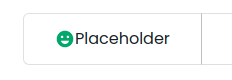
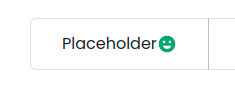
在这里,我想在图标和按钮占位符之间添加空间。使用:第一子和:最后一子似乎适用于这两种情况(当图标在左边,我想应用marginRight,当图标在右边,我想应用marginLeft)。
如何在CSS中实现?
回答 2
Stack Overflow用户
发布于 2022-02-24 10:14:07
可以将ID属性添加到SVG标记中。只有这样,你才能在CSS中瞄准SVG。
边注:,因为您正在使用react,所以我建议您为按钮本身创建一个组件,这样它就可以重用,并保持代码整洁。
可能对你有帮助的参考资料:
MDN文档:SVG和CSS
MDN文档:SVG风格
#btn-icon{
  /* Indicators to prove it works */
  margin: 0 1rem;
  fill: red;
  /* Indicators to prove it works */

  /* Apply your styles here */

  /* Apply your styles here */
}<button>
Placeholder <svg id="btn-icon" focusable="false" aria-hidden="true" viewBox="0 0 24 24">
<path d="M11.99 2C6.47 2 2 6.48 2 12s4.47 10 9.99 10C17.52 22 22 17.52 22 12S17.52 2 11.99 2zM8.5 8c.83 0 1.5.67 1.5 1.5S9.33 11 8.5 11 7 10.33 7 9.5 7.67 8 8.5 8zM12 18c-2.28 0-4.22-1.66-5-4h10c-.78 2.34-2.72 4-5 4zm3.5-7c-.83 0-1.5-.67-1.5-1.5S14.67 8 15.5 8s1.5.67 1.5 1.5-.67 1.5-1.5 1.5z"></path></svg>
</button>
Stack Overflow用户
发布于 2022-02-24 14:19:00
如果您的第一个代码示例是正确的,您就没有任何可以在css中选择的兄弟级。
因为您的按钮文本内容不是css中的可选元素。因此,svg图标将是:last-child和:first-child。
您可以尝试添加一个js来为您的按钮分配类:
let buttons = document.querySelectorAll('button');
buttons.forEach(function(button, i){
  let icon = button.querySelector('svg');
  let siblingLeft = icon.previousSibling.textContent;
  // strip whitespace
  siblingLeft = siblingLeft.replace(/\s/g, "")
  let btnClass = siblingLeft ?  'icon-right' : 'icon-left';
  button.classList.add(btnClass);
});body{
font-size:3em;
}
button{
font-size:inherit;
background:#fff;
border: 1px solid #ccc;
padding:0.3em;
}
.icon{
display:inline-block;
height:1em;
margin-left:0.3em;
margin-right:0.3em;
position:relative;
bottom:-0.1em;
fill: green;
}
.icon-right svg{
margin-right:0
}
.icon-left svg{
margin-left:0;
fill:red;
}<button>
<svg class="icon icon-inline" focusable="false" aria-hidden="true" viewBox="0 0 24 24">
<path d="M11.99 2C6.47 2 2 6.48 2 12s4.47 10 9.99 10C17.52 22 22 17.52 22 12S17.52 2 11.99 2zM8.5 8c.83 0 1.5.67 1.5 1.5S9.33 11 8.5 11 7 10.33 7 9.5 7.67 8 8.5 8zM12 18c-2.28 0-4.22-1.66-5-4h10c-.78 2.34-2.72 4-5 4zm3.5-7c-.83 0-1.5-.67-1.5-1.5S14.67 8 15.5 8s1.5.67 1.5 1.5-.67 1.5-1.5 1.5z" /></svg>Placeholder left
</button>
<button>
Placeholder right<svg class="icon icon-inline" focusable="false" aria-hidden="true" viewBox="0 0 24 24">
<path d="M11.99 2C6.47 2 2 6.48 2 12s4.47 10 9.99 10C17.52 22 22 17.52 22 12S17.52 2 11.99 2zM8.5 8c.83 0 1.5.67 1.5 1.5S9.33 11 8.5 11 7 10.33 7 9.5 7.67 8 8.5 8zM12 18c-2.28 0-4.22-1.66-5-4h10c-.78 2.34-2.72 4-5 4zm3.5-7c-.83 0-1.5-.67-1.5-1.5S14.67 8 15.5 8s1.5.67 1.5 1.5-.67 1.5-1.5 1.5z" /></svg>
</button>
但是我非常肯定您的预定义的UI css会有一些不同图标类型或位置的类属性。(因此,您应该在您的问题中添加一个正确的按钮标记代码示例)。
页面原文内容由Stack Overflow提供。腾讯云小微IT领域专用引擎提供翻译支持
原文链接:
https://stackoverflow.com/questions/71249879
复制相关文章
相似问题
腾讯云开发者

Copyright © 2013 - 2026 Tencent Cloud. All Rights Reserved. 腾讯云 版权所有
深圳市腾讯计算机系统有限公司 ICP备案/许可证号:粤B2-20090059  粤公网安备44030502008569号
腾讯云计算(北京)有限责任公司 京ICP证150476号 | 京ICP备11018762号