
剧作家NX测试
我有一个NX工作区,其中有一个名为my-app的应用程序。我想通过使用NX控制台来运行my-app应用程序的剧作家测试。目前NX不支持剧作家插件,所以我已经创建了一个定制的NX执行器根据本教程。我为执行者创建了必要的文件。之后,我在应用程序的e2e文件中注册了自定义project.json命令。剧作家配置文件停留在my-app文件夹中。
当我运行nx run my-app:e2e时,执行器被执行,但是由于某种原因,剧作家没有启动。相反,我看到了一个错误。
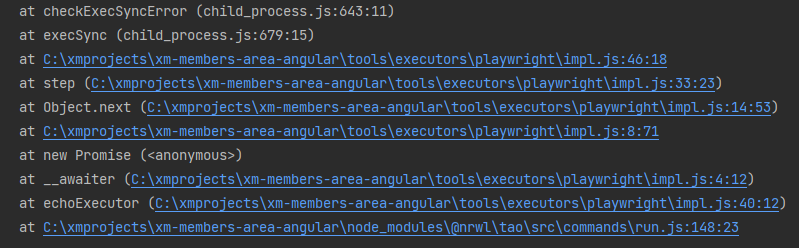
当我在控制台中手动运行时,由nx run my-app:e2e (即npx playwright test --config=apps/my-app/playwright.config.ts )触发的命令将启动,并进行必要的测试。
project.json
...
...
...
"e2e": {
  "executor": "./tools/executors/playwright:playwright",
  "options": {
    "path": "apps/my-app/playwright.config.ts"
  }
}
executor.json
{
  "executors": {
    "playwright": {
      "implementation": "./impl",
      "schema": "./schema.json",
      "description": "Runs Playwright Test "
    }
  }
}
impl.ts
export default async function echoExecutor(
  options: PlaywrightExecutorOptions,
  context: ExecutorContext
) {
  console.info(`Executing "Playwright"...`);
  console.info(`Options: ${JSON.stringify(options, null, 2)}`);

  const { stdout, stderr } = await promisify(exec)(
    `npx playwright test --config=${options.path}`,
  );
  console.log(stdout);
  console.error(stderr);

  const success = !stderr;
  return { success };
}
schema.json
{
  "$schema": "http://json-schema.org/schema",
  "type": "object",
  "cli": "nx",
  "properties": {
    "path": {
      "type": "string",
      "description": "Path to the project"
    }
  }
}
package.json
{
  "executors": "./executor.json"
}我不确定,但也许问题在promisify中?我想给npx打电话。在这种情况下,也许有一种不同的方法来调用npx?
  const { stdout, stderr } = await promisify(exec)(
    `npx playwright test --config=${options.path}`,
);回答 2
Stack Overflow用户
发布于 2022-11-15 15:05:54
我建议使用https://github.com/marksandspencer/nx-plugins/tree/main/packages/nx-playwright
您将需要使用
yarn add --dev @mands/nx-playwright
yarn playwright install --with-deps
在生成新应用之前删除现有的e2e应用程序
nx generate remove <APP-NAME>-e2e
生成新的e2e应用程序
yarn nx generate @mands/nx-playwright:project <APP-NAME>-e2e --project <APP-NAME>
PS:我也是插件的作者。
Stack Overflow用户
发布于 2022-05-04 23:34:15
试着用pnpm nx ..。首先,在package.json中定义:
"scripts": {
    "test": "playwright test --output build --workers 2",
    "test:debug": "playwright test --output build --debug",
    "test:headed": "playwright test --output build --headed",
    "test:codegen": "playwright codegen https://xxx.xxx.com/ -o records.test.ts",
    "test:codegen-json": "playwright codegen https://xxx.xxx.com/ --save-storage=storage/auth_1.json",
    "test:api": "playwright test src/e2e-api/ --retries 0  --output build "
}
然后,在共同的一行:
pnpm nx test e2e-tests --skip-nx-cache或
pnpm nx test:debug e2e-tests --skip-nx-cache或
pnpm nx test:headed e2e-tests --skip-nx-cachee2e-tests是e2e目标文件夹,package.json位于其中。--skip-nx-cache-跳过nx缓存输出
这个命令行可以在任何地方使用,例如在gitlab-ci.yaml中
https://stackoverflow.com/questions/71237912
复制相似问题
腾讯云开发者

Copyright © 2013 - 2026 Tencent Cloud. All Rights Reserved. 腾讯云 版权所有
深圳市腾讯计算机系统有限公司 ICP备案/许可证号:粤B2-20090059  粤公网安备44030502008569号
腾讯云计算(北京)有限责任公司 京ICP证150476号 | 京ICP备11018762号