
点击WMS上的数据复制
点击WMS上的数据复制
提问于 2022-02-22 11:46:20
当用户在地图上第一次点击时,他可以看到相关的信息。但是如果他再次点击,信息会被复制,就像你在下面的图片上看到的那样。
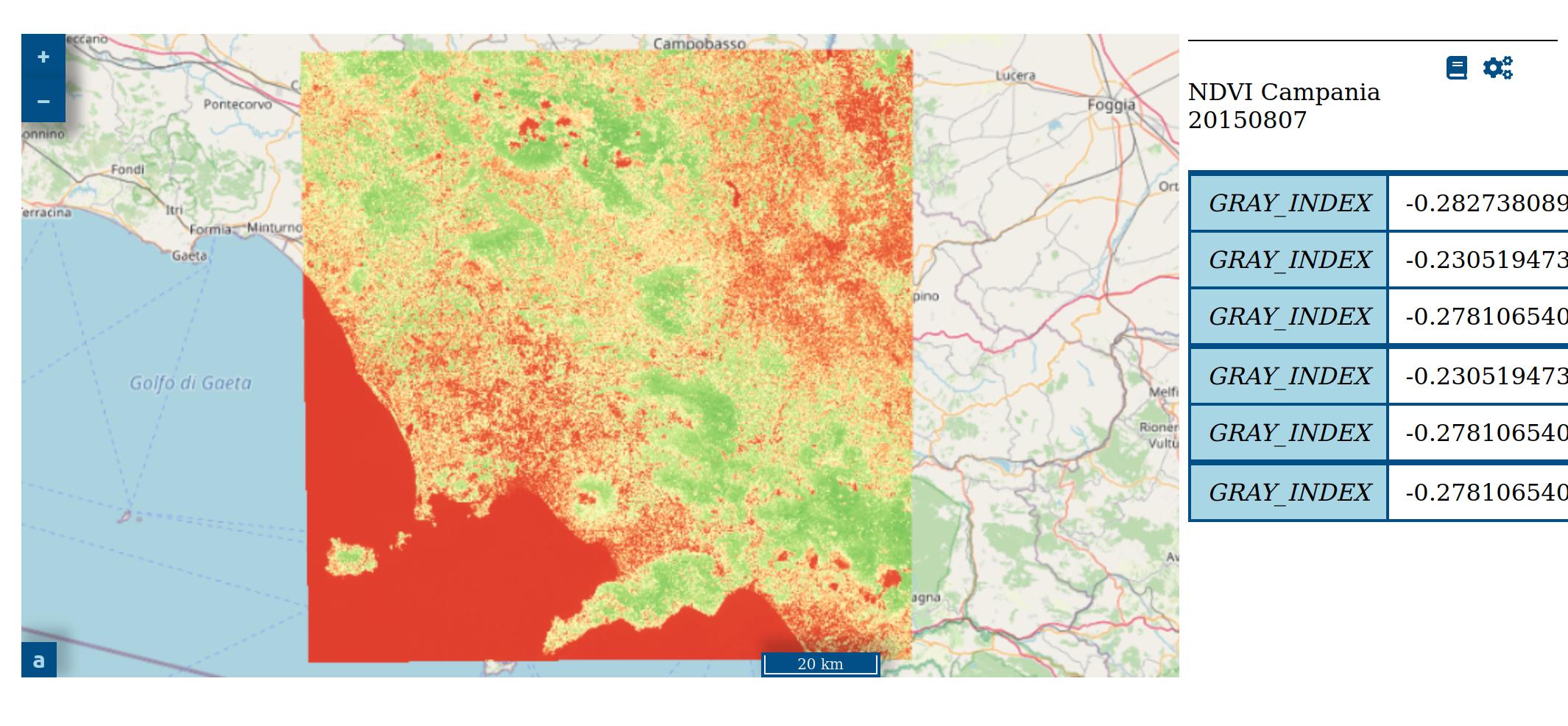
我希望旧的信息能被最新的信息所替代。为了处理此请求,我开发了以下功能:
function getElementInfo(elementID, layerName, layerTitle){
  map.on('singleclick', function (event) {
    var viewResolution = view.getResolution();
    var coordinates = event.coordinate;
    var epsg = 'EPSG:3857';
    var params = {
        'INFO_FORMAT': 'application/json'
      };
    var url = layerName.getSource().getFeatureInfoUrl(
      coordinates,
      viewResolution,
      epsg,
      params,
    );

    async function getFeatureProperties() {
      try {
        var response = await fetch(url);
        if (!response.ok) {
          throw new Error(`HTTP error!\n Status: ${response.status}\n Type: ${response.type}\n URL: ${response.url}`);
        } else {
          var data = await response.text();
          var json = JSON.parse(data).features[0].properties;

          var tableHeadContents = '<thead>'
          + '</thead>';
          var tableHead = $(tableHeadContents).attr("id","thead");
          $("#"+elementID).append(tableHead);
          var tableBodyContents = '<tbody></tbody>';
          var tableBody = $(tableBodyContents).attr("id","tbody");
          $("#"+elementID).append(tableBody);
          for (items in json) {
            key = items;
            value = json[items];
            tableRow = '<tr><td class="td-head">' + key + '</td><td class="td-body">' + value + '</td></tr>';
            $("tbody").append(tableRow);
          }

        }
      } catch (e) {
        console.log(e);
      }
    }
    getFeatureProperties();
  });
};
我在Javascript方面没有很强的技能,这里可能有一个错误,但我看不见。
我调用这个函数,只需在TileWMS之后添加它
getElementInfo('onclickinfo35', wms35, 'NDVI Campania 20150807');这些信息出现在一个简单的表格中:
<table id="onclickinfo35"></table>回答 1
Stack Overflow用户
回答已采纳
发布于 2022-02-22 12:02:34
每次单击都会在表中获取越来越多的值/行,原因是在添加数据之前没有清除表。
您需要在$("#"+elementID).html();之前调用$("#"+elementID).append(tableHead);
页面原文内容由Stack Overflow提供。腾讯云小微IT领域专用引擎提供翻译支持
原文链接:
https://stackoverflow.com/questions/71220739
复制相关文章
相似问题
腾讯云开发者

Copyright © 2013 - 2026 Tencent Cloud. All Rights Reserved. 腾讯云 版权所有
深圳市腾讯计算机系统有限公司 ICP备案/许可证号:粤B2-20090059  粤公网安备44030502008569号
腾讯云计算(北京)有限责任公司 京ICP证150476号 | 京ICP备11018762号