
Xamarin为android生成DatePicker和TimeTicker文本颜色
Xamarin为android生成DatePicker和TimeTicker文本颜色
提问于 2022-02-22 09:37:49
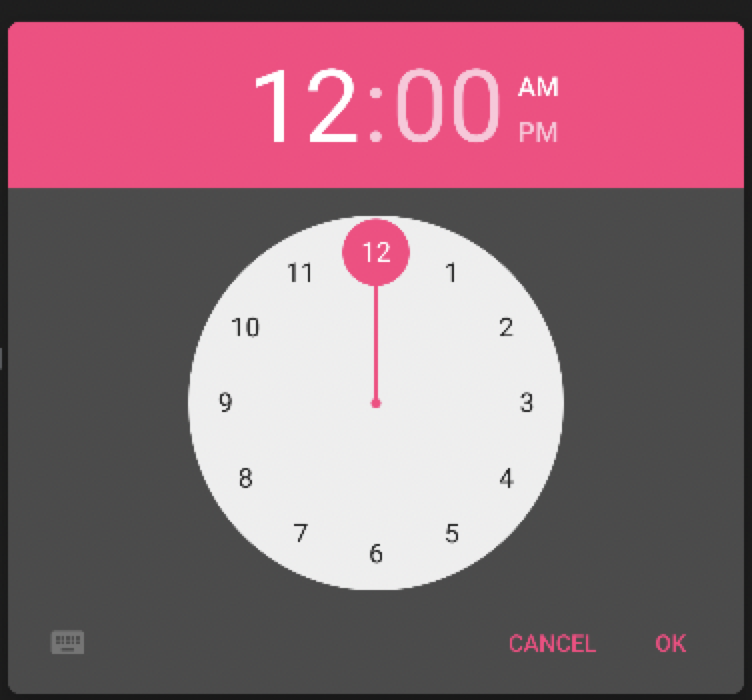
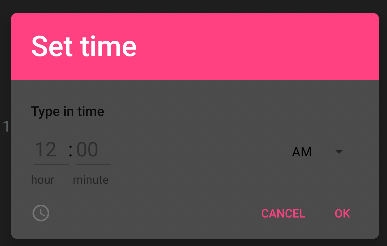
我无法在Android上为TimePicker和DatePicker设置文本颜色。另外,当我将对话框的背景色设置为深色时,时钟就会变成白色(见pick)。我成功地实现了在styles.xml中添加一种样式来更改textColor。但是,我需要能够在渲染器中更改textColor (在Xaml中设置textColor没有工作)。基本上,在时钟对话框中,我需要改变时钟的颜色,即使是静态的灰色也可以,但是设定的时间对话框,我需要能够将文本从黑暗切换到光,反之亦然。
回答 2
Stack Overflow用户
发布于 2022-02-22 10:43:00
要修改数据选择器的颜色,可以尝试修改styles.xml,如下所示。
 <style name="MainTheme" parent="MainTheme.Base">
  <item name="android:datePickerDialogTheme">@style/CustomDatePickerDialog</item>
 </style>

 <style name="CustomDatePickerDialog" parent="ThemeOverlay.AppCompat.Dialog">
  <!--header background-->
  <item name="colorAccent">#009933</item>
  <!--header textcolor-->
  <item name="android:textColorPrimaryInverse">#ff9900</item>
  <!--body background-->
  <item name="android:windowBackground">#000099</item>
  <!--selected day-->
  <item name="android:colorControlActivated">#ff8000</item>
  <!--days of the month-->
  <item name="android:textColorPrimary">#ffff00</item>
  <!--days of the week-->
  <item name="android:textColorSecondary">#ff0066</item>
  <!--cancel&ok-->
  <item name="android:textColor">#00ffff</item>
</style>Stack Overflow用户
发布于 2022-02-23 09:42:21
您可以定义两种不同的样式,它们在Light和Dark模式中表示Styles.xml
<style name="DarkTheme">
    <!-- Customize your theme here.
    -->
</style>


<style name="LightTheme">
    <!-- Customize your theme here.
    -->
</style>在MainActivity.cs中选择相应的暗/光模式样式。
[Activity(Label = "@string/app_name", Theme = "@style/AppTheme", MainLauncher = true)]
public class MainActivity: AppCompatActivity {
    protected override void OnCreate(Bundle savedInstanceState)
        {
            base.OnCreate(savedInstanceState);

            Xamarin.Essentials.Platform.Init(this, savedInstanceState);
            global::Xamarin.Forms.Forms.Init(this, savedInstanceState);
            LoadApplication(new App());

            Configuration config = Resources.Configuration;
            var ThemeMode = config.UiMode == (UiMode.NightYes | UiMode.TypeNormal);
            if (ThemeMode) SetTheme(Resource.Style.DarkTheme);
            else SetTheme(Resource.Style.LightTheme);
        }
}
但是,在这种情况下,每次切换模式时都需要重新启动应用程序。
页面原文内容由Stack Overflow提供。腾讯云小微IT领域专用引擎提供翻译支持
原文链接:
https://stackoverflow.com/questions/71218903
复制相关文章
相似问题
腾讯云开发者

Copyright © 2013 - 2026 Tencent Cloud. All Rights Reserved. 腾讯云 版权所有
深圳市腾讯计算机系统有限公司 ICP备案/许可证号:粤B2-20090059  粤公网安备44030502008569号
腾讯云计算(北京)有限责任公司 京ICP证150476号 | 京ICP备11018762号