
从Excel VBA宏优化的SAP GUI脚本
我试图将Excel优化为SAP连接,并且不想在启动以下代码时出现的两个消息框上单击"OK“:
 1 Sub SAP_1()
 2
 3 Dim obj_Shell As Object
 4 Dim obj_SAPGUI As Object
 5 Dim obj_Application As Object
 6 Dim obj_Connection As Object
 7 Dim obj_session As Object
 8
 9 Application.DisplayAlerts = False
10     Shell "C:\Program Files (x86)\SAP\FrontEnd\SAPgui\saplogon.exe", 4
11     Set obj_Shell = CreateObject("WScript.Shell")
12     Do Until obj_Shell.AppActivate("SAP Logon")
13         application.Wait Now + TimeValue("0:00:01")
14     Loop
15     Set obj_Shell = Nothing
16     Set obj_SAPGUI = GetObject("SAPGUI")
17     Set obj_Application = obj_SAPGUI.GetScriptingEngine
18     Set obj_Connection = obj_Application.OpenConnection(str_ConName, True)
19     Set obj_session = obj_Connection.Children(0)
20 ' rest of the code
21 Application.DisplayAlerts = True
22 End Sub
如何避免以下SAP消息框或通过VBA单击它们:
第17行:“脚本试图访问SAP”
第18行:“脚本打开到以下系统的连接:
下面的代码有什么不同?为什么SAP GUI脚本要求不将它们定义为对象?这是一个更好的选择吗?
 1     If Not IsObject(obj_SAPGUI) Then
 2        Set obj_SAPGUI = GetObject("SAPGUI")
 3        Set obj_Application = obj_SAPGUI.GetScriptingEngine
 4     End If
 5     If Not IsObject(obj_Connection) Then
 6        Set obj_Connection = obj_Application.Children(0)
 7    End If
 8     If Not IsObject(obj_session) Then
 9        Set obj_session = obj_Connection.Children(0)
10     End If
11     If IsObject(obj_WScript) Then
12        obj_WScript.ConnectObject obj_session, "on"
13        obj_WScript.ConnectObject obj_Application, "on"
14     End If
代码中还有其他可以优化的东西吗?
谢谢你的帮助。
回答 2
Stack Overflow用户
发布于 2022-02-21 17:03:42
以避免脚本启动访问resp的消息。连接到SAPGUI,您必须在注册表中或通过SAPGUI更改设置。
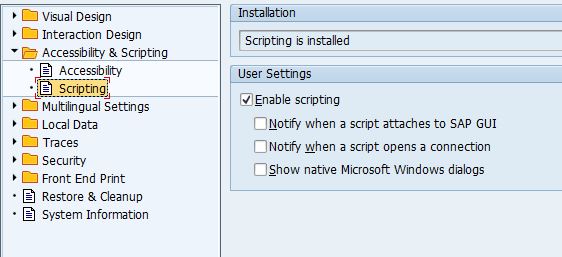
在SAPGUI中,按Alt-F12,然后选择Options、goto脚本,并取消选中下面的所有复选框启用脚本。
这些设置存储在寄存器中,还可以使用VBA代码来设置它们。关键是HKEY_CURRENT_USER\Software\SAP\SAPGUI前端\SAP前端服务器\安全
Stack Overflow用户
发布于 2022-02-21 18:26:53
非常感谢,这是我现在的最后代码:
Function RegKeyExists(i_RegKey As String) As Boolean

Dim myWS As Object
Set myWS = CreateObject("WScript.Shell")

On Error GoTo ErrorHandler
myWS.RegRead i_RegKey
RegKeyExists = True
Exit Function

ErrorHandler:
RegKeyExists = False

End Function
'
'-----------------------------------------------------------------------

Sub RegKeyReset()

Dim obj_WS As Object
Dim RegKey1 As String
Dim RegKey2 As String
Dim RegKey3 As String

Set obj_WS = CreateObject("WScript.Shell")
    RegKey1 = "HKEY_CURRENT_USER\Software\SAP\SAPGUI Front\SAP Frontend Server\Security\UserScripting"
    RegKey2 = "HKEY_CURRENT_USER\Software\SAP\SAPGUI Front\SAP Frontend Server\Security\WarnOnAttach"
    RegKey3 = "HKEY_CURRENT_USER\Software\SAP\SAPGUI Front\SAP Frontend Server\Security\WarnOnConnection"

    ' RegKey1
    If RegKeyExists(RegKey1) = False Then
        Exit Sub
    Else
        obj_WS.RegWrite RegKey1, 1, "REG_DWORD"     ' Value = 1, Type = Boolean
    End If

    ' RegKey2
    If RegKeyExists(RegKey2) = False Then
        Exit Sub
    Else
        obj_WS.RegWrite RegKey2, 0, "REG_DWORD"     ' Value = 0, Type = Boolean
    End If

    ' RegKey3
    If RegKeyExists(RegKey3) = False Then
        Exit Sub
    Else
        obj_WS.RegWrite RegKey3, 0, "REG_DWORD"     ' Value = 0, Type = Boolean
    End If

End Sub
'
'-----------------------------------------------------------------------

Sub SAPTransaction()
Dim ...
Set ...

Call RegKeyReset    ' <--------------------------- Problem solved here...

' rest of the code

End Sub
'
我是这样做的,因为我不会是唯一使用宏的人/用户,所以我不需要告诉每个人在SAP中更改他们的设置。
还得益于:https://www.slipstick.com/developer/read-and-change-a-registry-key-using-vba/
https://stackoverflow.com/questions/71209992
复制相似问题
腾讯云开发者

Copyright © 2013 - 2026 Tencent Cloud. All Rights Reserved. 腾讯云 版权所有
深圳市腾讯计算机系统有限公司 ICP备案/许可证号:粤B2-20090059  粤公网安备44030502008569号
腾讯云计算(北京)有限责任公司 京ICP证150476号 | 京ICP备11018762号