
为什么我的Xamarin.Mac应用程序在启用强化运行时崩溃,以便对其进行公证?
我正在用Mac.下的 .NET Framework4.5.2开发一个应用程序
苹果公司在他们最新的Mac版本中增加了安全特性,所以我想对应用程序进行公证,以便网关管理员能够读取生成的票证,而下载应用程序的其他Mac用户在启动应用程序时不会收到安全警告。
感谢Xamarin.Mac,Visual构建了应用程序之后,我手动运行了几个命令来对.app进行签名。然后,我创建一个安装程序,生成一个包含.dmg文件的.app文件。然后,我将.dmg文件发送到公证服务,它生成一个包含以下两行的报告。
"status": "Invalid",
"statusSummary": "Archive contains critical validation errors",
对.app进行签名的命令如下。
codesign -vvv --strict --force --timestamp --options runtime    MyApp.app/Contents/Frameworks/MyFramework.framework/Versions/A/Resources/UpdateApp.app/Contents/MacOS/UpdateApp
codesign -vvv --strict --force --timestamp                      MyApp.app/Contents/Frameworks/MyFramework.framework/Versions/A/MyFramework
codesign -vvv --strict --force --timestamp                      MyApp.app/Contents/Library/loginItems/LoginApp.app
codesign -vvv --strict --force --timestamp --options runtime    MyApp.app/Contents/PlugIns/FinderExt.appex
codesign -vvv --strict --force --timestamp                      MyApp.app
双击.app文件将启动应用程序,这正是我想要的。但公证报告说
The executable does not have the hardened runtime enabled.适用于以下两种应用程序
MyApp.dmg/MyApp.app/Contents/Library/loginItems/LoginApp.app/Contents/MacOS/LoginApp
MyApp.dmg/MyApp.app/Contents/MacOS/MyApp
为了尝试纠正这个问题,我添加了LoginApp的LoginApp参数。
codesign -vvv --strict --force --timestamp --options runtime    MyApp.app/Contents/Frameworks/MyFramework.framework/Versions/A/Resources/UpdateApp.app/Contents/MacOS/UpdateApp
codesign -vvv --strict --force --timestamp                      MyApp.app/Contents/Frameworks/MyFramework.framework/Versions/A/MyFramework
codesign -vvv --strict --force --timestamp --options runtime    MyApp.app/Contents/Library/loginItems/LoginApp.app
codesign -vvv --strict --force --timestamp --options runtime    MyApp.app/Contents/PlugIns/FinderExt.appex
codesign -vvv --strict --force --timestamp                      MyApp.app
双击.app文件仍然会启动应用程序,这正是我想要的。公证报告仍然说
The executable does not have the hardened runtime enabled.但只对第二个应用程序,即没有修改codesign命令的应用程序。
MyApp.dmg/MyApp.app/Contents/MacOS/MyApp因此,在我看来,要成功地公证应用程序,我所要做的就是以同样的方式修改第二个codesign命令。
codesign -vvv --strict --force --timestamp --options runtime    MyApp.app/Contents/Frameworks/MyFramework.framework/Versions/A/Resources/UpdateApp.app/Contents/MacOS/UpdateApp
codesign -vvv --strict --force --timestamp                      MyApp.app/Contents/Frameworks/MyFramework.framework/Versions/A/MyFramework
codesign -vvv --strict --force --timestamp --options runtime    MyApp.app/Contents/Library/loginItems/LoginApp.app
codesign -vvv --strict --force --timestamp --options runtime    MyApp.app/Contents/PlugIns/FinderExt.appex
codesign -vvv --strict --force --timestamp --options runtime    MyApp.app
我是对的,因为公证报告不再显示错误,并且为守门人生成了一张票。但是,当我双击.app以运行应用程序时,这一次它不会启动。在Mac的控制台应用程序中,我可以看到有以下行生成的崩溃报告。
Exception Type:        EXC_BAD_ACCESS (SIGSEGV)
Exception Codes:       KERN_INVALID_ADDRESS at 0x0000000000000000
Exception Note: EXC_CORPSE_NOTIFY我不明白如何才能得到SIGSEGV崩溃,因为应用程序是完全相同的,只有codesign命令才能适应应用程序的公证。
我所拥有的是我既可以启动应用程序,也可以进行公证,而我想要的是两者都有,一个公证的应用程序也可以在不崩溃的情况下启动,就像在codesign 命令之前所做的那样。
我已经阅读了关于这一主题的两页苹果文档,我认为我已经遵循了所有的建议,在解决我的问题上没有运气。
https://developer.apple.com/documentation/security/notarizing_macos_software_before_distribution
https://developer.apple.com/documentation/security/notarizing_macos_software_before_distribution/resolving_common_notarization_issues我已经尝试了一段时间,并且尝试了几个codesign命令和参数的组合。我遗漏了什么?提前谢谢你的指点。
注:所有codesign命令还包括一个--sign "Developer ID Application: MyCompany ([...])"参数。
回答 2
Stack Overflow用户
发布于 2022-04-20 09:19:09
在文本编辑器中打开entitlements.plist文件并添加
<key>com.apple.security.cs.allow-jit</key>
<true/>Stack Overflow用户
发布于 2022-06-22 06:25:43
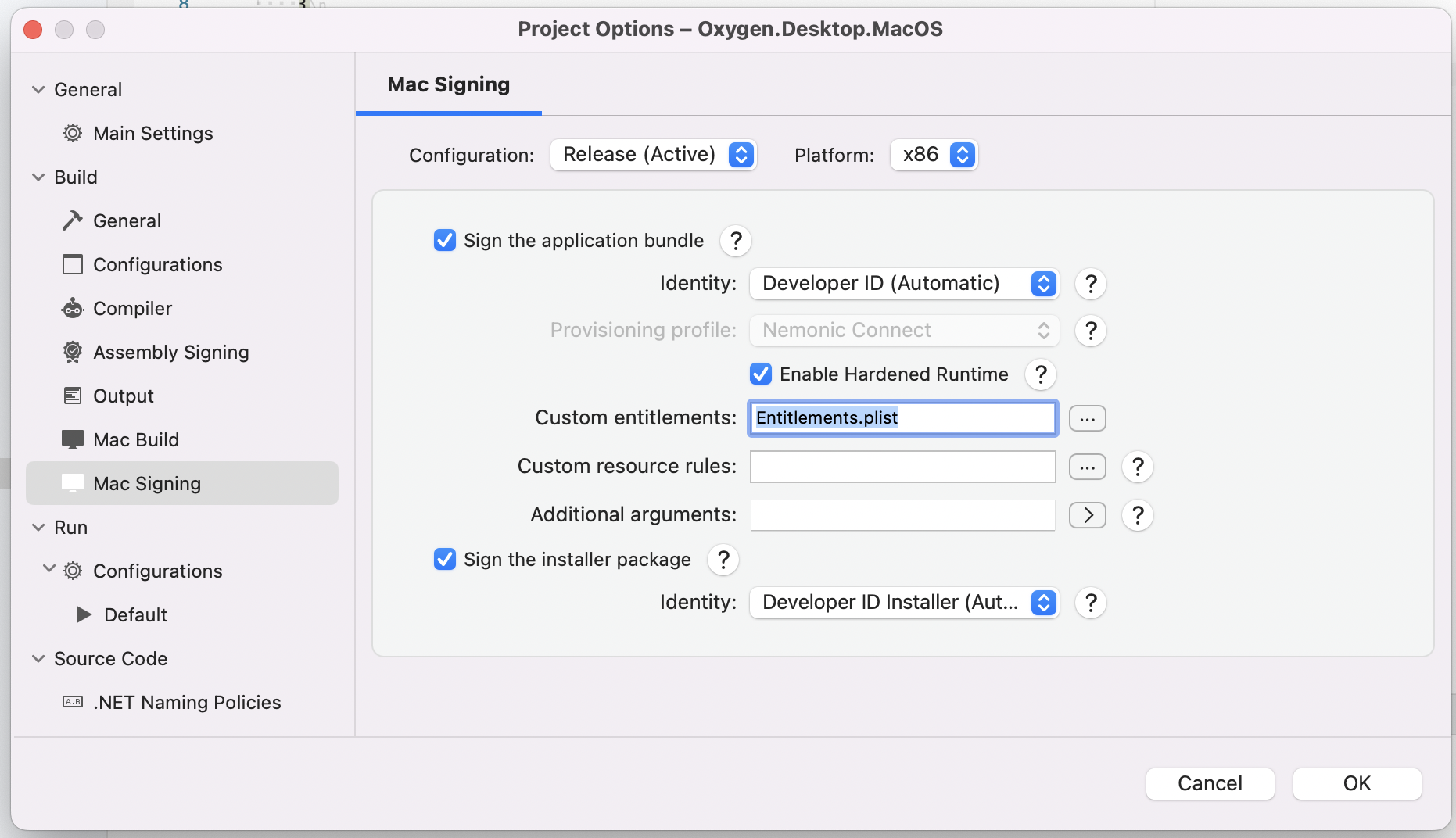
我也有同样的问题并解决了它。
这是entitlements.plist文件添加到Mac签名的步骤。
https://stackoverflow.com/questions/71204358
复制相似问题
腾讯云开发者

Copyright © 2013 - 2026 Tencent Cloud. All Rights Reserved. 腾讯云 版权所有
深圳市腾讯计算机系统有限公司 ICP备案/许可证号:粤B2-20090059  粤公网安备44030502008569号
腾讯云计算(北京)有限责任公司 京ICP证150476号 | 京ICP备11018762号