
如何显示超链接文本在标记弹出内被点击时的模式?
如何显示超链接文本在标记弹出内被点击时的模式?
提问于 2022-02-18 16:15:50
我是自定义的启动叶模板,我要做的是,当我点击描述文本的模式将出现。我在用传单。我已经尝试了下面的代码,但是当我单击"description“文本时什么也没有发生。
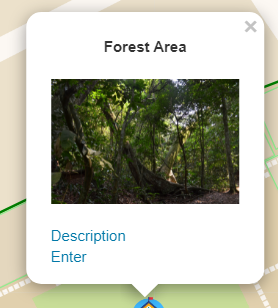
这是模态
<div class="modal fade" id="descriptionModal" tabindex="-1" role="dialog">
<div class="modal-dialog">
<div class="modal-content">
<div class="modal-header">
<button
type="button"
class="close"
data-dismiss="modal"
aria-hidden="true"
>
×
</button>
<h4 class="modal-title">Description Title</h4>
</div>
<div class="modal-body">
<p>Description here...</p>
</div>
<div class="modal-footer">
<button type="button" class="btn btn-default" data-dismiss="modal">
Close
</button>
</div>
</div>
</div>
</div>这是打开模式的脚本。
$("#description-btn").click(function () {
 $("#descriptionModal").modal("show");
 $(".navbar-collapse.in").collapse("hide");
 return false;
});
这是标记的脚本
var buildingLayer = L.geoJson(null);
var buildings = L.geoJson(null, {
  pointToLayer: function (feature, latlng) {
    return L.marker(latlng, {
      icon: L.icon({
        iconUrl: "assets/img/campus.png",
        iconSize: [28, 28],
        iconAnchor: [12, 28],
        popupAnchor: [0, -25],
      }),
      title: feature.properties.NAME,
      riseOnHover: true,
    });
  },
  onEachFeature: function (feature, layer) {
    if (feature.properties) {
      layer
        .bindPopup(
          "<p><b><center>" +
            feature.properties.NAME +
            "</center></b></p>" +
            "<center><img src='" +
            feature.properties.PIC +
            "' style='width:150px;height:50x;'></img></center> " +
            "</br><a href='#' data-toggle='collapse' data-target='.navbar-collapse.in' id='description-btn'>" +
            feature.properties.DESC +
            "</a>" +
            "</br><a href='#'>" +
            feature.properties.ENTER +
            "</a>"
        )
        .openPopup();
      buildingSearch.push({
        name: layer.feature.properties.NAME,
        address: layer.feature.properties.ADDRESS1,
        source: "Buildings",
        id: L.stamp(layer),
        lat: layer.feature.geometry.coordinates[1],
        lng: layer.feature.geometry.coordinates[0],
      });
    }
  },
});
$.getJSON("data/building.geojson", function (data) {
  buildings.addData(data);
  map.addLayer(buildingLayer);
});回答 1
Stack Overflow用户
回答已采纳
发布于 2022-02-18 16:26:02
在将单击侦听器添加到元素时,元素不存在,因为在打开弹出窗口之前,弹出窗口的html不会添加到DOM中。
因此,向该层添加一个侦听器以检查弹出窗口是否打开:
layer.bindPopup(YOUR_CONTENT_BLABLA).openPopup();

layer.on("popupopen", () => {
    $("#description-btn").click(function () {
        $("#descriptionModal").modal("show");
        $(".navbar-collapse.in").collapse("hide");
        return false;
    });
});页面原文内容由Stack Overflow提供。腾讯云小微IT领域专用引擎提供翻译支持
原文链接:
https://stackoverflow.com/questions/71176643
复制相关文章
相似问题
腾讯云开发者

Copyright © 2013 - 2026 Tencent Cloud. All Rights Reserved. 腾讯云 版权所有
深圳市腾讯计算机系统有限公司 ICP备案/许可证号:粤B2-20090059  粤公网安备44030502008569号
腾讯云计算(北京)有限责任公司 京ICP证150476号 | 京ICP备11018762号