
从CGContext中获取CGImage
我有一个CGImage,我想在上面画一条线。我认为我应该创建一个CGContext,然后在上面画图像,然后在上面画我的线。但是,我不知道如何从CGImage转到CGContext。我已经看到了从UIImage到CGContext的例子,但我想知道是否有一种更直接的方法(希望更有效)。
我的尝试:
let ctx = CGContext(data: nil, width: cgImage.width, height: cgImage.height, bitsPerComponent: cgImage.bitsPerComponent, bytesPerRow: cgImage.bytesPerRow, space: cgImage.colorSpace!, bitmapInfo: cgImage.bitmapInfo.rawValue)

      ctx!.draw(cgImage, in: CGRect(x: 0, y: 0, width: cgImage.width, height: cgImage.height))

      ctx!.setFillColor(UIColor.red.cgColor)

      ctx!.fillEllipse(in: CGRect(x: 0, y: 0, width: 100, height: 100))

cgImage = (ctx!.makeImage())!回答 1
Stack Overflow用户
发布于 2022-02-18 14:36:24
它看起来效率低下,创建一个空白的上下文并将图像绘制给它,不是吗?另一方面,这种类型的图像绘制是高度优化的。但让我们看看我们还能做些什么。
注意:请勿复制或粘贴
不要在以下情况下使用程序中的代码块:
- 内存泄漏分析
- 衡量变化前后的绩效统计数据
- 了解输入图像具有某种格式时会发生什么情况,Core不知道如何使用。
向CGContext发送数据
CGContext构造函数接受一个data参数。我们将其设置为nil,让它创建新的数据,但是如果我们给它一些现有的字节,上下文就会出现,并且它的图像已经就位。
但是我们从哪里得到这些字节呢?也许有更好的方法来做这件事,但最简单的是我能找到这样做的方法:
- 获取CGImage.dataProvider,然后是CGImageDataProvider.data,它将原始图像字节复制到不可变的
CFData对象中。 - 分配一个
UnsafeMutablePointer<UInt8>并使用CFData的长度。(请记住稍后使用deallocate())。 - 将
CFData内容复制到UnsafeMutablePointer<UInt8>中。 - 使用
CGContext构造UnsafeMutablePointer<UInt8>。
这看起来已经很可疑了:我们可能期望复制图像中的所有字节一次,但是我们要复制它们两次。
把它放在一起
func imageByCopyingBytes(cgImageInput : CGImage) -> CGImage? {
    var cgImageOutput : CGImage? = nil

    if let dataProvider = cgImageInput.dataProvider {
        // Here we make a copy of the image bytes.
        // This copy is immutable, so can't be used by CGContext().
        // The CGDataProvider documentation:
        // https://developer.apple.com/documentation/coregraphics/cgdataprovider/1408309-data
        // Says "You are responsible for releasing this object."
        // However, Swift does manage these types:
        // https://developer.apple.com/documentation/swift/imported_c_and_objective-c_apis/working_with_core_foundation_types
        if let data : CFData = dataProvider.data {
            let length = CFDataGetLength(data)

            // We must manually deallocate this memory by calling bytes.deallocate() once we finish it.
            let bytes = UnsafeMutablePointer<UInt8>.allocate(capacity: length)

            // Copy the immutable image data into the mutable bytes.
            CFDataGetBytes(data, CFRange(location: 0, length: length), bytes)

            // Create a context with the mutable bytes as the data.
            // This may fail and return nil if the input image bitmapInfo is not supported on this operating system.
            //
            if let ctx = CGContext(data: bytes, width: cgImageInput.width, height: cgImageInput.height, bitsPerComponent: cgImageInput.bitsPerComponent, bytesPerRow: cgImageInput.bytesPerRow, space: cgImageInput.colorSpace!, bitmapInfo: cgImageInput.bitmapInfo.rawValue) {

                // Do your drawing here.
                ctx.setFillColor(UIColor.red.cgColor)
                ctx.fillEllipse(in: CGRect(x: 0, y: 0, width: 100, height: 100))

                // Make a CGImage from the context.
                cgImageOutput = (ctx.makeImage())

                if cgImageOutput == nil {
                    print("Failed to make image from CGContext.")
                }
            } else {
                print("Could not create context. Try different image parameters.")
            }

            // We have finished with the bytes, so deallocate them.
            bytes.deallocate()
        } else {
            print("Could not get dataProvider.data")
        }
    } else {
        print ("Could not get cgImage.dataProvider")
    }

    return cgImageOutput
}
表现:令人失望
我设置函数来创建CGContext和CGImage副本,通过这些方法-没有绘图,只是复制。我数了数我能在1秒内运行多少次,从小图标到普通的iPhone照片,再到巨大的全景图。
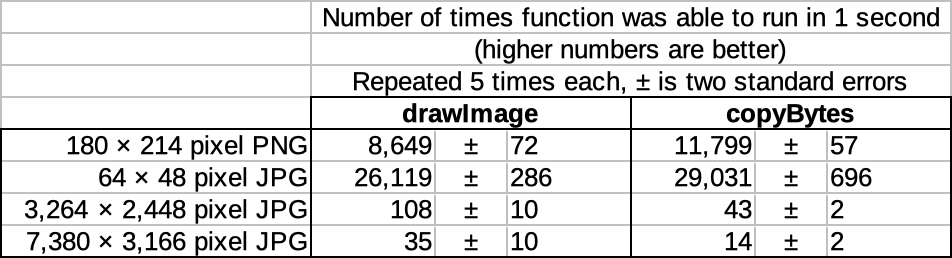
在小图标图像上,imageByCopyingBytes的速度快了11%到36%,可能还不足以证明程序的复杂性。在正常大小的照片和全景,它是60%的慢!
我不能完全解释。但这确实表明,苹果在优化其绘图功能方面投入了大量工作。千万不要以为你需要和他们打交道。
附加警告: CGContext构造器
您可能会注意到,为了确保在使用变量之前定义了变量,我的imageByCopyingBytes函数是可选的绑定。这会导致函数悄悄地返回nil,其中只有一个日志到控制台,让您知道发生了什么。
我不知道这会不会完好无损,但这是我试过的第一张照片。这是我拥有的一个较小的PNG文件,所以应该是一个安全的测试文件,对吗?不对?
我试图在macOS 11.6.1上作为催化剂应用程序运行。我试图构造CGContext的步骤导致将此错误记录到控制台。由于没有创建CGContext,接下来的步骤将导致崩溃。
CGBitmapContextCreate: unsupported parameter combination: set CGBITMAP_CONTEXT_LOG_ERRORS environmental variable to see the details错误环境变量?的问题和答案帮助我看到了完全的错误:
CGBitmapContextCreate: unsupported parameter combination:
    8 bits/component; integer;
    32 bits/pixel;
    RGB color space model; kCGImageAlphaLast;
    default byte order;
720 bytes/row.接下来将列出支持的格式,这表明它不喜欢kCGImageAlpaLast,并且想要kCGImageAlphaPremultipliedLast或类似的格式。
我指定了我的macOS版本,因为它在iOS 15.2模拟器上工作得很好,尽管它仍然不能用kCGImageAlphaLast处理灰度图片。
所有这一切意味着,我将非常谨慎地创建您的CGContext格式与您的输入图像。我有一种匹配它的冲动,特别是当您从用户那里获取文件,在它们上绘制东西,然后返回编辑的文件时。我喜欢保留图像格式的应用程序。但是核心图形库有他们喜欢的格式,也有它们勉强容忍的格式。对于大多数任务,最好指定您创建的任何CGContext的格式。显然,您不能再使用我们刚才所做的工作来创建上面的字节数组。但是,通过绘制图片复制图片,就像您在问题中所做的一样,应该仍然有效,并让converting来处理转换它的艰苦工作。
结论
如果您一直滚动到这里,这是我对您的问题的最后回答:继续通过绘制来复制图像,但是在CGContext构造函数中指定您自己的bitmapInfo和可能的colorSpace。
如果加载带有非标准方向的JPEG,也会得到预期的结果吗?
https://stackoverflow.com/questions/71169691
复制相似问题
腾讯云开发者

Copyright © 2013 - 2026 Tencent Cloud. All Rights Reserved. 腾讯云 版权所有
深圳市腾讯计算机系统有限公司 ICP备案/许可证号:粤B2-20090059  粤公网安备44030502008569号
腾讯云计算(北京)有限责任公司 京ICP证150476号 | 京ICP备11018762号