
用于聊天室语音气泡位置的css
用于聊天室语音气泡位置的css
提问于 2022-02-17 08:47:16
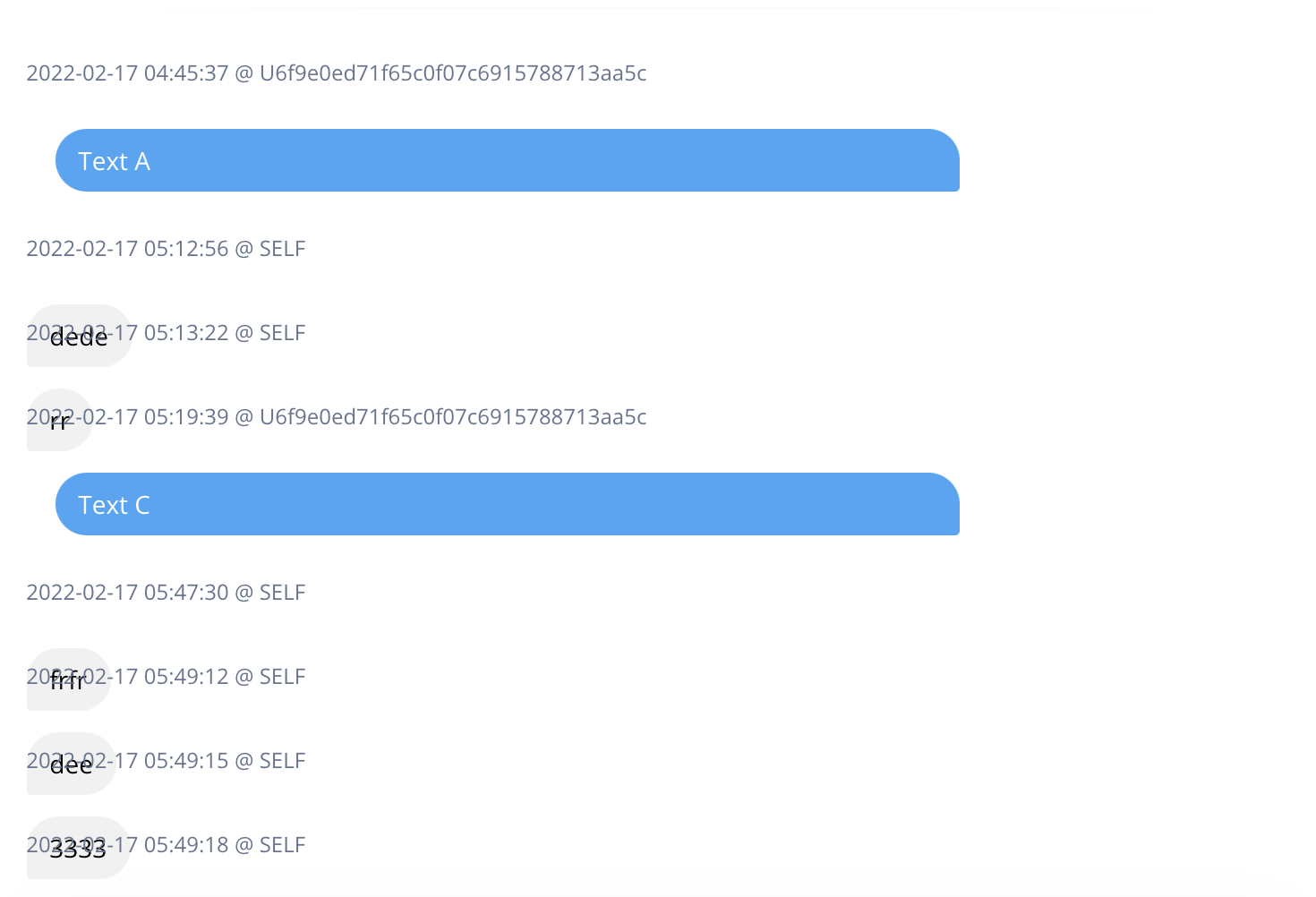
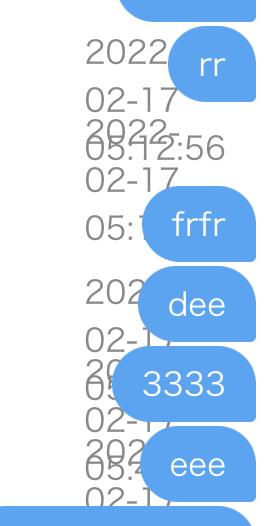
你好,我试图设计一个聊天室,并被困在css的语音气泡。
我想要的东西--右边是蓝色的,左边是灰色的。

,,我尝试了几个答案,比如位置相对/绝对。但所有的答案对我都没有用。如果有人能在这里帮我,那就太好了。
<div class="card-body p-3 pt-0">
    <div class="my-1 rounded-lg ">
        <div class="position-relative w-100">

            @foreach ($chats as $chat)
            <p class="text-xs">
                {{$chat->created_at}} @ {{$chat->name}}
            </p>
            <div class="border-0 {{ $chat->user_identifier == 'SELF' ? 'chat-bubble-send' : 'chat-bubble-receive' }}">
                <p class="text-sm ">
                    {{ $chat->message }}
                </p>
            </div>
            @endforeach

        </div>
    </div>
</div>
Css
.chat-bubble-receive p {
    background: #42a5f5;
    color: #fff !important;
    border-radius: 20px 20px 3px 20px;
    display: block;
    max-width: 75%;
    padding: 7px 13px 7px 13px;
}

.chat-bubble-send p {
    background: #f1f1f1;
    color: #000 !important;
    border-radius: 20px 20px 20px 3px;
    display: block;
    max-width: 75%;
    padding: 7px 13px 7px 13px;
    position: absolute;
    left: 0;
}

.card-body {
    flex: 1 1 auto;
    padding: 1rem 1rem;
}
消息短时的()
回答 2
Stack Overflow用户
回答已采纳
发布于 2022-02-17 09:27:38
使用CSS Flex的聊天消息
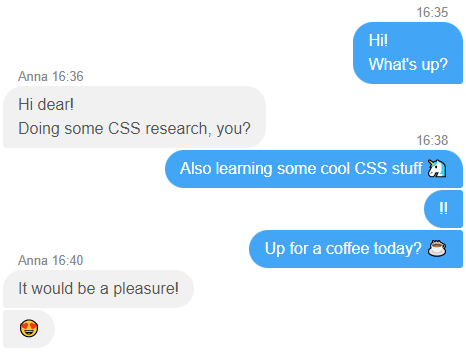
为了确定消息元素的左/右位置--使用设置为auto
- When using
position:absolute的margin-(left/right),确保在父元素上使用position:relative;(或除static以外的任何其他位置)。默认情况下,
- 使用
bottom: 100%将绝对时间详细信息定位在第一个"name+datetime“伪元素之上。但是,仅对组中的第一条消息显示display:block;,通过使用:first-child和+next combinator选择器
- ,您可以使用
data-*attribute存储额外的详细信息(时间等),并使用pseudo element like::before来代替使用:first-child填充该值。
/* QuickReset */ * {margin: 0; box-sizing: border-box;}

.chat {
  --rad: 20px;
  --rad-sm: 3px;
  font: 16px/1.5 sans-serif;
  display: flex;
  flex-direction: column;
  padding: 20px;
  max-width: 500px;
  margin: auto;
}

.msg {
  position: relative;
  max-width: 75%;
  padding: 7px 15px;
  margin-bottom: 2px;
}

.msg.sent {
  border-radius: var(--rad) var(--rad-sm) var(--rad-sm) var(--rad);
  background: #42a5f5;
  color: #fff;
  /* moves it to the right */
  margin-left: auto;
}

.msg.rcvd {
  border-radius: var(--rad-sm) var(--rad) var(--rad) var(--rad-sm);
  background: #f1f1f1;
  color: #555;
  /* moves it to the left */
  margin-right: auto;
}

/* Improve radius for messages group */

.msg.sent:first-child,
.msg.rcvd+.msg.sent {
  border-top-right-radius: var(--rad);
}

.msg.rcvd:first-child,
.msg.sent+.msg.rcvd {
  border-top-left-radius: var(--rad);
}


/* time */

.msg::before {
  content: attr(data-time);
  font-size: 0.8rem;
  position: absolute;
  bottom: 100%;
  color: #888;
  white-space: nowrap;
  /* Hidden by default */
  display: none;
}

.msg.sent::before {
  right: 15px;
}

.msg.rcvd::before {
  left: 15px;
}


/* Show time only for first message in group */

.msg:first-child::before,
.msg.sent+.msg.rcvd::before,
.msg.rcvd+.msg.sent::before {
  /* Show only for first message in group */
  display: block;
}<div class="chat">
<div data-time="16:35" class="msg sent">Hi!<br>What's up?</div>
<div data-time="Anna 16:36" class="msg rcvd">Hi dear! <br>Doing some CSS research, you?</div>
<div data-time="16:38" class="msg sent">Also learning some cool CSS stuff </div>
<div data-time="16:38" class="msg sent">!!</div>
<div data-time="16:38" class="msg sent">Up for a coffee today? ☕</div>
<div data-time="Anna 16:40" class="msg rcvd">It would be a pleasure!</div>
<div data-time="Anna 16:40" class="msg rcvd"></div>
</div>
Stack Overflow用户
发布于 2022-02-17 09:15:35
我建议使用flex魔术,用一个新的行div包装每个气泡。
.row:nth-of-type(2n) {
  display: flex;
  justify-content: flex-end;
}

.bubble {
  display: inline-block;
  padding: 5px;
}<div class="page-wrapper">
<div class="bubble-wrapper">
<div class="row">
<div class="bubble">
<p>First bubble</p>
<small>Details</small>
</div>
</div>
<div class="row">
<div class="bubble">
<p>Second bubble</p>
<small>Details</small>
</div>
</div>
<div class="row">
<div class="bubble">
<p>Third bubble</p>
<small>Details</small>
</div>
</div>
<div class="row">
<div class="bubble">
<p>Fourth bubble</p>
<small>Details</small>
</div>
</div>
</div>
</div>
页面原文内容由Stack Overflow提供。腾讯云小微IT领域专用引擎提供翻译支持
原文链接:
https://stackoverflow.com/questions/71154905
复制相关文章
相似问题
腾讯云开发者

Copyright © 2013 - 2026 Tencent Cloud. All Rights Reserved. 腾讯云 版权所有
深圳市腾讯计算机系统有限公司 ICP备案/许可证号:粤B2-20090059  粤公网安备44030502008569号
腾讯云计算(北京)有限责任公司 京ICP证150476号 | 京ICP备11018762号