
选择时如何将strokeColor应用于cardView
我想知道如何将笔画颜色应用于卡片视图onClick,并在再次单击时取消选择它。
另外,我有多个卡片视图,所以如果其中一个已经被选中并应用了笔画颜色,但是如果用户单击另一个卡片视图,则笔画颜色从第一个卡片中消失,并应用到受人尊敬的卡片视图中。
我怎样才能做到这一点?
现在,我已经将笔画颜色应用到了一个卡片视图中。
作为进一步的注意,我希望得到所选的CardView id或当点击捐赠按钮时的金额,并将卡片视图(金额)传递给支付网关。
看上去是这样的:
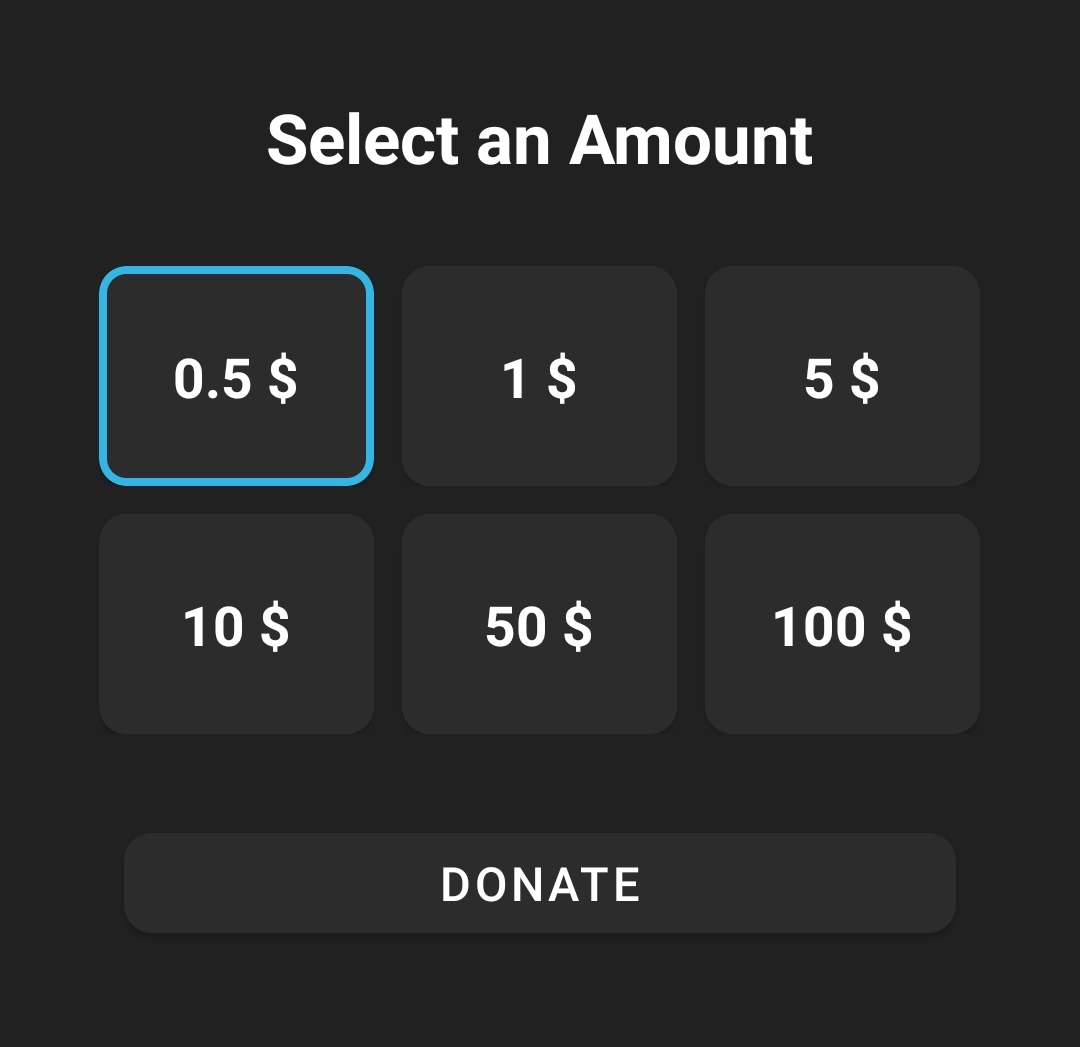
donate_fragment.xml //只有卡片视图部分和按钮
<TextView
        android:layout_width="wrap_content"
        android:layout_height="wrap_content"
        android:layout_gravity="center"
        android:layout_marginTop="50dp"
        android:text="@string/select_an_amount"
        android:textColor="@color/white"
        android:textSize="25sp"
        android:textStyle="bold|normal" />

    <LinearLayout
        android:layout_width="wrap_content"
        android:layout_height="wrap_content"
        android:layout_gravity="center"
        android:layout_marginTop="30dp"
        android:orientation="horizontal">

        <com.google.android.material.card.MaterialCardView
            android:layout_width="100dp"
            android:layout_height="80dp"
            app:strokeColor="@color/wallet_holo_blue_light"
            app:strokeWidth="3dp"
            android:layout_marginEnd="10dp"
            android:backgroundTint="@color/Card_Elevation_Color"
            android:clickable="true"
            android:focusable="true"
            android:foreground="?android:attr/selectableItemBackground"
            app:cardCornerRadius="10dp"
            app:cardElevation="2dp">

            <TextView
                android:layout_width="wrap_content"
                android:layout_height="wrap_content"
                android:layout_gravity="center"
                android:text="@string/_0_5"
                android:textColor="@color/white"
                android:textSize="20sp"
                android:textStyle="bold|normal" />
        </com.google.android.material.card.MaterialCardView>

        <com.google.android.material.card.MaterialCardView
            android:layout_width="100dp"
            android:layout_height="80dp"
            android:layout_marginEnd="10dp"
            android:backgroundTint="@color/Card_Elevation_Color"
            android:clickable="true"
            android:focusable="true"
            android:foreground="?android:attr/selectableItemBackground"
            app:cardCornerRadius="10dp"
            app:cardElevation="2dp">

            <TextView
                android:layout_width="wrap_content"
                android:layout_height="wrap_content"
                android:layout_gravity="center"
                android:text="@string/_1"
                android:textColor="@color/white"
                android:textSize="20sp"
                android:textStyle="bold|normal" />
        </com.google.android.material.card.MaterialCardView>

        <com.google.android.material.card.MaterialCardView
            android:layout_width="100dp"
            android:layout_height="80dp"
            android:backgroundTint="@color/Card_Elevation_Color"
            android:clickable="true"
            android:focusable="true"
            android:foreground="?android:attr/selectableItemBackground"
            app:cardCornerRadius="10dp"
            app:cardElevation="2dp">

            <TextView
                android:layout_width="wrap_content"
                android:layout_height="wrap_content"
                android:layout_gravity="center"
                android:text="@string/_5"
                android:textColor="@color/white"
                android:textSize="20sp"
                android:textStyle="bold|normal" />
        </com.google.android.material.card.MaterialCardView>


    </LinearLayout>

    <LinearLayout
        android:layout_width="wrap_content"
        android:layout_height="wrap_content"
        android:layout_gravity="center"
        android:layout_marginTop="10dp"
        android:orientation="horizontal">

        <com.google.android.material.card.MaterialCardView
            android:layout_width="100dp"
            android:layout_height="80dp"
            android:layout_marginEnd="10dp"
            android:backgroundTint="@color/Card_Elevation_Color"
            android:clickable="true"
            android:focusable="true"
            android:foreground="?android:attr/selectableItemBackground"
            app:cardCornerRadius="10dp"
            app:cardElevation="2dp">

            <TextView
                android:layout_width="wrap_content"
                android:layout_height="wrap_content"
                android:layout_gravity="center"
                android:text="@string/_10"
                android:textColor="@color/white"
                android:textSize="20sp"
                android:textStyle="bold|normal" />
        </com.google.android.material.card.MaterialCardView>

        <com.google.android.material.card.MaterialCardView
            android:layout_width="100dp"
            android:layout_height="80dp"
            android:layout_marginEnd="10dp"
            android:backgroundTint="@color/Card_Elevation_Color"
            android:clickable="true"
            android:focusable="true"
            android:foreground="?android:attr/selectableItemBackground"
            app:cardCornerRadius="10dp"
            app:cardElevation="2dp">

            <TextView
                android:layout_width="wrap_content"
                android:layout_height="wrap_content"
                android:layout_gravity="center"
                android:text="@string/_50"
                android:textColor="@color/white"
                android:textSize="20sp"
                android:textStyle="bold|normal" />
        </com.google.android.material.card.MaterialCardView>

        <com.google.android.material.card.MaterialCardView
            android:layout_width="100dp"
            android:layout_height="80dp"
            android:backgroundTint="@color/Card_Elevation_Color"
            android:clickable="true"
            android:focusable="true"
            android:foreground="?android:attr/selectableItemBackground"
            app:cardCornerRadius="10dp"
            app:cardElevation="2dp">

            <TextView
                android:layout_width="wrap_content"
                android:layout_height="wrap_content"
                android:layout_gravity="center"
                android:text="@string/_100"
                android:textColor="@color/white"
                android:textSize="20sp"
                android:textStyle="bold|normal" />
        </com.google.android.material.card.MaterialCardView>


    </LinearLayout>

    <com.google.android.material.button.MaterialButton
        android:id="@+id/donateBtn"
        android:layout_width="match_parent"
        android:layout_height="wrap_content"
        android:layout_marginStart="45dp"
        android:layout_marginTop="30dp"
        android:layout_marginEnd="45dp"
        android:text="@string/donate"
        android:textAlignment="center"
        android:textSize="17sp"
        app:cornerRadius="10dp" />
在实现答案之后,这是结果//谢谢您@Zain
更新 //如何传递并从片段中获取选定的cardView
Donate_Fragment
// Donate Btn  // navigating to the Activity

    donateBtn = view.findViewById(R.id.donateBtn);
    donateBtn.setOnClickListener(view12 -> {
        Intent intent = new Intent(getActivity(), donate_final_activity.class);
        if (cardView1.isChecked()) {
            startActivity(intent);
        }
        if (cardView2.isChecked()) {
            startActivity(intent);
        }
        if (cardView3.isChecked()) {
            startActivity(intent);
        }
        if (cardView4.isChecked()) {
            startActivity(intent);
        }
        if (cardView5.isChecked()) {
            startActivity(intent);
        }
        if (cardView6.isChecked()) {
            startActivity(intent);
        }


    });
donate_activity.java //这是我希望从片段中获取选定的cardViews的活动
public class donate_final_activity extends AppCompatActivity {
    MaterialButton donateBtn;
    TextView selectedAmt;

    protected void onCreate(Bundle savedInstanceState) {
        super.onCreate(savedInstanceState);
        setContentView(R.layout.final_donate_activity);
        // just trying to get something from the fragment  but didnt understand how to do it
        Donate_Fragment donate_fragment = new Donate_Fragment();
        donate_fragment.getView();
       // end of trying haha ha

        selectedAmt = findViewById(R.id.selectedAmt); // also i want to set the text after getting the cardView for eg if cardView6 was seleceted i want to setText to 100 $

        //Donate btn // this the final button when the payment gateway will open
        donateBtn = findViewById(R.id.donateBtn_final);
        donateBtn.setOnClickListener(view -> {
            if (cardView1.isChecked()){  // ofcourse this is not working as i didn't get the selected carView (or i say the listener) , i just keep it so you can get a understanding of what im trying to achive
                makePayment1();
            }
            if (cardView2.isChecked()) {
                makePayment2();
            }
            if (cardView3.isChecked()) {
                makePayment3();
            }
            if (cardView4.isChecked()) {
                makePayment4();
            }
            if (cardView5.isChecked()) {
                makePayment5();
            }
            if (cardView6.isChecked()) {
                makePayment6();
            }
        });
}回答 2
Stack Overflow用户
发布于 2022-02-16 20:42:11
可以使用笔画颜色的选择器来更改state_checked。
selector.xml:
<?xml version="1.0" encoding="utf-8"?>
<selector xmlns:android="http://schemas.android.com/apk/res/android">
    <item android:color="#36B3E0" android:state_checked="true" />
    <item android:color="@android:color/transparent" android:state_checked="false" />
</selector>将其应用于CardView
app:checkedIcon="@null"
app:strokeColor="@drawable/selector"
android:checkable="true"checkedIcon设置为没有勾选卡的图标。
然后在OnClickListener中更改检查状态
但在此之前,通过使用周围的ViewGroup清除所有检查过的卡,这里有一个扩展函数:
fun ViewGroup.clearCardSelection() {
    this.children.forEach {
        if (it is MaterialCardView)
            it.isChecked = false
    }
}
听众:
val listener = View.OnClickListener {
    if (it is MaterialCardView) {
        val isChecked = it.isChecked
        linearlayout1.clearCardSelection() // top LinearLayout
        linearlayout2.clearCardSelection() // bottom LinearLayout
        it.isChecked = !isChecked
    }
}
cardView.setOnClickListener(listener) // repeat this for the 6 cards
这就是结果:
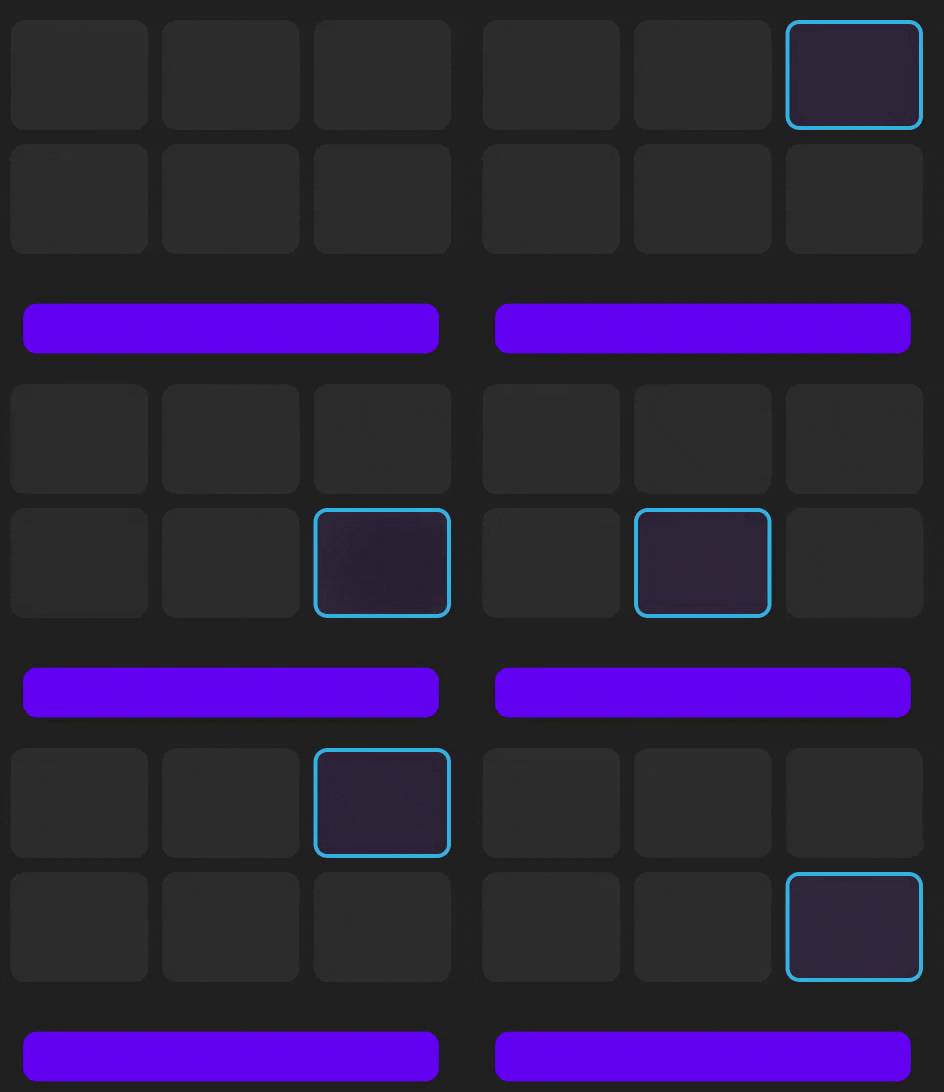
请确保永久保存选中的卡状态,以避免在配置更改期间丢失该状态。
更新
以下是java的等价物:
private void clearCardSelection(LinearLayout layout) {
    for (int i = 0; i < layout.getChildCount(); i++) {
        View child = layout.getChildAt(i);
        if (child instanceof MaterialCardView)
            ((MaterialCardView) child).setChecked(false);
    }
}


View.OnClickListener listener = view -> {
    if (view instanceof MaterialCardView) {
        MaterialCardView card = (MaterialCardView) view;
        boolean isChecked = card.isChecked();
        clearCardSelection(linearlayout1);
        clearCardSelection(linearlayout2);
        card.setChecked(!isChecked);
    }
};

cardView.setOnClickListener(listener); // repeat for all the cards当我在java中测试它时,我在MaterialCaredView布局上得到了NPE,这是因为将app:checkedIcon="@null"设置为null,为了修复这个问题,用app:checkedIcon="@android:color/transparent"替换app:checkedIcon="@null"
Stack Overflow用户
发布于 2022-02-17 08:09:59
好的,我已经解决了第二个问题,它起作用了。
好的,我知道这是实现if()的非常糟糕的方法,但是如果您有更好的解决方案,请更新这个答案。
// Donate Btn
        donateBtn = view.findViewById(R.id.donateBtn);
        donateBtn.setOnClickListener(view12 -> {
            if (cardView1.isChecked()) {
                makePayment1();
            }
            if (cardView2.isChecked()) {
                makePayment2();
            }
            if (cardView3.isChecked()) {
                makePayment3();
            }
            if (cardView4.isChecked()) {
                makePayment4();
            }
            if (cardView5.isChecked()) {
                makePayment5();
            }
            if (cardView6.isChecked()) {
                makePayment6();
            }
});https://stackoverflow.com/questions/71146575
复制相似问题
腾讯云开发者

Copyright © 2013 - 2026 Tencent Cloud. All Rights Reserved. 腾讯云 版权所有
深圳市腾讯计算机系统有限公司 ICP备案/许可证号:粤B2-20090059  粤公网安备44030502008569号
腾讯云计算(北京)有限责任公司 京ICP证150476号 | 京ICP备11018762号