
重做和撤消笔画的顺序不对?
重做和撤消笔画的顺序不对?
提问于 2022-02-16 08:44:10
我想实现撤销和重做的墨画布笔画。
我希望实现可以在一列中多次操作的重做和撤消。
我不知道我的代码哪里有问题。请帮帮我。
我的代码如下:
xaml:
<Grid>
        <Grid.ColumnDefinitions>
            <ColumnDefinition Width="*"/>
            <ColumnDefinition Width="100" />
        </Grid.ColumnDefinitions>
        <Grid.RowDefinitions>
            <RowDefinition Height="50" />
            <RowDefinition Height="50" />
            <RowDefinition Height="50" />
            <RowDefinition Height="50" />
            <RowDefinition Height="*" />
        </Grid.RowDefinitions>
        <InkCanvas x:Name="inkCanvas"
                    Grid.Column="0" Grid.ColumnSpan="2"
                    Grid.Row="0" Grid.RowSpan="7"
                    Width="Auto" Height="Auto" EditingMode="Ink"
                    IsHitTestVisible="True"
                    Background="LightSeaGreen"
                    UseCustomCursor="True"
                    Cursor="Pen"/>
        <Button x:Name="btn_Test1"
                 Grid.Row="0"
                 Grid.Column="1"
                 Width="100"
                 Height="50"
                 Content="pen"
                 Cursor="Hand"
                 Tag="Test1"
                 Click="Button_Click" />
        <Button x:Name="btn_Test3"
                 Grid.Row="1"
                 Grid.Column="1"
                 Width="100"
                 Height="50"
                 Content="clear"
                 Tag="Test3"
                 Click="Button_Click" />
        <Button x:Name="btn_Test4"
                 Grid.Row="2"
                 Grid.Column="1"
                 Width="100"
                 Height="50"
                 Content="UnDo"
                 Tag="Undo"
                 Click="Button_Click" />
        <Button x:Name="btn_Test5"
                 Grid.Row="3"
                 Grid.Column="1"
                 Width="100"
                 Height="50"
                 Content="ReDo"
                 Tag="Redo"
                 Click="Button_Click" />
    </Grid>
代码背后:
using System.Collections.Generic;
using System.Windows;
using System.Windows.Controls;
using System.Windows.Ink;
using System.Windows.Media;

namespace InkCanvasUndoRedo
{
  public partial class MainWindow : Window
  {
    public Stack<DoStroke> DoStrokes { get; set; }

    public Stack<DoStroke> UndoStrokes { get; set; }

    private bool handle = true;

    public MainWindow()
    {
      InitializeComponent();

      DoStrokes = new Stack<DoStroke>();

      UndoStrokes = new Stack<DoStroke>();

      inkCanvas.DefaultDrawingAttributes.FitToCurve = true;
      inkCanvas.DefaultDrawingAttributes.Color = Color.FromArgb(255, 255, 255, 255);

      inkCanvas.Strokes.StrokesChanged += Strokes_StrokesChanged;
    }

    private void Strokes_StrokesChanged(object sender, StrokeCollectionChangedEventArgs e)
    {
      if (handle)
      {
        DoStrokes.Push(new DoStroke
        {
          ActionFlag = e.Added.Count > 0 ? "ADD" : "REMOVE",
          Stroke = e.Added.Count > 0 ? e.Added[0] : e.Removed[0]
        });
      }
    }
    public void Undo()
    {
      handle = false;

      if (DoStrokes.Count > 0)
      {
        DoStroke dos = DoStrokes.Pop();
        if (dos.ActionFlag.Equals("ADD"))
        {
          inkCanvas.Strokes.Remove(dos.Stroke);
        }
        else
        {
          inkCanvas.Strokes.Add(dos.Stroke);
        }

        UndoStrokes.Push(dos);
      }
      handle = true;
    }
    public void Redo()
    {
      handle = false;
      if (UndoStrokes.Count > 0)
      {
        DoStroke dos = UndoStrokes.Pop();
        if (dos.ActionFlag.Equals("ADD"))
        {
          inkCanvas.Strokes.Add(dos.Stroke);
        }
        else
        {
          inkCanvas.Strokes.Remove(dos.Stroke);
        }
      }
      handle = true;
    }
    private void Button_Click(object sender, RoutedEventArgs e)
    {
      switch ((sender as Button).Tag)
      {
        case "Test1":
          inkCanvas.EditingMode = InkCanvasEditingMode.Ink;
          break;
        case "Test3":
          inkCanvas.Strokes.Clear();
          break;

        case "Undo":
          Undo();
          break;
        case "Redo":
          Redo();
          break;
      }
    }

  }
  public struct DoStroke
  {
    public string ActionFlag { get; set; }
    public Stroke Stroke { get; set; }
  }
}
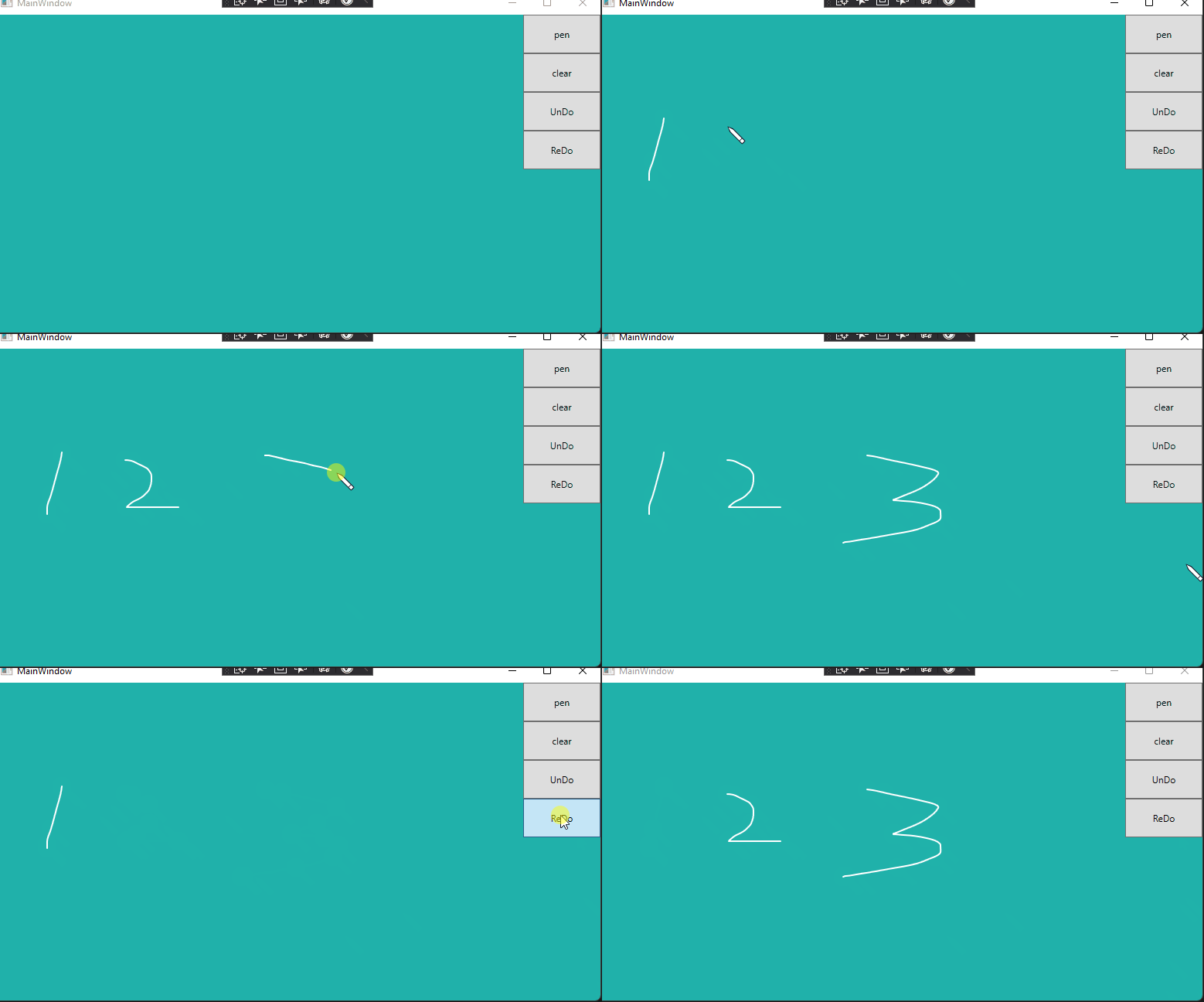
结果:写: 123
单击:撤消->撤消->重做->重做->撤消
预期:3人失踪
实际:1人消失
回答 1
Stack Overflow用户
回答已采纳
发布于 2022-02-16 08:49:17
在你的重做方法中
        DoStroke dos = UndoStrokes.Pop();
        if (dos.ActionFlag.Equals("ADD"))
        {
          inkCanvas.Strokes.Add(dos.Stroke);
        }
        else
        {
          inkCanvas.Strokes.Remove(dos.Stroke);
}您可能应该在结束时调用DoStrokes.Push(dos);。以类似于在撤销方法中所做的方式。
页面原文内容由Stack Overflow提供。腾讯云小微IT领域专用引擎提供翻译支持
原文链接:
https://stackoverflow.com/questions/71138598
复制相关文章
相似问题
腾讯云开发者

Copyright © 2013 - 2026 Tencent Cloud. All Rights Reserved. 腾讯云 版权所有
深圳市腾讯计算机系统有限公司 ICP备案/许可证号:粤B2-20090059  粤公网安备44030502008569号
腾讯云计算(北京)有限责任公司 京ICP证150476号 | 京ICP备11018762号