
嵌套启动--在更改后不要重新加载(嵌套启动-监视不工作)
我安装了一个nest.js。当我运行npm时,运行start:dev (运行启动-监视),一切正常工作,绿色日志出现。
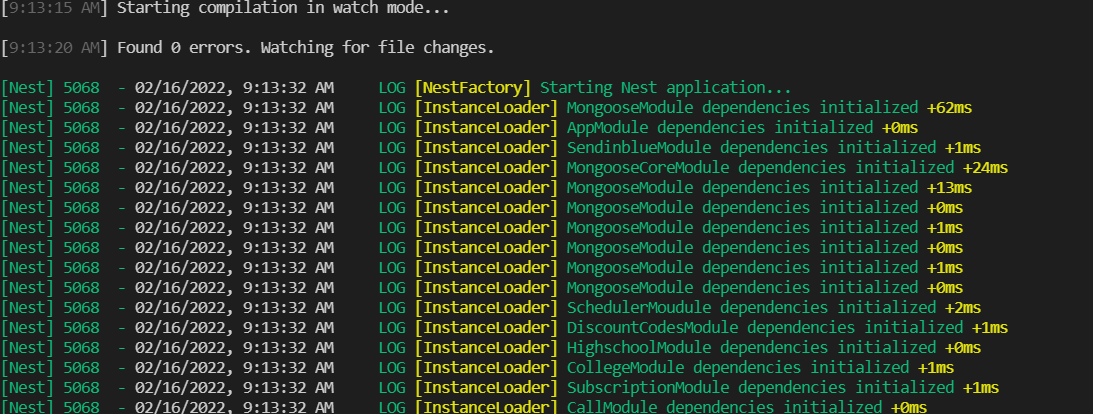
问题是,当我更新代码中的某些内容时,nest不再更新,它被卡在下面的图像中:

我确信这不是我的代码的问题,因为我在所有的nest.js存储库中都遇到了同样的问题。我还删除了node_modules并重新安装了它们,但它没有工作。
我还尝试在全球范围内重新安装nest CLI。
我的节点版本是16.5.0和NPM8.5.0
这是我的package.json:
{
  "name": "unigow-backend",
  "version": "0.0.1",
  "description": "",
  "author": "",
  "private": true,
  "license": "UNLICENSED",
  "scripts": {
    "prebuild": "env-cmd -f .env.production rimraf dist",
    "build": "env-cmd -f .env.production nest build",
    "format": "prettier --write \"src/**/*.ts\" \"test/**/*.ts\"",
    "start": "nest start",
    "start:dev": "env-cmd -f .env.development nest start --watch",
    "start:debug": "env-cmd -f .env.development nest start --debug --watch",
    "start:prod": "env-cmd -f .env.production node dist/main",
    "lint": "eslint \"{src,apps,libs,test}/**/*.ts\" --fix",
    "test": "jest",
    "test:watch": "jest --watch",
    "test:cov": "jest --coverage",
    "test:debug": "node --inspect-brk -r tsconfig-paths/register -r ts-node/register node_modules/.bin/jest --runInBand",
    "test:e2e": "jest --config ./test/jest-e2e.json"
  },
  "dependencies": {
    "@nestjs/common": "^8.3.0",
    "@nestjs/core": "^8.0.0",
    "@nestjs/mapped-types": "^1.0.1",
    "@nestjs/mongoose": "^8.0.1",
    "@nestjs/platform-express": "^8.0.0",
    "@types/dotenv": "^8.2.0",
    "@types/luxon": "^2.0.9",
    "@types/mongoose": "^5.11.97",
    "class-transformer": "^0.5.1",
    "class-validator": "^0.13.2",
    "dateformat": "^5.0.1",
    "dotenv": "^10.0.0",
    "env-cmd": "^10.1.0",
    "luxon": "^1.28.0",
    "moment": "^2.29.1",
    "moment-range": "^4.0.2",
    "mongoose": "^5.13.9",
    "reflect-metadata": "^0.1.13",
    "rimraf": "^3.0.2",
    "rrule": "^2.6.8",
    "rxjs": "^7.2.0",
    "sib-api-v3-sdk": "^8.2.1",
    "stripe": "^8.183.0",
    "twilio": "^3.69.0",
    "uuid": "^8.3.2"
  },
  "devDependencies": {
    "@nestjs/cli": "^8.0.0",
    "@nestjs/schematics": "^8.0.0",
    "@nestjs/testing": "^8.0.0",
    "@types/express": "^4.17.13",
    "@types/jest": "^26.0.24",
    "@types/node": "^16.0.0",
    "@types/supertest": "^2.0.11",
    "@typescript-eslint/eslint-plugin": "^4.28.2",
    "@typescript-eslint/parser": "^4.28.2",
    "eslint": "^7.30.0",
    "eslint-config-prettier": "^8.3.0",
    "eslint-plugin-prettier": "^3.4.0",
    "jest": "27.0.6",
    "prettier": "^2.3.2",
    "supertest": "^6.1.3",
    "ts-jest": "^27.0.3",
    "ts-loader": "^9.2.3",
    "ts-node": "^10.0.0",
    "tsconfig-paths": "^3.10.1",
    "typescript": "^4.3.5"
  },
  "jest": {
    "moduleFileExtensions": [
      "js",
      "json",
      "ts"
    ],
    "rootDir": "src",
    "testRegex": ".*\\.spec\\.ts$",
    "transform": {
      "^.+\\.(t|j)s$": "ts-jest"
    },
    "collectCoverageFrom": [
      "**/*.(t|j)s"
    ],
    "coverageDirectory": "../coverage",
    "testEnvironment": "node"
  }
}
这是我的ts配置:
{
  "compilerOptions": {
    "module": "commonjs",
    "declaration": true,
    "removeComments": true,
    "emitDecoratorMetadata": true,
    "experimentalDecorators": true,
    "allowSyntheticDefaultImports": true,
    "target": "es2017",
    "sourceMap": true,
    "outDir": "./dist",
    "baseUrl": "./",
    "incremental": true,
    "skipLibCheck": true
  }
}
这是我的tsconfig.build:
{
  "extends": "./tsconfig.json",
  "exclude": ["node_modules", "test", "dist", "**/*spec.ts"]
}回答 4
Stack Overflow用户
发布于 2022-06-08 13:42:27
我对nestjs也有同样的问题。
我不知道到底是什么问题。
但我就是这样解决的。
首先,安装所需的软件包:
npm i --save-dev webpack-node-externals run-script-webpack-plugin webpack
安装完成后,在应用程序的根目录中创建一个webpack-hmr.config.js文件。
/* webpack-hmr.config.js file */
const nodeExternals = require('webpack-node-externals');
const { RunScriptWebpackPlugin } = require('run-script-webpack-plugin');

module.exports = function (options, webpack) {
  return {
    ...options,
    entry: ['webpack/hot/poll?100', options.entry],
    externals: [
      nodeExternals({
        allowlist: ['webpack/hot/poll?100'],
      }),
    ],
    plugins: [
      ...options.plugins,
      new webpack.HotModuleReplacementPlugin(),
      new webpack.WatchIgnorePlugin({
        paths: [/\.js$/, /\.d\.ts$/],
      }),
      new RunScriptWebpackPlugin({ name: options.output.filename }),
    ],
  };
};
打开应用程序输入文件(main.ts),并添加以下webpack相关说明:
declare const module: any;

async function bootstrap() {
  const app = await NestFactory.create(AppModule);
  await app.listen(3000);

  if (module.hot) {
    module.hot.accept();
    module.hot.dispose(() => app.close());
  }
}
bootstrap();
要简化执行过程,请将脚本添加到package.json文件中。
"dev": "nest build --webpack --webpackPath webpack-hmr.config.js --watch"现在打开命令行并运行以下命令:
npm run devStack Overflow用户
发布于 2022-06-02 09:57:53
您需要遵循这些步骤,它将重新编译更改,而不必再次重新启动服务器。
Stack Overflow用户
发布于 2022-08-24 15:59:04
我认为,与其改变webpack的吐露,不如通过cli命令旗号覆盖构建机制可能是一个更好的选择。这样,使用webpack的产品构建是相同的,但是在dev模式下,您将类型记录编译到您的/dist目录中。这也意味着在回购中减少一个不需要维护的文件webpack.config.js。
重写命令脚本:
nest start --tsc --watchhttps://stackoverflow.com/questions/71138325
复制相似问题
腾讯云开发者

Copyright © 2013 - 2026 Tencent Cloud. All Rights Reserved. 腾讯云 版权所有
深圳市腾讯计算机系统有限公司 ICP备案/许可证号:粤B2-20090059  粤公网安备44030502008569号
腾讯云计算(北京)有限责任公司 京ICP证150476号 | 京ICP备11018762号