
颤振小部件的圆形背景
颤振小部件的圆形背景
提问于 2022-02-12 08:33:27
这是安蒂卡。从几天前开始,我就开始学习编写代码了,我只熟悉HTML/CSS/JS,以及dart/的基础知识。
开发人员级:初学者
Project & language:我正在为自己开发一个学习计划程序,使用flutter。
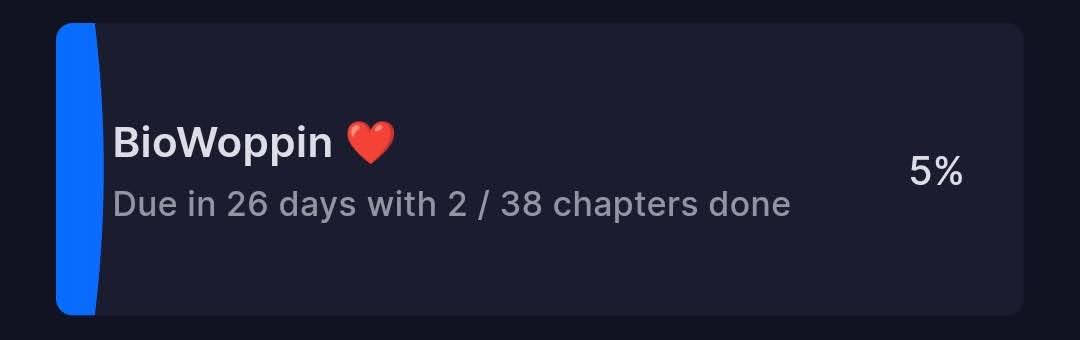
Problem --我尝试过许多方法来创建一个小部件,其中有任务的详细信息--,,带有类似于进度条的背景。
类似的东西(小部件)-
如何用颤振创建这样的Widget。
回答 2
Stack Overflow用户
回答已采纳
发布于 2022-02-12 09:49:50
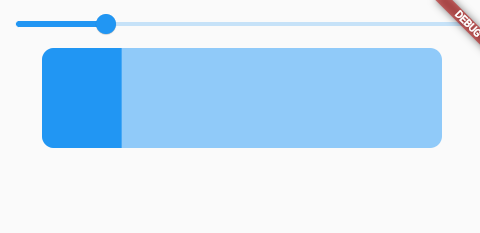
LinearProgressIndicator可以用SizedBox包装。
ClipRRect(
    borderRadius: BorderRadius.circular(12), // have border decoration
    child: Stack(
      // you may need to wrap with sizedBOx
      children: [
        SizedBox(
          height: 100, //stack size, or use fit
          width: 400,
          child: LinearProgressIndicator(
            value: sliderValue,
          ),
        )

        //place your widget
      ],
    )),
Stack Overflow用户
发布于 2022-02-12 08:58:01
我就是这样做的:
final double _width = 300;
final double _height = 110;

return SafeArea(
  child: Scaffold(
    body: Center(
      child: Stack(
        children: [
          Container(
            width: _width,
            height: _height,
            color: Colors.blue,
          ),
          Container(
            //0.74 is percentage
            width: _width * 0.74,
            height: _height,
            color: Colors.amber,
          ),
          SizedBox(
            width: _width,
            height: _height,
            child: Row(
              mainAxisAlignment: MainAxisAlignment.spaceEvenly,
              children: [
                Column(
                  crossAxisAlignment: CrossAxisAlignment.start,
                  mainAxisAlignment: MainAxisAlignment.center,
                  children: [
                    Text(
                      'BioWopin',
                      style: TextStyle(fontSize: 20),
                    ),
                    Text(
                      'Due in 26 days',
                      style: TextStyle(fontSize: 16),
                    )
                  ],
                ),
                Text(
                  '74%',
                  style: TextStyle(fontSize: 18),
                )
              ],
              crossAxisAlignment: CrossAxisAlignment.center,
            ),
          )
        ],
      ),
    ),
  ),
);页面原文内容由Stack Overflow提供。腾讯云小微IT领域专用引擎提供翻译支持
原文链接:
https://stackoverflow.com/questions/71090203
复制相关文章
相似问题
腾讯云开发者

Copyright © 2013 - 2026 Tencent Cloud. All Rights Reserved. 腾讯云 版权所有
深圳市腾讯计算机系统有限公司 ICP备案/许可证号:粤B2-20090059  粤公网安备44030502008569号
腾讯云计算(北京)有限责任公司 京ICP证150476号 | 京ICP备11018762号