
React和尾风CSS:没有应用动态生成的类
我只是在学习React和Tailwind,并且使用Tailwind类对CSS网格有过一种奇怪的体验。我为计算器制作了按钮,最后一个按钮跨越两列:
App.js:
export default function App() {
  return (
    <div className="flex min-h-screen items-center justify-center bg-blue-400">
      <Calculator />
    </div>
  );
}
Calculator.js
import { IoBackspaceOutline } from "react-icons/io5";

export const Calculator = () => {
  return (
    <div className="grid grid-cols-4 grid-rows-5 gap-2">
      <Button>AC</Button>
      <Button>
        <IoBackspaceOutline size={26} />
      </Button>
      <Button>%</Button>
      <Button>÷</Button>
      <Button>7</Button>
      <Button>8</Button>
      <Button>9</Button>
      <Button>x</Button>
      <Button>4</Button>
      <Button>5</Button>
      <Button>6</Button>
      <Button>-</Button>
      <Button>1</Button>
      <Button>2</Button>
      <Button>3</Button>
      <Button>+</Button>
      <Button>0</Button>
      <Button>.</Button>
      <Button colSpan={2}>=</Button>
    </div>
  );
};

const Button = ({ colSpan = 1, rowSpan = 1, children }) => {
  return (
    <div
      className={`col-span-${colSpan} row-span-${rowSpan} bg-white p-3 rounded`}
    >
      <div className="flex items-center justify-center">{children}</div>
    </div>
  );
};
这不起作用(在Chrome上测试):
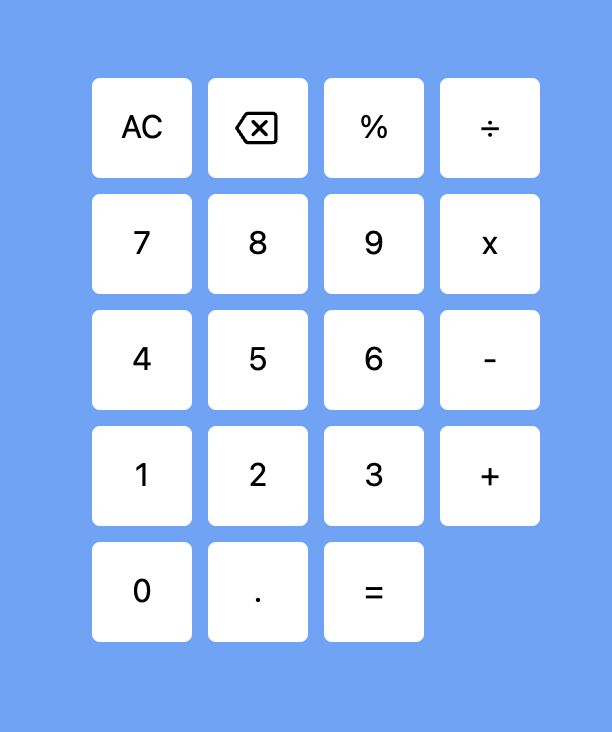
现在来了奇怪的部分。我用Tailwind教程中的HTML替换了App组件返回的JSX,并再次删除了它。
<div className="bg-blue-400 text-blue-400 min-h-screen flex items-center justify-center">
  <div className="grid grid-cols-3 gap-2">
    <div className="col-span-2 bg-white p-10 rounded">1</div>
    <div className="bg-white p-10 rounded">2</div>
    <div className="row-span-3 bg-white p-10 rounded">3</div>
    <div className="bg-white p-10 rounded">4</div>
    <div className="bg-white p-10 rounded">5</div>
    <div className="bg-white p-10 rounded">6</div>
    <div className="col-span-2 bg-white p-10 rounded">7</div>
    <div className="bg-white p-10 rounded">8</div>
    <div className="bg-white p-10 rounded">9</div>
  </div>
</div>
在我用了很多次Ctrl之后,所以我只有前面的代码,我的按钮突然按预期跨越了两列:
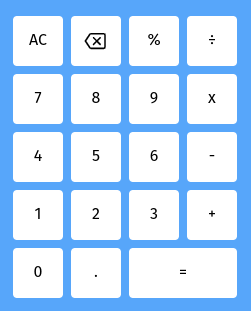
我检查了以确保代码中没有任何更改:

我的朋友甚至克隆了我的回购,遵循同样的步骤,得到了同样的结果。他怀疑这与Tailwind的JIT编译器有关的Button组件中的变量classNames有关,但我们中没有人能够精确地指出错误。
我是不是用错了CSS变量类?
这是一个WTF的时刻。这是什么原因?
回答 3
Stack Overflow用户
发布于 2022-02-10 16:39:38
由Tailwind生成的CSS文件只包含它在扫描代码时识别的类,这意味着不包含动态生成的类(例如col-span-${colSpan})。
如果只需要跨2列,则可以传递布尔值,这些值将触发添加要添加的完整col-span-2或row-span-2实用工具类:
const Button = ({ colSpan = false, rowSpan = false, children }) => {
  return (
    <div
      className={`${colSpan ? 'col-span-2' : ''} ${rowSpan ? 'row-span-2' : ''} bg-white p-3 rounded`}
    >
      <div className="flex items-center justify-center">{children}</div>
    </div>
  );
};
否则,可以将值作为类传递给Button组件:
<Button className='col-span-2 row-span-1'>=</Button>

const Button = ({ className, children }) => {
  return (
    <div
      className={`${className} bg-white p-3 rounded`}
    >
      <div className="flex items-center justify-center">{children}</div>
    </div>
  );
};更多信息:https://tailwindcss.com/docs/content-configuration#dynamic-class-names
Stack Overflow用户
发布于 2022-05-11 14:37:19
另一个对我有用的棘手解决方案是使用变量和强制类型的可能的className值(在类型记录中),例如:
export type TTextSizeClass =
  'text-xl'  |
  'text-2xl' |
  'text-3xl' |
  'text-4xl' |
  'text-5xl' |
  'text-6xl' |
  'text-7xl' |
  'text-8xl' |
  'text-9xl'
;
...
const type : number = 6 ;
const textSizeClass : TTextSizeClass = type != 1 ? `text-${type}xl` : 'text-xl';
...
<div className={`font-semibold ${textSizeClass} ${className}`}>text</div>Stack Overflow用户
发布于 2022-10-20 16:41:34
正如埃德·卢卡斯所说:The CSS file generated by Tailwind will only include classes that it recognizes when it scans your code, which means that dynamically generated classes (e.g. col-span-${colSpan}) will not be included
但现在可以用safeListing了
和顺风安全发电机包来“预生成”我们的动态风格。
使用顺风安全生成器,您可以根据一组模式为主题生成一个safelist.txt文件。
“顺风”的JIT模式扫描您的代码库中的类名,并根据它发现的内容生成CSS。如果没有显式列出类名,如text-${error?“红色”:“绿色”}-500,尾风不会发现的。为了确保生成这些实用程序,您可以维护一个显式列出它们的文件,就像项目根中的safelist.txt文件一样。
https://stackoverflow.com/questions/71063619
复制相似问题
腾讯云开发者

Copyright © 2013 - 2026 Tencent Cloud. All Rights Reserved. 腾讯云 版权所有
深圳市腾讯计算机系统有限公司 ICP备案/许可证号:粤B2-20090059  粤公网安备44030502008569号
腾讯云计算(北京)有限责任公司 京ICP证150476号 | 京ICP备11018762号