
K8s网络策略仅限制一个端点的出口
我需要为我的pod创建一个NetwrokPolicy,它需要从网络方面访问,只需要访问集群之外的一个特定端点,只访问这个端点。
端点看起来如下所示。https://140.224.232.236:8088
在将以下网络策略应用于结束符(图像基于高山)并运行ping www.google.com之前,它按预期工作,
然而,当我应用网络策略时,我和我尝试ping google.com,我得到了ping: bad address 'www.google.com',但是当我像
ping 140.224.232.236ping 140.224.232.236:8080
它被卡住了,在我能看到这样的东西之前
64 bytes from 140.224.232.236: seq=518 ttl=245 time=137.603 ms
64 bytes from 140.224.232.236: seq=519 ttl=245 time=137.411 ms
64 bytes from 140.224.232.236: seq=520 ttl=245 time=137.279 ms
64 bytes from 140.224.232.236: seq=521 ttl=245 time=137.138 ms
....
现在它被困在这上面了,知道吗?
ping 140.224.232.236
PING 140.224.232.236 (140.224.232.236): 56 data bytes
仅此而已,这意味着什么?
我所做的是
apiVersion: networking.k8s.io/v1
kind: NetworkPolicy
metadata:
    name: test-network-policy
    namespace: dev
spec:
    podSelector:
      matchLabels:
        app.kubernetes.io/name: foo
  policyTypes:
  - Egress
  egress:
  - to:
    - ipBlock:
        cidr: 140.224.232.236/32
    ports:
    - protocol: TCP
port: 8088 - 我已经把它应用在同样的豆荚上了。
- 吊舱选择器标签的名称摘自荚,我想应用网络策略,并具有以下内容。
app.kubernetes.io/name: foo
回答 3
Stack Overflow用户
发布于 2022-02-24 03:17:32
正如您用端口定义的出口:
ports:
- protocol: TCP
port: 8080这意味着允许在TCP端口 8080上连接到ip 140.224.232.236。
然而,ping(ICMP)不知道端口。平每次都会失败。
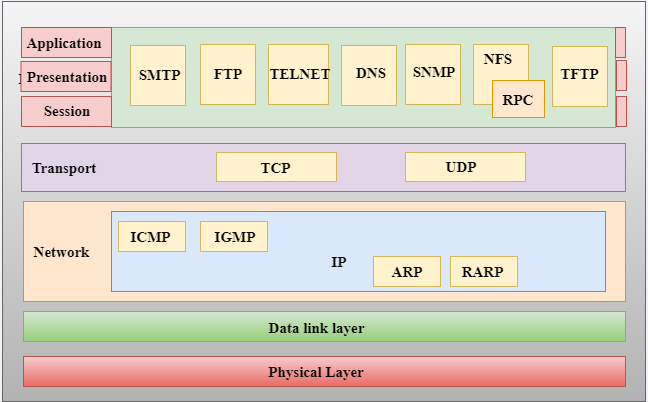
ping是一个网络实用工具,用于测试Internet协议(IP)上远程主机的可访问性。ping实用程序通过向远程主机发送一系列Internet控制消息协议(ICMP)回送请求数据包来实现此目的。- 您不能使用ping命令探测特定端口,因为ICMP属于层-3 IP层,而不是layer-4传输层(例如TCP/UDP)。
- 为了平分远程主机的特定端口,您需要使用具有端口号概念的layer-4传输协议,并使用许多命令行工具,如:
paping140.224.232.236 -p 8080 -c 3nmap-p 80 -sT www.google.comtcppingwww.google.com
Stack Overflow用户
发布于 2022-02-23 18:59:06
您允许出口流量通过TCP移植8088,而不是ICMP。平不会用那个申请的。
如果您希望允许非TPC或UDP协议使用vanilla的Kubernetes网络策略API,则需要省略端口定义。
为此,您还可以使用卡利科的网络策略API。
这为在集群中配置网络策略提供了更大的灵活性。
Stack Overflow用户
发布于 2022-02-27 09:13:44
您的网络策略是完美的。您不能使用ping测试TCP端口,因为ping与ICMP协议一起工作。
有些方法不需要更改网络策略来测试配置。
例如:-
- 执行执行程序并运行此
one liner。你应该得到‘港口开放’
$  </dev/tcp/140.224.232.236/8088 && echo Port is open || echo Port is closed
Port is open/dev/tcp/host/port
If host is a valid hostname or Internet address, and port is an integer port number
or service name, bash attempts to open a TCP connection to the corresponding socket.
/dev/udp/host/port
If host is a valid hostname or Internet address, and port is an integer port number
or service name, bash attempts to open a UDP connection to the corresponding socket.- 如果安装了
curl/wget,那么通过对pod执行exec来运行cur/wget
curl -k https://140.224.232.236:8088
wget --no-check-certificate https://140.224.232.236:8088- 如果存在网络工具
nc,则执行结束符并运行此命令,如果返回“0”,则工作正常。
nc 140.224.232.236 8088 &> /dev/null; echo $?
0
或以下命令应返回“已成功”
nc -zv 140.224.232.236 8088
Connection to 140.224.232.236 8088 port [tcp/*] succeeded!https://stackoverflow.com/questions/71056391
复制相似问题
腾讯云开发者

Copyright © 2013 - 2026 Tencent Cloud. All Rights Reserved. 腾讯云 版权所有
深圳市腾讯计算机系统有限公司 ICP备案/许可证号:粤B2-20090059  粤公网安备44030502008569号
腾讯云计算(北京)有限责任公司 京ICP证150476号 | 京ICP备11018762号