
不接受sx内部“颜色”的排版组件
不接受sx内部“颜色”的排版组件
提问于 2022-02-08 15:27:19
我已经经历了一个问题,我不能应用‘颜色’在'sx‘属性的印刷组件。有人知道是什么导致了这个问题吗?
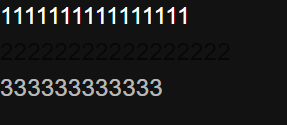
移除“颜色”键将使2行的颜色恢复为默认颜色(与第一行相同)。
import React from 'react';
import {Box, createTheme, CssBaseline, Typography} from '@mui/material';
import {ThemeProvider} from '@mui/styles';

const theme = createTheme({
  palette: {
    mode: 'dark',
  },
});

console.log(theme);

function App() {
  return (
    <ThemeProvider theme={theme}>
      <CssBaseline />
      <Box
        sx={{
          height: '100%',
          bgcolor: 'background.paper',
          color: 'text.primary',
        }}>
        1111111111111111
        <Typography sx={{color: 'text.secondary'}}>
          22222222222222222
        </Typography>
        <Box sx={{color: 'text.secondary'}}>333333333333</Box>
      </Box>
    </ThemeProvider>
  );
}

export default App;回答 1
Stack Overflow用户
回答已采纳
发布于 2022-02-08 15:40:56
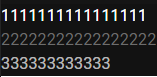
Typography组件不直接支持主题化和配色方案,您必须在调色板中手动完成,或者您可以简单地使用Box组件,或者更确切地说,不要在sx属性中给出颜色
或者你可以做这样的事
  <Typography color='GrayText'>
          22222222222222222
  </Typography>
要获得更多更深入的信息,请参阅这个关于为什么Typography不改变主题更改颜色的答案
(Material-ui does not change Typography color according to theme)
页面原文内容由Stack Overflow提供。腾讯云小微IT领域专用引擎提供翻译支持
原文链接:
https://stackoverflow.com/questions/71036474
复制相关文章
相似问题
腾讯云开发者

Copyright © 2013 - 2026 Tencent Cloud. All Rights Reserved. 腾讯云 版权所有
深圳市腾讯计算机系统有限公司 ICP备案/许可证号:粤B2-20090059  粤公网安备44030502008569号
腾讯云计算(北京)有限责任公司 京ICP证150476号 | 京ICP备11018762号